16
Viscount Chorum
User Manual
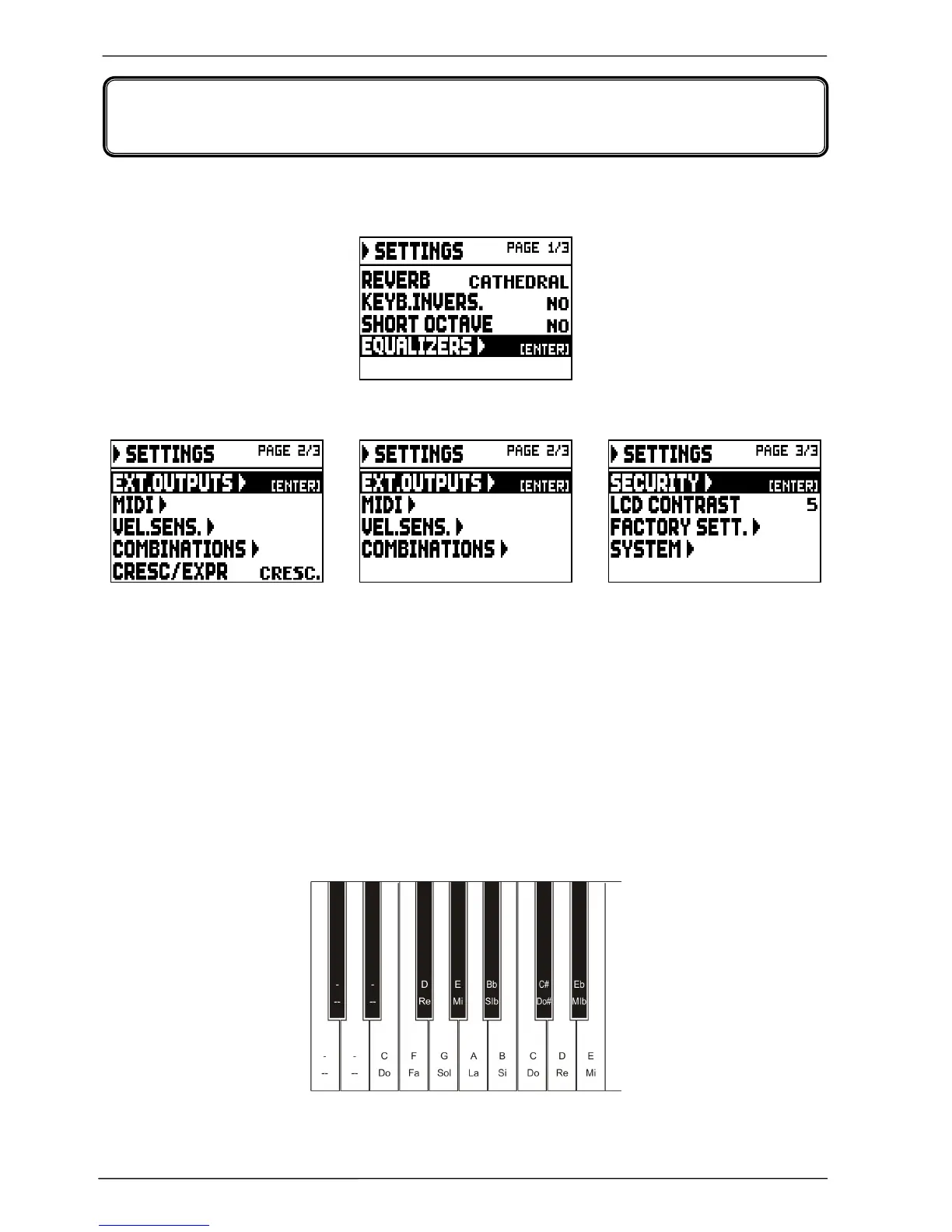
To access the SETTINGS menu, containing all the configuration options, select the SETTINGS field
from the MAIN MENU; the following page will appear:
Use the [FIELD S] and [FIELD T] buttons to move the cursor and scroll through all the fields:
The following functions are available:
o REVERB: select the ambient, in order to simulate the reverb situation. The options span from a large
church, full of acoustic reflections and with a strong reverb, to small rooms with a shorter and softer
reverb. A detailed description of the reverb effect can be found in par. 5.1.
o KEYB.INVERS. (Keyboard Inversion): select YES to invert keyboards; as a consequence:
- three-manual models: Choir stops are played with the second manual, Great stops are played with
the first manual.
- two-manual models: Great stops are played with the second manual and Swell stops are played
with the first manual. To deactivate the function, select NO.
o SHORT OCTAVE: select YES to activate the short octave on the first octave of pedalboard and
manuals; this is necessary to play partitures written for ancient organs (between XVI and XVIII
century) where the first octave consisted of these notes:
To deactivate this function, select NO.
o EQUALIZERS: set up equalizer, internal amplification and rear panel outputs. These functions are
described in par. 5.2.
5. INSTRUMENT GENERAL SETTINGS













 To Next Page