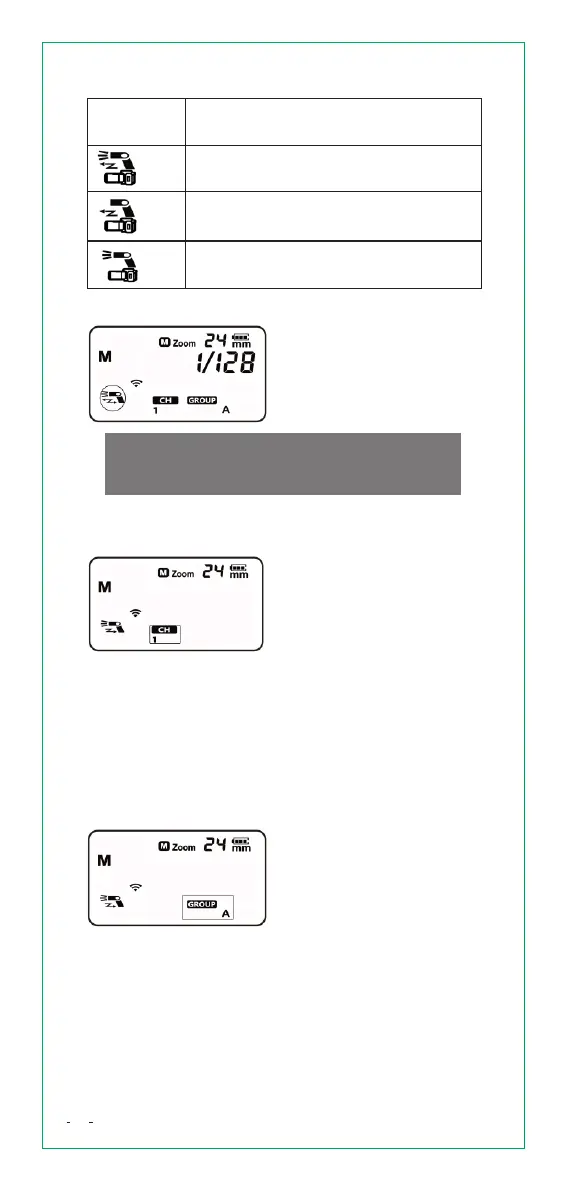
Symbol
Meaning
Master unit and slave unit fire at
the same time.
Master unit is set to OFF, only the
slave units will fire a flash.
Slave unit is set to OFF, only the
Master unit will fire a flash.
SlaveMode
When the flash is used as a
slave unit, a symbol will
display on the screen as
shown in the picture.
SetTransmissionchanneland
GrouponSlaveUnit
SetTransmission
channel
1. Press and hold [M/S]
button for 3 seconds and set
to slave mode.
2. Press and hold [MODE]
button for 3 seconds, so that
<CH> is displayed on the
screen.
3. Turn the [Select Dial] to
choose a transmission
channel number from 1 to 4.
4. Press and hold [MODE]
button for 3 seconds or turn
off the power to save
parameter.
SetGroup
1. Press and hold [M/S] button
for 3 seconds and set to
slave mode.
2. Press and hold [MODE]
button for 3 seconds, so that
<CH> is displayed on the
screen.
3. Press and hold [MODE]
button for 3 seconds twice,
so that <GROUP> is
displayed on the screen.
4. Turn the [Select Dial] to
choose Group number from
A to C.
13


 To Next Page