CatchlightPanel
• If the wall or ceiling is too far away, the bounced
flash might be too weak and result in
underexposure.
•T he wall or ceiling should be plain white for high
reflectance. If the bounce surface is not white, a
color cast may result in the picture.
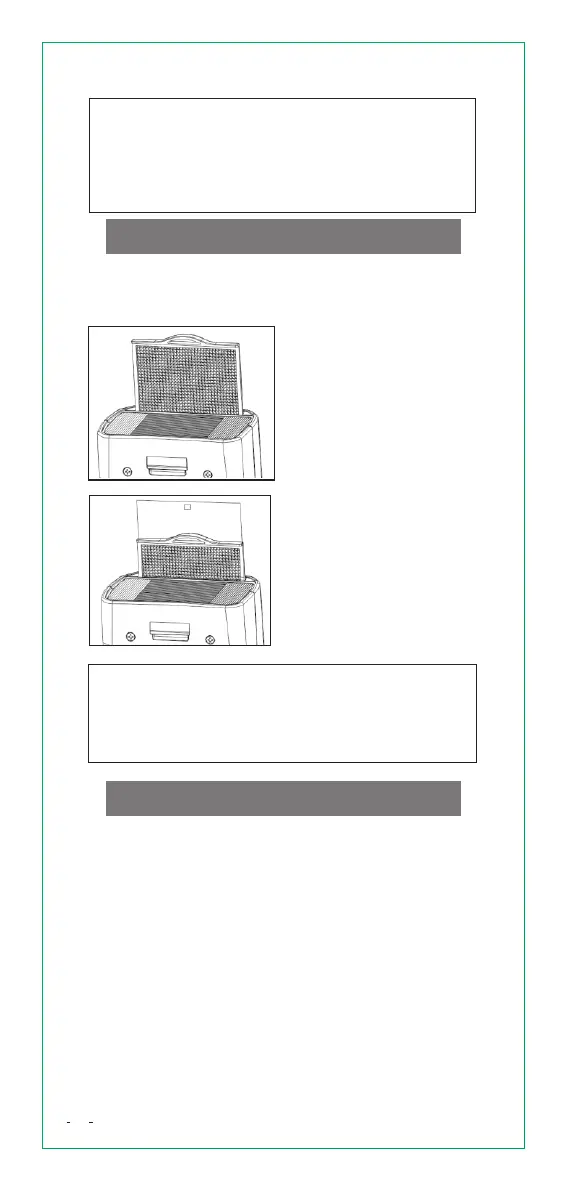
Using the catchlight panel enables you to reflect
light in a person's eyes and create a more vivid
expression.
3. Push back the [wide
panel]. Shoot using the
same method as bounce
shooting.
1. Turn the flash head
90° up.
2. Pull out the [wide panel].
The [catchlight panel] is
also pulled up at the same
time.
To obtain captivating catchlight in a person's
eyes, shoot within 1.5m of the subject.
Position the flash head towards the front and
90° up. When the flash head is rotate to the
left or right, the catchlight is not very effective.
Zoom:FlashCoverageSetting
The flash coverage can be set automatically or
manually in a range of 24~105mm. Using built-in
wide panel, you can perform flash shooting with
ultra-wide angle lenses up to 14mm.
When the flash is used as a master unit, repeatedly
press [ZOOM] button to select Manual Zoom or Auto
Zoom.
Auto Zoom: <M> doesn't appear on the LCD panel.
The flash coverage is automatically adjusted
according to the focal length of the shooting lens.
Manual Zoom: <M> appears on the LCD panel.
Press [ZOOM] button to change the flash coverage
in sequence (24, 28, 35, 50, 70, 80, 105mm).
17


 To Next Page