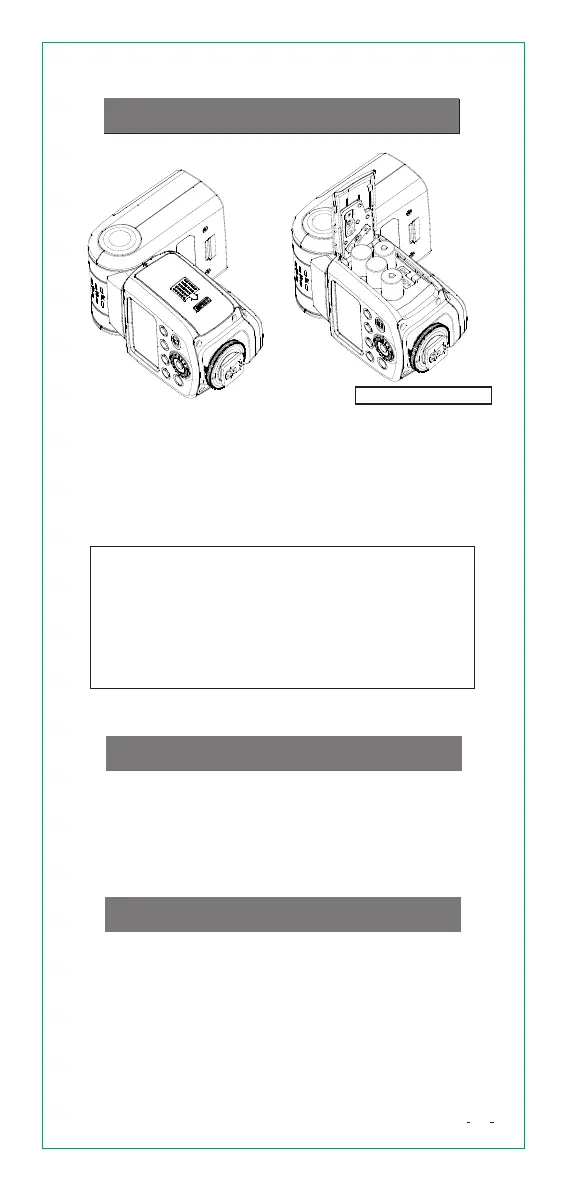
Fig.1 Fig.2
Push the [Battery Cover] downward, and
open the battery cover.
According to “+” and “-” indicator on the
battery compartment, install 4 pieces of
AA batteries
Slide [Battery Cover] upward and locks the battery.
Caution: Please use regular AA batteries.
After a sequence of continuous shots, be aware
that the battery might be hot.
When replace batteries, please use 4 pieces of
new batteries from the same brand.
If the unit is not used for a long time, please turn
off Speedlite and remove battery.
Installbattery
Slip the Speedlite's mounting foot all the way
into the camera's hot shoe.
Rotate locking ring clockwise to attach the
Speedlite on camera firmly.
Rotate locking ring anticlockwise to detach the
Speedlite.
AttachSpeedlite
TurnonthePower
Switch [POWER] button to right side to turn
on the unit. Flash-ready lamp turns to red
(fully charged), press [PILOT] button to fire a
test flash.
When set as a MASTER flash, the power will
turn off automatically after approx. 90 seconds
battery not include
06


 To Next Page