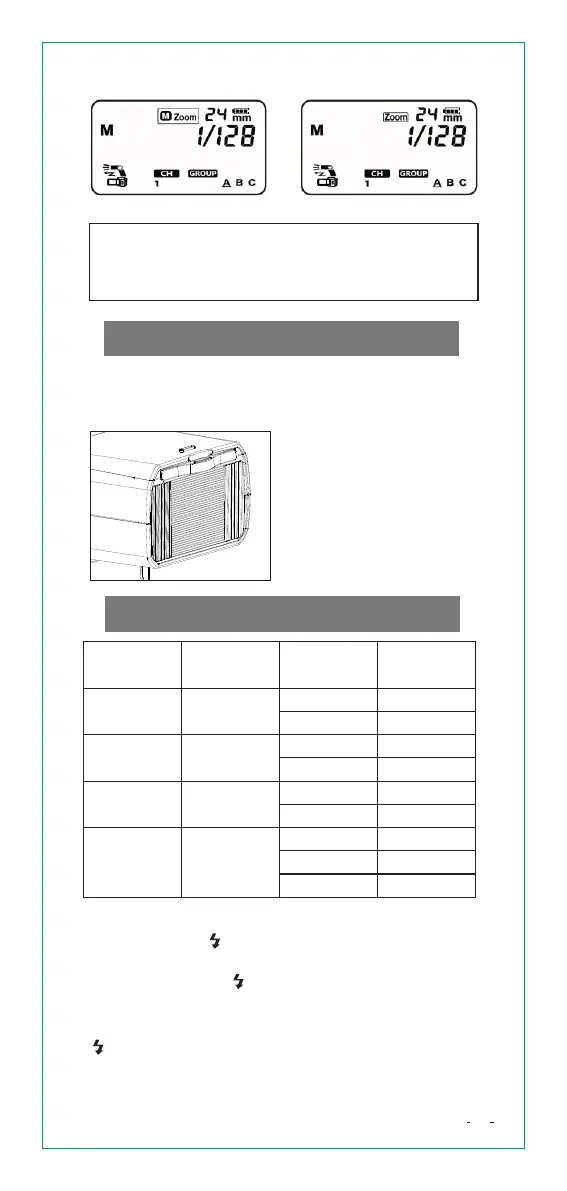
Auto ZoomManual Zoom
If set flash coverage manually, make sure flash
coverage is wider than the angle of view you are
shooting, to prevent the periphery of the picture
from being dark.
WidePanel
When you use the flash's built-in wide panel, you can
perform flash shooting with ultra-wide angle lenses
up to 14mm.
Pull out the [wide panel].
The [catchlight panel] is
also pulled up at the same
time.
Push back the [catchlight
panel].
SettingCustomFunctions
Custom
Functions No.
Function
Setting Code
Description
Fn01
Auto power
off
ON
OF
Enable
Disable
Fn08
Fn20
Fn22
AF-assist
beam firing
Beep
LCD panel
illuminate
ON
ON
OF
OF
OF
ON
Enable
Enable
OFF
Disable
Disable
ON
12
On for 12s
SettingCustomFunctions
Press and hold [ H/FN] button for 3 seconds until
<Fn> appears.
Repeatedly press [ H/FN] button to select the
Custom Function number Fn 01, Fn 08, Fn 20, Fn 22.
Turn the [Select Dial] to select the Custom Function
After you set the Custom Function, press and hold
[ H/FN] button for 3 seconds, the camera will be
ready to shoot.
18


 To Next Page