EasyManua.ls Logo

VISTEON CD6 - User Manual

VISTEON CD6
26 pages
Print Icon
To Next Page IconTo Next Page
Loading...
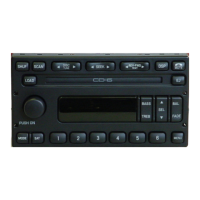
PREMIUM AM/FM STEREO IN – DASH SIX CD RADIO
(CD CHANGER COMPATIBLE)
Welcome
Please take a few minutes to review this User Manual to become familiar
with your new Visteon In-Dash Six CD Radio features and operation of
controls.
For any information about your Visteon In-Dash Six CD Radio, please
call 1-800-367-3333.
1
Welcome
AUDIOPHILE AM/FM STEREO IN–DASH SIX CD RADIO
(CD CHANGER COMPATIBLE)
1
SHUF SCAN DSP
MUTE
DISC
TUNE
CD
PUSH
ON
AM
FM
2 3 4 5 6
MENU
SEEK
BASS
TREB
BAL
FADE
SEL
REW FF
EJ
LOAD
1
SHUF SCAN COMP
MUTE
DISC
TUNE
CD
PUSH
ON
AM
FM
2 3 4 5 6
MENU
SEEK
BASS
TREB
BAL
FADE
SEL
REW FF
EJ
LOAD
Question and Answer IconNeed help?

Do you have a question about the VISTEON CD6 and is the answer not in the manual?

Summary

Welcome

Warranty and Service

Limited Warranty

Details the limited warranty terms provided by Visteon for the CD 6 Audio System.

Eligibility

Outlines who is eligible to enforce the terms of the limited warranty.

Limited Warranty Period

Specifies the duration of the warranty for new vehicles based on installation date and mileage.

New Vehicle

Defines the warranty period for a new vehicle based on installation timing and mileage.

Used Vehicle

Specifies the warranty period for vehicles purchased used.

Parts and Services

Covers warranty for parts and labor due to defects in materials or workmanship.

Limitations and Exclusions

Lists conditions and damages not covered by the limited warranty.

Procedures For Obtaining Repair

Explains the steps to follow for obtaining warranty repair services.

Controls and Features

Volume;power control

Explains how to turn the audio system on/off and adjust volume levels.

AM;FM select

Describes how to select AM or FM frequency bands and switch between presets.

Tune adjust

Details how to adjust radio frequencies and select CD tracks.

Seek function

Explains how to seek the next listenable station or track.

Scan function

Describes how to sample stations or tracks briefly.

Radio station memory preset

Explains how to use and set memory preset stations.

Autostore

Allows automatic setting of strongest local radio stations to presets.

CD select

Explains how to enter CD mode and select discs.

Display description

Describes the meaning of the six circles in the digital display for CD slots.

Load

Details the procedure for loading single CDs into the player.

Auto load

Explains how to automatically load multiple CDs into the player.

Eject

Describes how to eject a CD from the player.

Auto eject

Explains how to eject all CDs automatically.

Rewind

Details how to rewind tracks on a CD.

Fast forward

Details how to fast forward tracks on a CD.

Shuffle feature

Explains the modes for playing tracks randomly from discs or within a disc.

Compression feature

Describes how to adjust audio compression for consistent listening levels.

Bass adjust

How to increase or decrease the audio system's bass output.

Treble adjust

How to increase or decrease the audio system's treble output.

Speaker balance adjust

How to adjust sound distribution between left and right speakers.

Speaker fade adjust

How to adjust sound distribution between front and rear speakers.

Radio Data System (RDS)

How to activate and use the RDS feature to receive text information from radio stations.

Traffic announcements

How to enable traffic announcements and control their volume.

Find type

How to search for RDS stations based on program type.

Show in display

How to select the type of RDS broadcast information displayed.

Menu mode

Accesses various system features through different menu sets.

Digital signal processing (if equipped)

How to select different sound modes for listening preferences.

Phone mode

Controls for a factory-installed cellular phone via radio controls.

Setting the clock

How to set the hours and minutes for the system clock.

Care and Cleaning

Troubleshooting the CD changer (if equipped)

Provides solutions for common CD changer issues like skipping or not working.

Cleaning compact discs

Instructions for inspecting and cleaning compact discs before playing.

CD and CD changer care

Guidelines for handling discs and maintaining the CD changer.

Radio Frequency Information

Radio reception factors

Lists three factors that can affect the quality of radio reception.

Summary

Welcome

Warranty and Service

Limited Warranty

Details the limited warranty terms provided by Visteon for the CD 6 Audio System.

Eligibility

Outlines who is eligible to enforce the terms of the limited warranty.

Limited Warranty Period

Specifies the duration of the warranty for new vehicles based on installation date and mileage.

New Vehicle

Defines the warranty period for a new vehicle based on installation timing and mileage.

Used Vehicle

Specifies the warranty period for vehicles purchased used.

Parts and Services

Covers warranty for parts and labor due to defects in materials or workmanship.

Limitations and Exclusions

Lists conditions and damages not covered by the limited warranty.

Procedures For Obtaining Repair

Explains the steps to follow for obtaining warranty repair services.

Controls and Features

Volume;power control

Explains how to turn the audio system on/off and adjust volume levels.

AM;FM select

Describes how to select AM or FM frequency bands and switch between presets.

Tune adjust

Details how to adjust radio frequencies and select CD tracks.

Seek function

Explains how to seek the next listenable station or track.

Scan function

Describes how to sample stations or tracks briefly.

Radio station memory preset

Explains how to use and set memory preset stations.

Autostore

Allows automatic setting of strongest local radio stations to presets.

CD select

Explains how to enter CD mode and select discs.

Display description

Describes the meaning of the six circles in the digital display for CD slots.

Load

Details the procedure for loading single CDs into the player.

Auto load

Explains how to automatically load multiple CDs into the player.

Eject

Describes how to eject a CD from the player.

Auto eject

Explains how to eject all CDs automatically.

Rewind

Details how to rewind tracks on a CD.

Fast forward

Details how to fast forward tracks on a CD.

Shuffle feature

Explains the modes for playing tracks randomly from discs or within a disc.

Compression feature

Describes how to adjust audio compression for consistent listening levels.

Bass adjust

How to increase or decrease the audio system's bass output.

Treble adjust

How to increase or decrease the audio system's treble output.

Speaker balance adjust

How to adjust sound distribution between left and right speakers.

Speaker fade adjust

How to adjust sound distribution between front and rear speakers.

Radio Data System (RDS)

How to activate and use the RDS feature to receive text information from radio stations.

Traffic announcements

How to enable traffic announcements and control their volume.

Find type

How to search for RDS stations based on program type.

Show in display

How to select the type of RDS broadcast information displayed.

Menu mode

Accesses various system features through different menu sets.

Digital signal processing (if equipped)

How to select different sound modes for listening preferences.

Phone mode

Controls for a factory-installed cellular phone via radio controls.

Setting the clock

How to set the hours and minutes for the system clock.

Care and Cleaning

Troubleshooting the CD changer (if equipped)

Provides solutions for common CD changer issues like skipping or not working.

Cleaning compact discs

Instructions for inspecting and cleaning compact discs before playing.

CD and CD changer care

Guidelines for handling discs and maintaining the CD changer.

Radio Frequency Information

Radio reception factors

Lists three factors that can affect the quality of radio reception.

VISTEON CD6 Specifications

General IconGeneral
BrandVISTEON
ModelCD6
CategoryCar Receiver
LanguageEnglish

Related product manuals