14
Controls and Features
particular slot is empty, NO CD will
display and the system will begin to
play the next available disc.
If your vehicle is equipped with a CD
changer, pressing the CD control
again will allow you to toggle between
accessing the multi–disc system and
the CD changer. The display will read
CD or CDDJ.
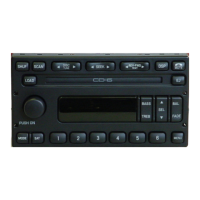
Display description
Six circles are always lit in the digital
display. These signify the six CD slots
in the audio system. When a disc is
loaded into a particular slot (1– 6),
the number inside that specific circle
lights. If the circle is empty, there is
no CD in that particular slot.
Load
The load feature allows you to load
single CDs into the player internal to
the radio.
This six–disc CD player is
equipped with a CD door.
Compact discs should
only be inserted into the player
after the door has opened. Do not
attempt to force the door open.
Compact discs should only be
loaded by pressing the LOAD
control.
• Press the LOAD control. (You can
choose which slot will be loaded by
pressing the desired preset number. If
you do not choose a slot, the system
LOAD


 To Next Page