ENG
9Page of 44
09360 Issue 2
Vitalograph micro - Instructions for Use
grippingandslidingitrmlyinthedirectionoftheowhead
cone (6).
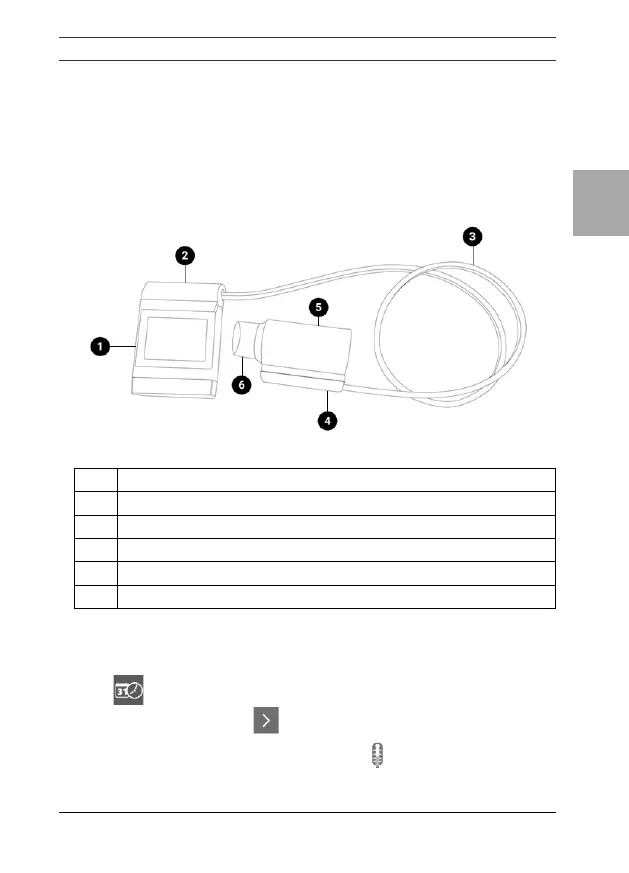
2. Connecttheremoteowheadadaptor(4)tothebaseofthe
owhead(5),connectthedevicecap(2)tothedevice(1).
3. Unwraptheowheadconnectiontubing(3)andconnectone
endtodevicecap(2)andtheotherendtotheremoteowhead
adaptor (4). See Figure 2. The tubing is keyed, so it will only
connect one way.
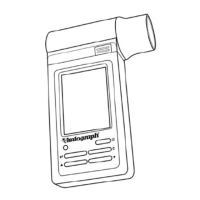
Figure 2 micro with remote owhead
1 micro Device
2 Device Cap
3 Flowhead Connection Tubing
4 Remote Flowhead Adaptor
5 Flowhead
6 Flowhead Cone
5. Operating Instructions
Onrsttimeuse,themicroopensontheSetupscreenforDateand
Time . Enter the current date and time.
Press the forward button tosave.
Continuetothetemperatureentryscreen .
Enter the temperature.



 To Next Page