User Guide VTouch-Plus Configuration Tool
VITREA Smart Home Technologies | T: +972.3.5474746 | F: +972.3.5474738 | vitrea-sh.com | support@vitrea-sh.com
Page 17 of 27
Configuring the Keypad
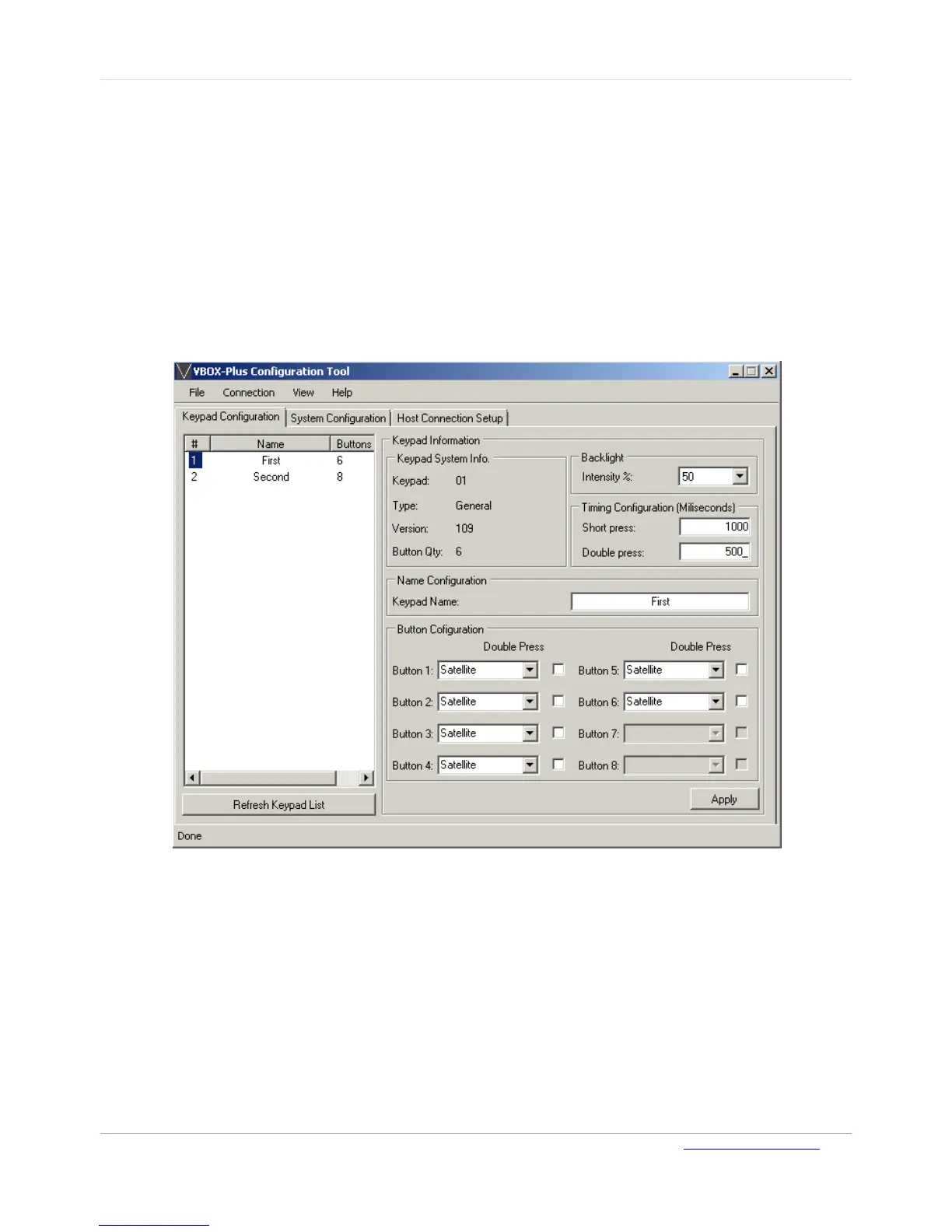
The following keypad settings can be configured via the Keypad Configuration page:
Keypad buttons can be configured as Toggle, Satellite, Push Button or Disabled
Enable/disable Double Press function for each button
Timing for Short Press and Double Press
Adjusting the blue background light intensity
Keypad name
Keypad type (Standard or Lutron) and firmware version details are also displayed on this page.
Figure 11: Keypad Configuration Page
To configure a keypad:
1. On the Keypad Configuration page, select the required keypad from the list of keypads.
2. Modify the keypad settings as required, and then click Apply to save the changes.
Note: The list of keypads can be updated at any point by clicking Refresh Keypad List.



 To Next Page