VTouch-Plus Configuration Tool User Guide
VITREA Smart Home Technologies | T: +972.3.5474746 | F: +972.3.5474738 | vitrea-sh.com | support@vitrea-sh.com
Page 18 of 27
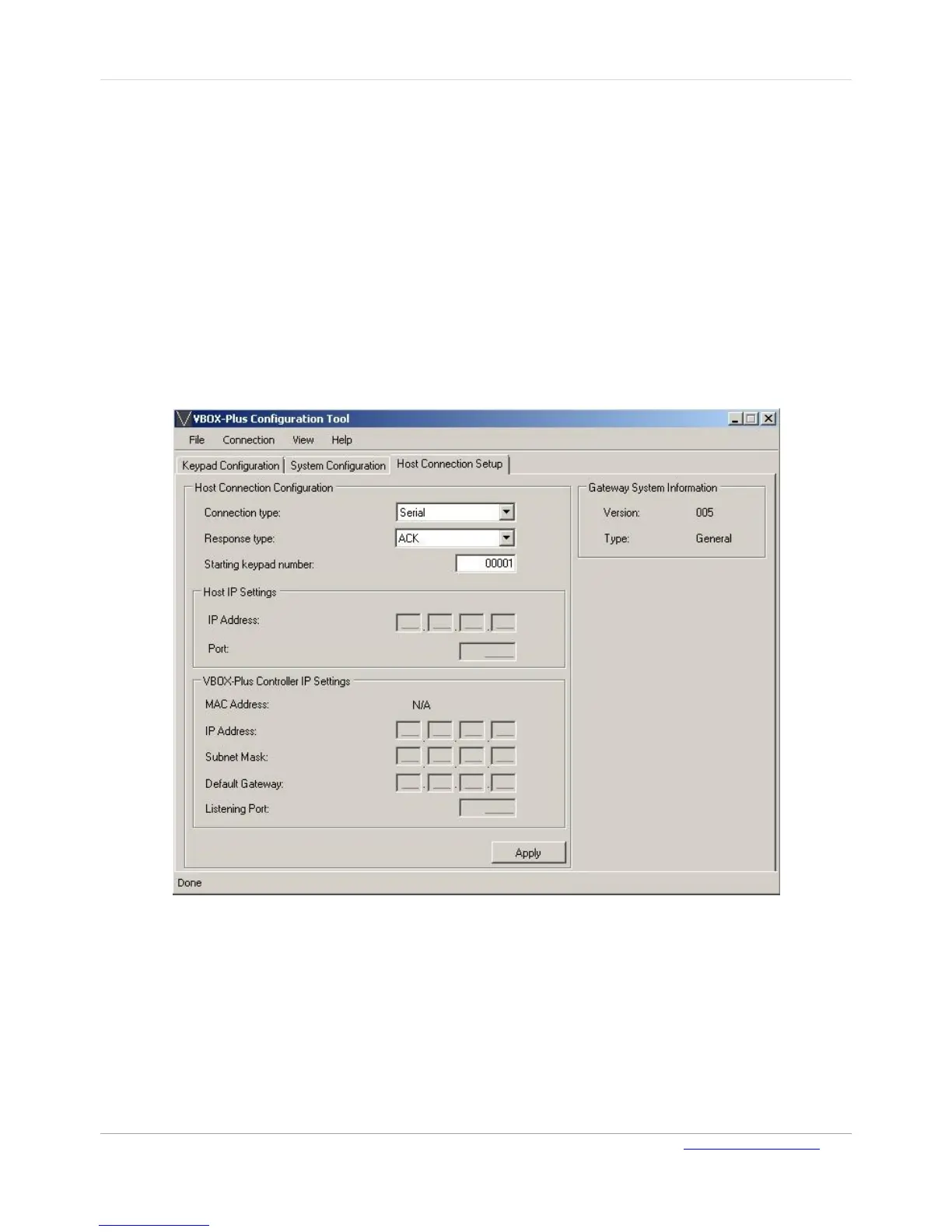
Host Connection Setup
The following host connection settings can be configured on the Host Connection Setup page:
Host connection type: Serial via RS-232 (default), TCP Client or Server via Ethernet
Response to host commands type
Starting keypad number
IP address, Subnet Mask and Default Gateway IP Address of the VBOX-Plus Gateway
TCP/IP Port
IP address of remote host (for TCP Client mode)
Additional information is also provided on this page about the VBOX-Plus Gateway including, NIC
MAC Address, FW version and type.
Figure 12: Host Connection Setup Page
To configure the host connection:
On the Host Connection Setup page, make the required changes, and click Apply.
Note: The keypads are numbered sequentially from 1 to 50 through the registration process. All
communication between the Gateway and the keypads uses this numbering system. The
Starting keypad number field is only used for Gateway-Host communication. For example,
if the Starting keypad number entered is 1000, then the host must use Keypad number 1001
to refer to Keypad 1.



 To Next Page