User Guide VTouch-Plus Configuration Tool
VITREA Smart Home Technologies | T: +972.3.5474746 | F: +972.3.5474738 | vitrea-sh.com | support@vitrea-sh.com
Page 19 of 27
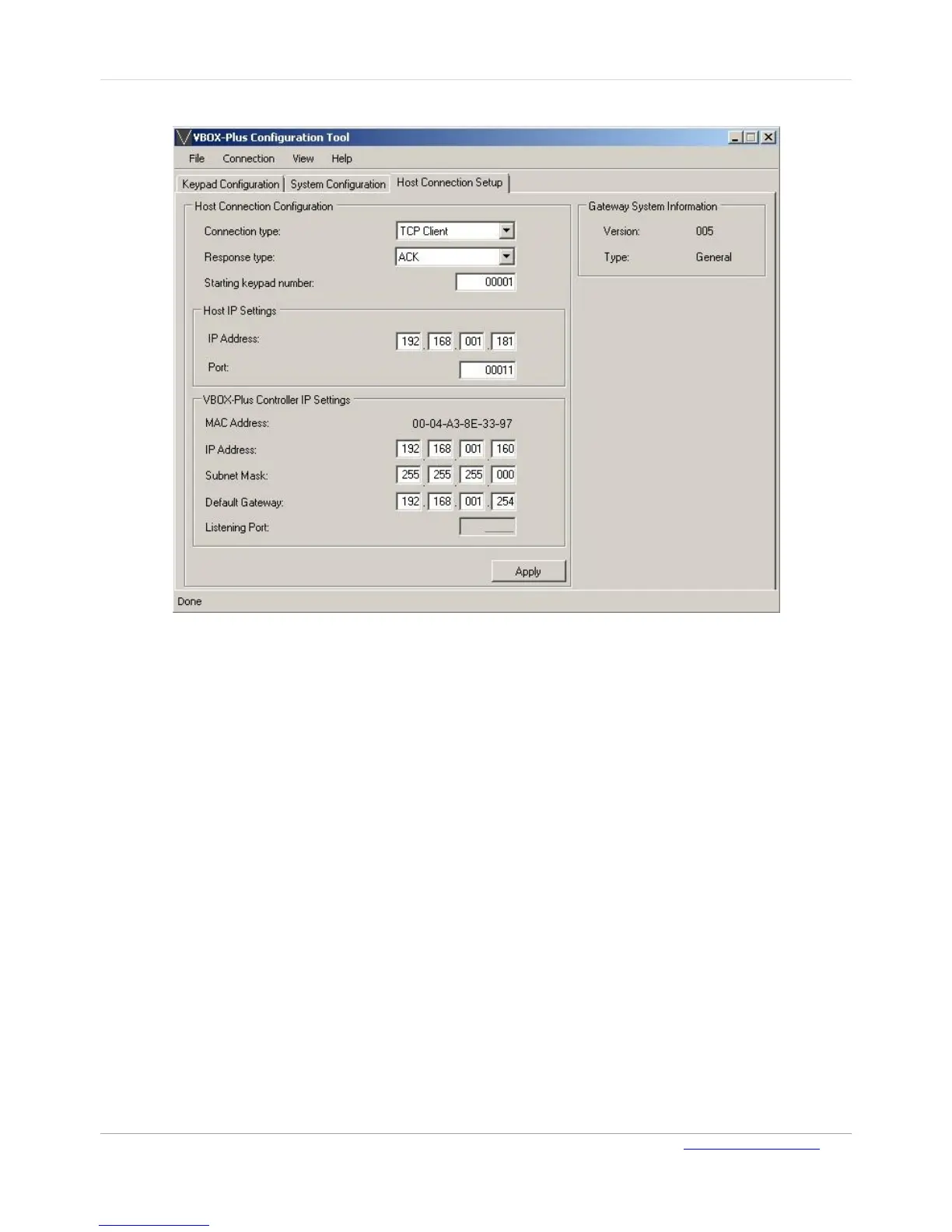
Configuring a Host as Server
Figure 13: Host Connection Setup - 1
To configure the VBOX-Plus Gateway to work with an external Host via Ethernet connection as a
TCP/IP Client (The Host functions as a server):
1. On the Host Connection Setup age, in the Connection Type field, select TCP Client.
2. In the Host IP Settings section, type the IP address and TCP/IP Port of the external host
3. In the VBOX-Plus Controller IP Settings, type the IP address, network Subnet Mask and
Default Gateway of the VBOX-Plus Gateway
4. Click Apply to save the configuration.



 To Next Page