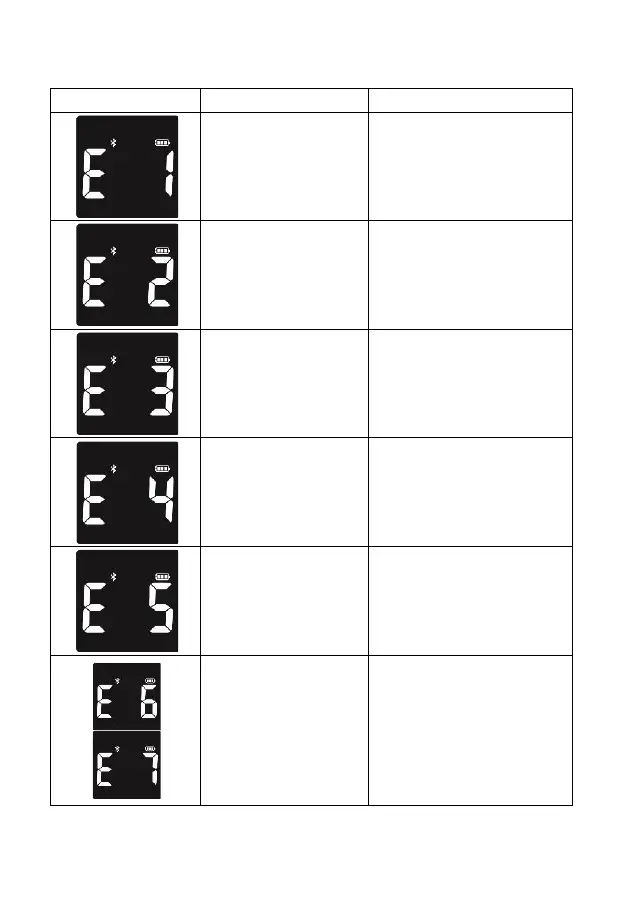
Blood or control solution
was applied to the test
strip before the flashing
blood drop appeared on
the display
Discard the test strip and
repeat the test with a new test
strip. Wait until you see the
flashing blood drop on the
display before testing.
The meter is sensing a
used or contaminated
test strip.
Discard the test strip and
repeat the test with a new test
strip. Wait until you see the
flashing blood drop on the
display before testing.
Discard the test strip and
repeat the test with a new test
strip. Make sure that you are
using a VivaChek™ Ino /Fad
test strip from VivaChek
Biotech (Hangzhou) Co., Ltd..
Discard the test strip and
repeat the test with a new test
strip. Make sure that only
human capillary blood and
VivaChek™ Ino/Fad control
solution are used for the test.
Temperature out of
range.
Move to an area that is within
the operating range for the
meter. Let the meter adjust to
this temperature for 20 minutes
before performing a test.
Potential software or
hardware issue.
Restart the meter. If the problem
continues, contact VivaChek
Customer Support at
800-951-8430 (available 7 days a
week, 8 a.m.- 5 p.m. Eastern
Time). Please contact your health
care professional if you need
help.


 To Next Page