Wiring Diagrams
4
Vivint Element CT200 Installation Guide
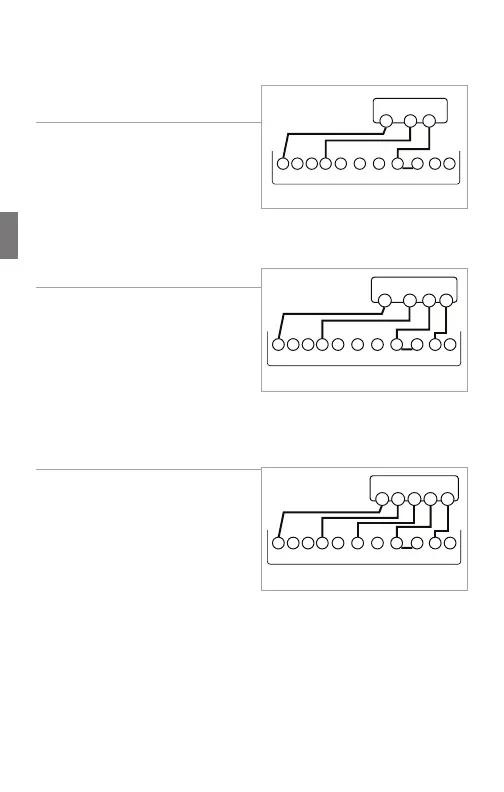
Step-By-Step Wiring Diagrams
3 Wire Heat GAS MILLIVOLT or
24VAC System
1. Connect the R (or RH) wire to the
RH terminal. This connects the
heat power.
2. Connect the W wire to the W
terminal. This connects the heat.
3. If available, connect the C wire to
the C terminal.
4. Go to “Connect Your Wires” on page 9.
4 Wire Heat
1. Connect the R (or RH) wire to the
RH terminal. This connects the
heat power.
2. Connect the W wire to the W
terminal. This connects the heat.
3. Connect the G wire to the G
terminal. This connects the fan.
4. If available, connect the C wire to the C terminal.
5. Go to “Connect Your Wires” on page 9.
5 Wire Heat/Cool
1. Connect the W wire to the W
terminal. This connects the heat.
2. Connect the Y wire to the Y
terminal. This connects the
cooling compressor.
3. Connect the RH or R wire to the
RH terminal. This connects the
power.
4. Connect the G wire to the G terminal. This connects the fan.
5. If available, connect the C wire to the C terminal.
6. Go to “Connect Your Wires” on page 9.
POWER
HVAC SYSTEM
THERMOSTAT
CBOW YY2
RH
RC GAW2
W R
C
POWER
HVAC SYSTEM
THERMOSTAT
CBOW YY2
RH
RC GAW2
W R
C
G
POWER
HVAC SYSTEM
THERMOSTAT TERMINALS
CBOW YY2
RH
RC GAW2
W R
C
GY
24



 To Next Page