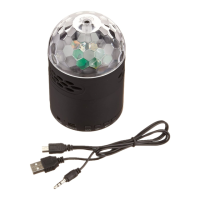
The Vivitar Light-Up Speaker (model V60099BT) is a portable Bluetooth speaker designed to stream music from smartphones and other Bluetooth-enabled devices. It features a distinctive light-up design with RGB lighting, adding a visual element to the audio experience. The speaker comes with a convenient carry tag for portability.
Function Description:
The Vivitar Light-Up Speaker primarily functions as a wireless audio output device. It connects to external devices via Bluetooth for music streaming. In addition to Bluetooth, it supports playback from USB drives, TF (memory) cards, and auxiliary (AUX-IN) connections, offering versatile music source options. The speaker includes controls for power, volume adjustment, track navigation, light mode selection, and call management (answer, end, reject calls). It also integrates a voice assistant feature for hands-free control with connected smartphones. The RGB lighting can be customized through different light modes and can be turned on or off.
Important Technical Specifications:
- Bluetooth Range: Up to 33 feet (10 meters), allowing for flexible placement relative to the connected device.
- Charging Input: 5V-1A max, indicating compatibility with standard USB charging adapters.
- Battery: 3.7V / 1200mAh integrated lithium-ion battery. This battery is non-replaceable and should not be removed from the device.
- Speaker Output: 5W / 4Ω, providing a moderate audio output suitable for personal use or small gatherings.
- Play Time: Approximately 4 hours when playing music with the light-up feature active, at 50% of maximum volume. Actual play time may vary and will be lower at higher volumes.
- Connectivity: USB-C charging port, AUX-IN port, USB port, and TF Card Slot, offering multiple ways to connect and play audio.
Usage Features:
- Power On/Off: Press and hold the power button for 3-4 seconds. The multicolor LED light automatically turns on when the speaker is powered on.
- Bluetooth Pairing: In pairing mode, the indicator light between the 'M' button and charging port will slowly flash blue. Once paired, this light will shine a steady blue. Users need to select "V60099BT" from their phone's Bluetooth settings.
- Music Playback:
- Press the power button to play or pause a track.
- Press the '+' button to skip to the next track; press and hold to increase volume.
- Press the '-' button to go back to the last track; press and hold to decrease volume.
- Light Modes: Press the light button to switch between different light modes. Press and hold the light button to turn off the LED light; press it again to turn it back on.
- Call Management:
- Press the power button to answer and end a call.
- Press and hold the power button to reject an incoming call.
- Voice Assistant: Double press the power button to activate the voice assistant on a connected smartphone.
- Multiple Audio Modes: The speaker supports USB, TF card, AUX, and Bluetooth modes. Users can switch between these modes by pressing the 'Mode' button.
- USB/TF Mode: Automatically activates and plays .mp3 audio files upon insertion of a USB drive or memory card. If the mode doesn't change, re-insert the drive/card.
- AUX Mode: Automatically activates when an auxiliary cable (not included) is inserted into the AUX-IN jack. Note that some speaker functions and controls may be unresponsive in AUX mode.
Maintenance Features:
- Cleaning: Use a soft cloth to clean the speaker. Avoid harsh chemicals or detergents. Ensure the speaker is dry before charging.
- Storage: When not in use, store the speaker in a cool, dry place.
- Charging Cable Handling: Connect and disconnect USB charging cables carefully; avoid tugging or yanking.
- Environmental Protection: Do not expose the speaker to high temperatures (above 40°C), extreme cold, high humidity, excessive moisture, or direct sunlight.
- Repair: Do not attempt to repair the product yourself. Contact a qualified service center if service is needed.
- Disposal: Recycle or dispose of the battery and speaker properly according to local laws and regulations. Contact local recycling facilities or the manufacturer for further information. The integrated lithium-ion battery is not replaceable and should not be removed.
- Safety Precautions: Avoid dropping, puncturing, or exposing the speaker to excessive trauma, flames, or fire. Do not use near water or on wet surfaces. Keep away from strong magnetic fields. Not intended for commercial use.

 Need help?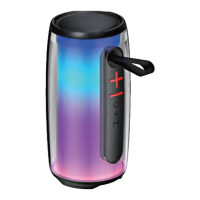

 To Next Page
 General