D
D
D
L
L
L
P
P
P
P
P
P
r
r
r
o
o
o
j
j
j
e
e
e
c
c
c
t
t
t
o
o
o
r
r
r
–
–
–
U
U
U
s
s
s
e
e
e
r
r
r
’
’
’
s
s
s
M
M
M
a
a
a
n
n
n
u
u
u
a
a
a
l
l
l
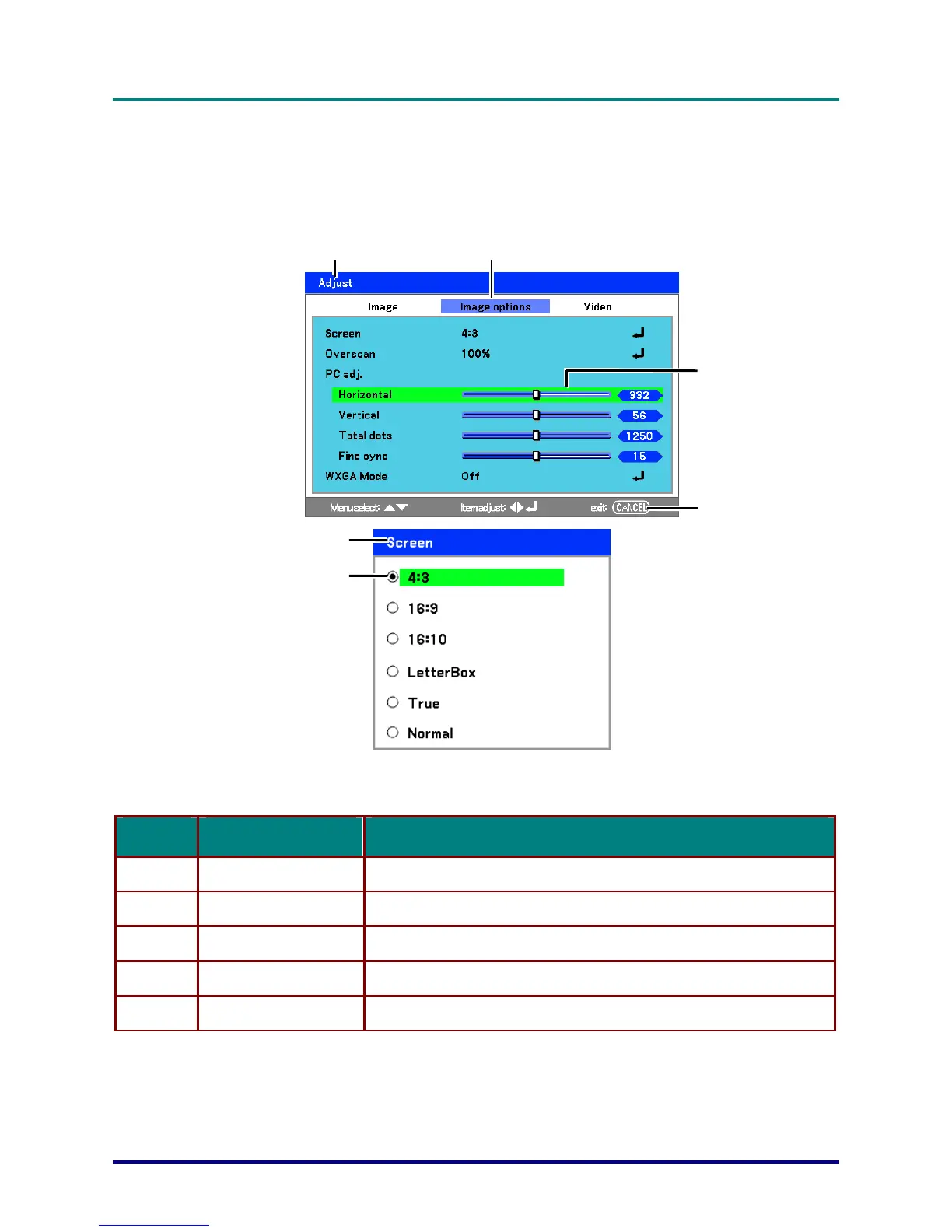
Menu Elements
Some menus and windows contain large amounts of information in a small area. Refer to the follow-
ing guide to navigate through options more easily.
– 47 –
Title Highlight
Slide bar
Exit
Title
Radio button
Menu windo
ws or dialog windows typically contain the following elements:
ITEM LABEL DESCRIPTION
1.
Title Indicates the menu title.
2.
Highlight
Indicates the selected menu or item.
3.
Radio button Click this round button to select an option in a dialog box.
4.
Slide bar Indicates a representation of adjustable values.
5.
Exit Return to the previous menu.



 To Next Page