8
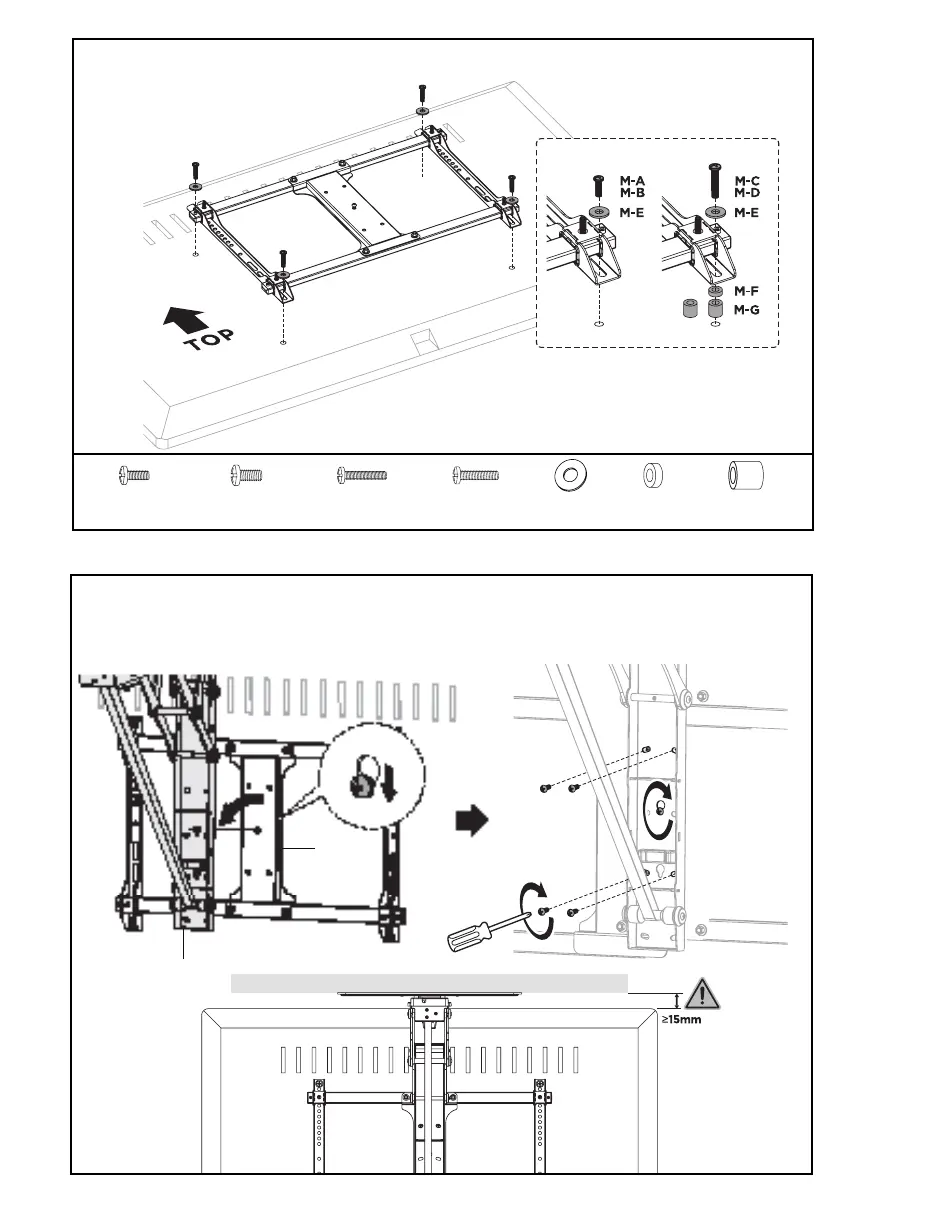
STEP 6: Mounting VESA Assembly
STEP 7: Place TV on Mount
Attach VESA assembly to TV using appropriate mounting Screws (M-A through M-D), M8 Washers (M-E), and
Spacers (M-F, M-G).
Place the TV with VESA bracket assembly on Mount (A) by inserting the center screw on Center Plate (B) into
the keyhole on Mount (A) at the desired height. Secure using previously removed screws (STEP 5) and tighten
with a Phillips screwdriver. Clearance between the ceiling and top edge of TV should be no less than 15mm
when TV is in the fully lowered position.
M-G (x4)
Large Spacer
M-A (x4)
M6x14mm Screw
M-B (x4)
M8x16mm Screw
M-C (x4)
M6x30mm Screw
M-D (x4)
M8x35mm Screw
M-E (x4)
M8 Washer
M-F (x4)
Small Spacer
B
A


 To Next Page