EasyManua.ls Logo

Vivo MOUNT-E-FD70S/W - User Manual

Vivo MOUNT-E-FD70S/W
12 pages
Print Icon
To Next Page IconTo Next Page
Loading...
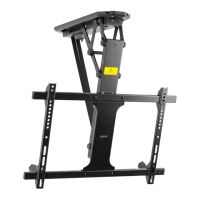
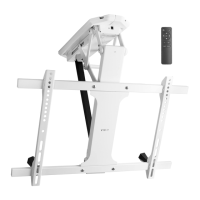
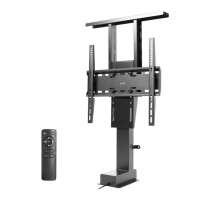
Black Electric Flip Down / Swivel Ceiling TV Mount
Follow along step-by-step with our video walk through by scanning
the QR code with your mobile device or by following the product
link: vivo-us.com/products/mount-e-fd70s
Instruction Manual
SKU: MOUNT-E-FD70S/W
ASSEMBLY VIDEO AVAILABLE:
help@vivo-us.com
www.vivo-us.com
309-278-5303
Question and Answer IconNeed help?

Do you have a question about the Vivo MOUNT-E-FD70S/W and is the answer not in the manual?

Summary

Product Title and Video Guide

Black Electric Flip Down; Swivel Ceiling TV Mount

Product title and SKU MOUNT-E-FD70S/W for the ceiling TV mount.

Assembly Video Available

Access a step-by-step video tutorial for product assembly via QR code or direct link.

Customer Support Information

Contact Us First!

Guidance to contact support before returning the item for assistance.

Personable Customer Support

Support availability: Monday-Friday, 7 AM - 7 PM.

Missing a Part?

Policy for reporting missing or defective parts within 30 days of delivery for replacement.

Pre-Assembly Warnings and Guidelines

General Installation Warnings

Read directions carefully, check for missing parts, and avoid improper use or exceeding weight capacity.

Choking Hazard Warning

Contains small parts; not suitable for children under 3 years. Adult supervision is required.

Installation Cautions

Do not install into drywall alone; mount to wood studs. Verify wall construction.

Pitch Ceiling Warning

Do not attempt to install on a pitched ceiling as the mount will not operate as intended.

Weight Capacity Limit

Do not exceed the specified weight capacity (77lbs/35kg) to prevent serious injury.

Product Warranty and Returns

Information on product warranty, returns, and conditions for shipping charges.

Tools and Package Contents

Tools Needed for Installation

List of necessary tools including Phillips screwdriver, drill, pencil, wrench, and stud finder.

Included Components List

Detailed list of all parts included in the package for assembly.

Step-by-Step Assembly Guide

Step 1: Installing the Mounting Brackets

Assemble mounting brackets to the main mount using specified screws and wrench.

Step 2: Mounting VESA Assembly

Instructions for mounting to wood beam or concrete ceilings using template and hardware.

Step 3: Assembling VESA Components

Connect bracket rails to the center plate and attach VESA brackets.

Step 4: Adjusting VESA Assembly

Adjust VESA bracket spacing to match TV mounting holes and secure them.

Step 5: Removing VESA Screws

Remove pre-installed screws and loosen the center screw to prepare for TV attachment.

Step 6: Mounting VESA Assembly

Attach the VESA assembly to the TV using appropriate screws, washers, and spacers.

Step 7: Place TV on Mount

Place the TV with VESA bracket onto the mount and secure with screws.

Step 8: Manage Cables

Route and secure cables using provided clips and ties for a clean setup.

Step 9: Connect AC Adapter

Plug in the AC adapter and follow remote instructions for mount operation.

Additional Information and Support

Explore Other VIVO Products

Discover other VIVO home & office products like speaker mounts, adjustable desks, and monitor mounts.

About VIVO

Information about VIVO as a brand focused on ergonomic office furniture and solutions.

Need Further Assistance?

Contact information and average resolution times for customer support via phone, chat, and email.

Social Media and Product Updates

Tag VIVO on Social Media

Share your VIVO setup photos on social media using provided handles.

Product Website

Check out the website for more great VIVO products.

Overview

This document is an instruction manual for the VIVO Black Electric Flip Down / Swivel Ceiling TV Mount, SKU: MOUNT-E-FD70S/W.

Function Description:

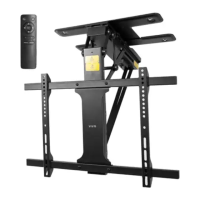
The VIVO MOUNT-E-FD70S/W is an electric ceiling TV mount designed to allow a television to flip down and swivel from a ceiling. This provides a versatile viewing experience, enabling the TV to be hidden when not in use and deployed for viewing at various angles. The electric operation, controlled by a remote, enhances convenience, allowing users to adjust the TV's position without manual effort. The mount is suitable for both wood beam and concrete ceilings, offering flexibility in installation environments. It supports VESA-compatible televisions and includes features for cable management to maintain a clean and organized setup.
Important Technical Specifications:

  • SKU: MOUNT-E-FD70S/W
  • Weight Capacity: 77 lbs (35 kg). Exceeding this limit can result in serious injury or damage.
  • Mounting Compatibility: Designed for wood studs, brick, and concrete walls. Not suitable for drywall alone.
  • Ceiling Type: Compatible with flat ceilings. Not designed for pitched ceilings.
  • Minimum Clearance: A minimum clearance of 15mm between the ceiling and the top edge of the TV is required when the TV is in the fully lowered position.
  • VESA Compatibility: The mount supports various VESA mounting hole patterns, with adjustable VESA brackets (E) to match TV mounting holes.
  • Mounting Hardware: Includes a comprehensive set of screws, washers, nuts, anchors, and Allen wrenches for different installation scenarios.
    • Wood Beam Mounting: Utilizes ST6.3x55mm Screws (W-A) and Washers (W-C). Requires a 3/16" (4.5mm) drill bit for 2.2" (55mm) deep pilot holes.
    • Concrete Ceiling Mounting: Utilizes ST6.3x55mm Screws (W-A), Washers (W-C), and Concrete Anchors (W-B). Requires a 3/8" (10mm) drill bit for 2.4" (60mm) deep pilot holes.
  • Power: Operated via an AC Adapter (G) which plugs into the mount (A) and an AC outlet.
  • Control: Includes a Remote (H) for electric operation of the mount.

Usage Features:

  • Electric Flip Down/Swivel: The primary feature is the electric mechanism that allows the TV to flip down and swivel, providing dynamic viewing angles and discreet storage.
  • Remote Control Operation: The included remote control simplifies the operation, enabling users to adjust the TV's position from a distance.
  • Adjustable VESA Brackets: VESA Brackets (E) can be adjusted to match the specific mounting holes of the TV, ensuring broad compatibility.
  • Cable Management: Includes Cable Clips (J) with adhesive backing and Cable Ties (I) to route and secure cables along the mount's arm, contributing to a tidy installation.
  • Installation Flexibility: The design accommodates both wood beam and concrete ceiling installations, offering options for various structural environments.
  • Safety Warnings: The manual emphasizes critical safety warnings, including weight capacity limits, proper installation surfaces (avoiding drywall alone), and the unsuitability for pitched ceilings. It also warns against operating the mount before the TV is fully installed and against manually swiveling the mount.

Maintenance Features:

  • Pre-Assembly Check: Users are instructed to check for missing or defective parts before assembly to prevent damage or injury.
  • Contact Support: VIVO offers customer support for missing parts, damaged items, or installation queries, providing a direct line for assistance.
  • Warranty Information: Product warranty details are available on the VIVO website or through customer support.
  • Return Policy: A hassle-free 30-day return policy is offered for all products, with specific conditions for items ordered in error or no longer needed (return shipping at buyer's expense).
  • Assembly Video: An assembly video is available via QR code or product link (vivo-us.com/products/mount-e-fd70s) to guide users through the installation process step-by-step.
  • Regular Checks: While not explicitly stated as "maintenance," the initial warning to "check carefully to make sure there are no missing or defective parts" implies a need for vigilance regarding the product's condition, which can be extended to periodic checks after installation.
  • Professional Assistance: The manual advises calling a qualified technician if directions are unclear or if there are doubts about installation safety.

Vivo MOUNT-E-FD70S/W Specifications

General IconGeneral
BrandVivo
ModelMOUNT-E-FD70S/W
CategoryTV Mount
LanguageEnglish

Related product manuals