VIVOTEK
User's Manual - 63
Focus
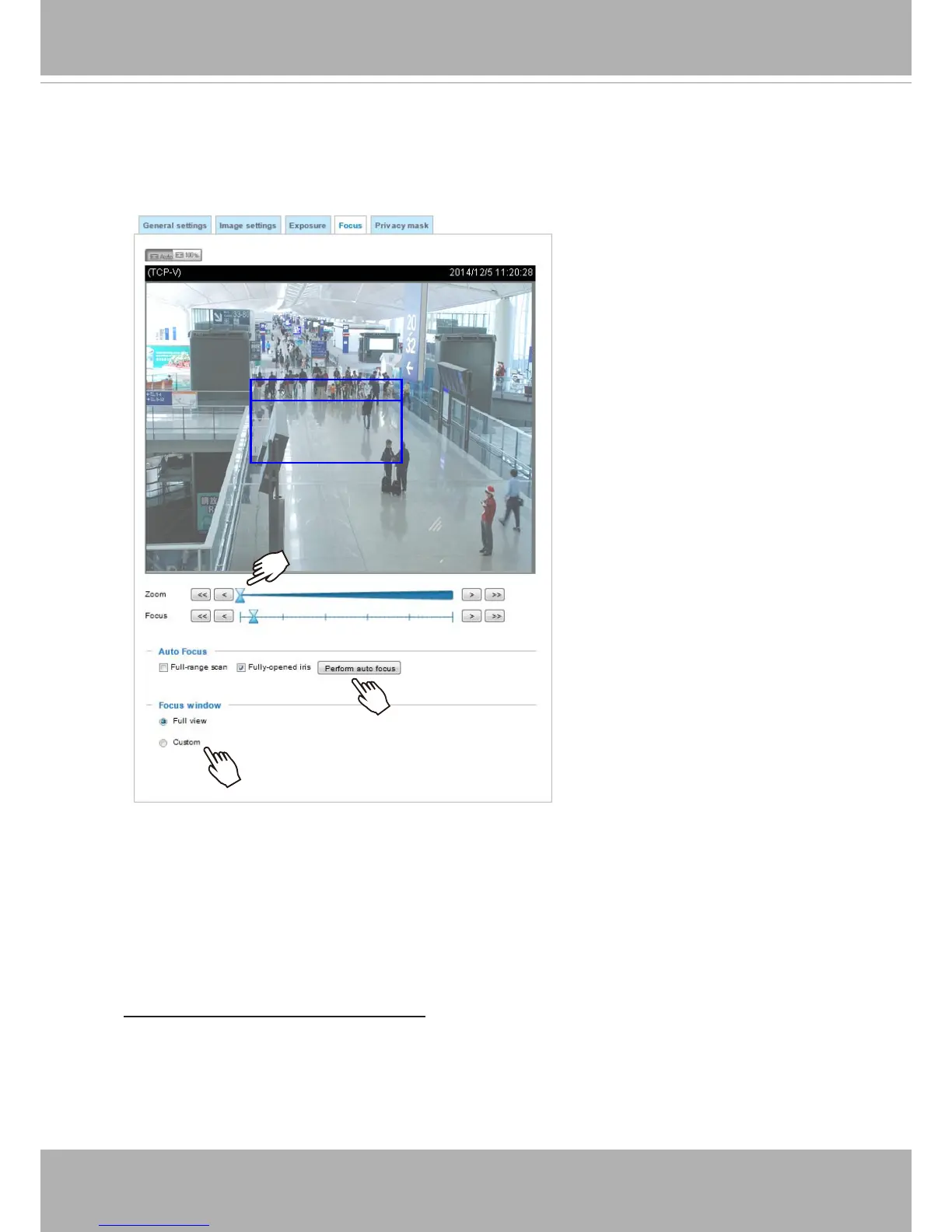
The camera comes with a motorized vari-focal lens, and therefore a smart focus function panel is
provided to facilitate zoom and focus conguration
�
Focus window
■ Zoom
: If you need to zoom in to a eld of view, click and drag the pointer to the right to zoom in.
Note that the size of the eld of view will also be reduced.
■ Focus:
Whenever the zoom factor is changed, the focus is automatically updated� You can use
the Fine-tune focus button to help achieve best image focus� When you see the live image is out
of focus, you can click the focus buttons on the sides, or drag its pointer to nd the best focus by
draging it along the slide bar�
Auto focus and Full-ranage scan focus:
Click the Perform auto focus button for the camera to automatically find the best focus� The
process takes about several seconds to complete� The pointers will move along the Focus slide
bar� When the scan is completed, the Focus pointer will stay at the optimal location on the slide
bar�
You may still need to use the “>” or “<” buttons to ne-tune the focus depending on the live image
on your screen�











 To Next Page