VIVOTEK
User's Manual - 59
Camera Control
This section explains how to control the Network Camera’s Pan/Tilt/Zoom/Focus operation via
the control panel and how to preset positions�
Preset Locations
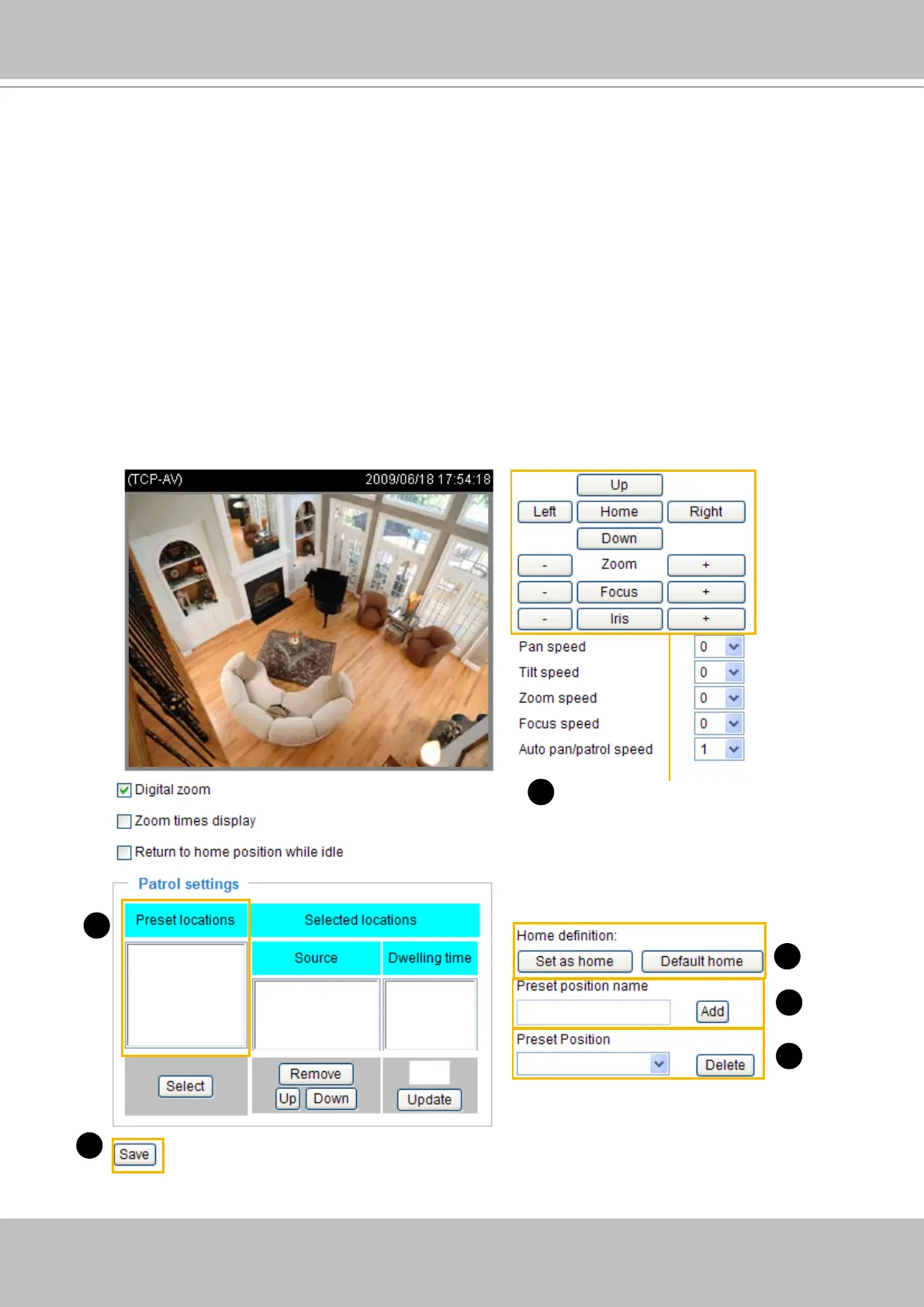
On this page, you can preset positions for the Network Camerato go to directly or patrol� A total of 128
preset positions can be congured.
Please follow the steps below to preset a position:
1� Adjust the shooting area to a desired position using the buttons on the right side of the window�
2� Click Set as home or Default home to dene your home position.
3� Enter a name for the preset position, which allows for up to forty characters� Click Add to enable the
settings� The preset positions will be displayed under the Preset Location list on the left-hand side�
4� To add additional preset positions, please repeat step 1~3�
5� To remove a preset position from the list, select it from the drop-down list and click Delete�
6� Click Save to enable the settings�
functions are the same
as the control panel on
home page
1
2
3
5
6
3



 To Next Page