ENG - 20
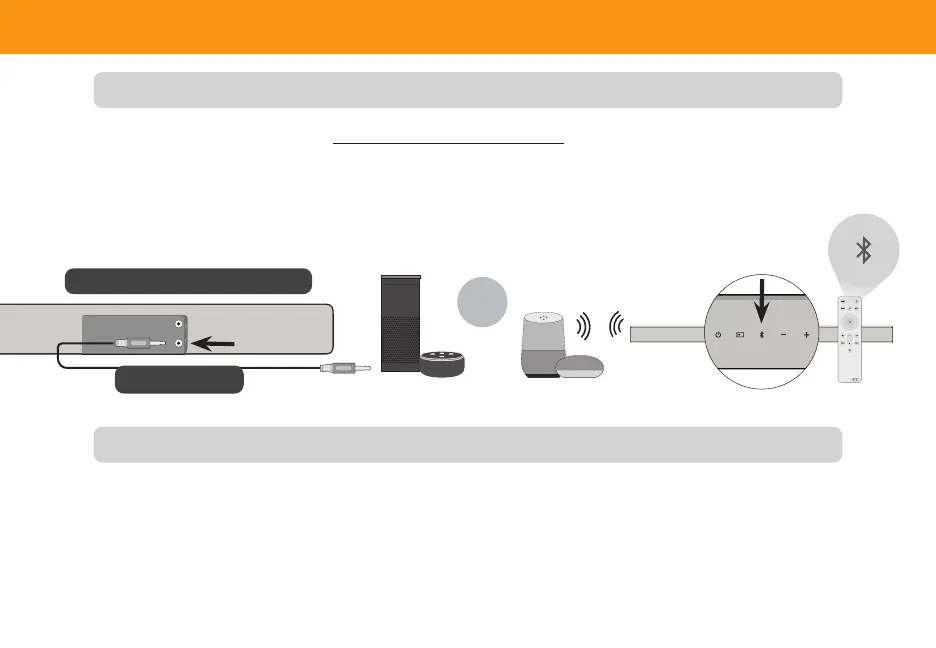
Use a 3.5mm audio cable to connect the AUX VA port on the sound bar to an AUX port on your voice assistant device.
If there is no AUX port on the VA device, use a Bluetooth connection instead.
Benets of this type of connection:
• Simple and easy connection setup.
Using the AUX VA Port to Connect
Connecting to a Voice Assistant
Using Bluetooth to Connect
Press and hold the Bluetooth button on the sound bar or remote for three (3) seconds. Search for the sound bar (VIZIO
V21) using your VA device app. For more information, refer to the user documentation that came with the device.
Benets of this type of connection:
• Ability to position the VA device in other locations other than physically connected to the sound bar.
• Ability to place the VA device closer to you so that it can hear commands better.
Connect to the AUX VA port only
3.5mm Audio Cable
OR


 To Next Page