ENG - 25
Wall-mounting
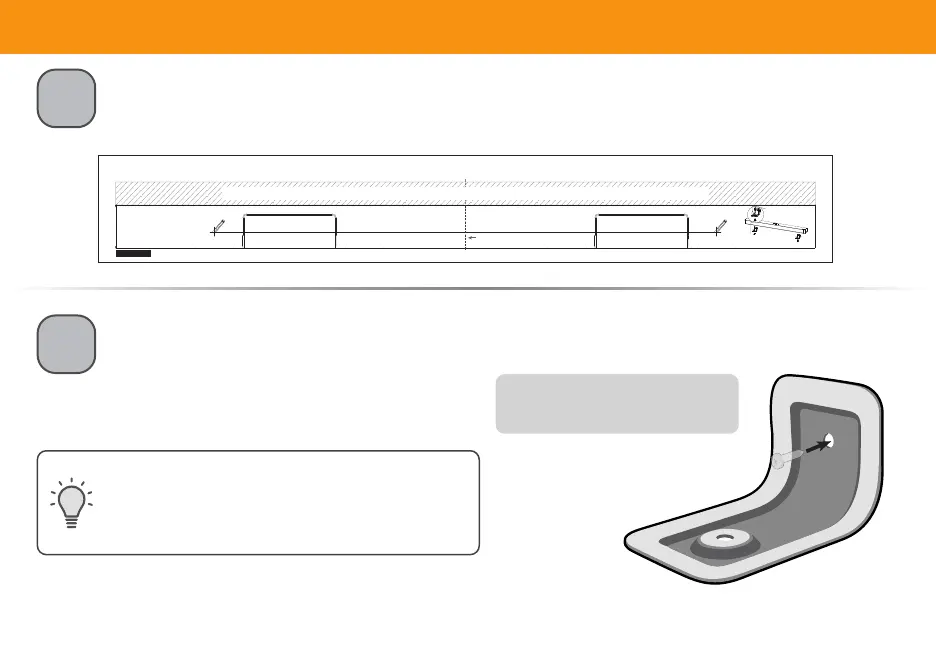
Place the included wall mounting template against the wall under your TV.
Mark the two bracket holes using a pencil.
Center Line / Ligne Centrale
25.83"/ 65,60 cm
WALL MOUNTING TEMPLATE / MODÈLE DE SUPPORT MURAL
MARK HERE
APPOSEZ UNE MARQUE ICI
MARK HERE
APPOSEZ UNE MARQUE ICI
LEAVE THIS SPACE BETWEEN THE SOUND BAR AND YOUR TV / LAISSEZ CET ESPACE ENTRE LA BARRE DE SON ET VOTRE TÉLÉVISEUR
Refer to the "Wall-mounting" section in the User Manual for additional information/Reportez-vous à la section <<Montage mural>> du manuel de l'utilisateur pour plus d'informations
1202-0001945
Wall Mount Screw
Screw Size: M4 x 9L (Included with sound bar)
Vis de Montage Mural
Taille des Vis: M4 x 9L (Incluses avec la barre de son)
*
Bracket Screw
NOT INCLUDED WITH SOUND BAR
*
Vis de Fixation
NON FOURNI AVEC LA BARRE DE SON
1
2
Then place the shorter end of the bracket on the two holes you just marked and screw into
the wall. Be sure your screws are attached to wood studs, drywall anchors (for drywall), or
concrete anchors (for brick/concrete walls).
Screws for attaching the bracket to the wall are
not included. Choose the screw type and length
appropriate to your home’s construction. If in doubt,
consult a professional installer.
Suggested screw size: 3.5 mm diameter,
1.63" minimum length
Bracket Screw
*
(Not included with sound bar)
* Do not use any of the included screws for the wall mount installation. These are not intended for mounting.


 To Next Page