Sonic Series
AC EV Charging Station
User Manual
- 25 -
6. OPERATION
6.1. Power on
After the charging station has been installed and confirmed, switch on the power supply. The light
and screen lights up and the charging station switches to standby state.
6.2. Human-Machine Interface
6.2.1. Overview
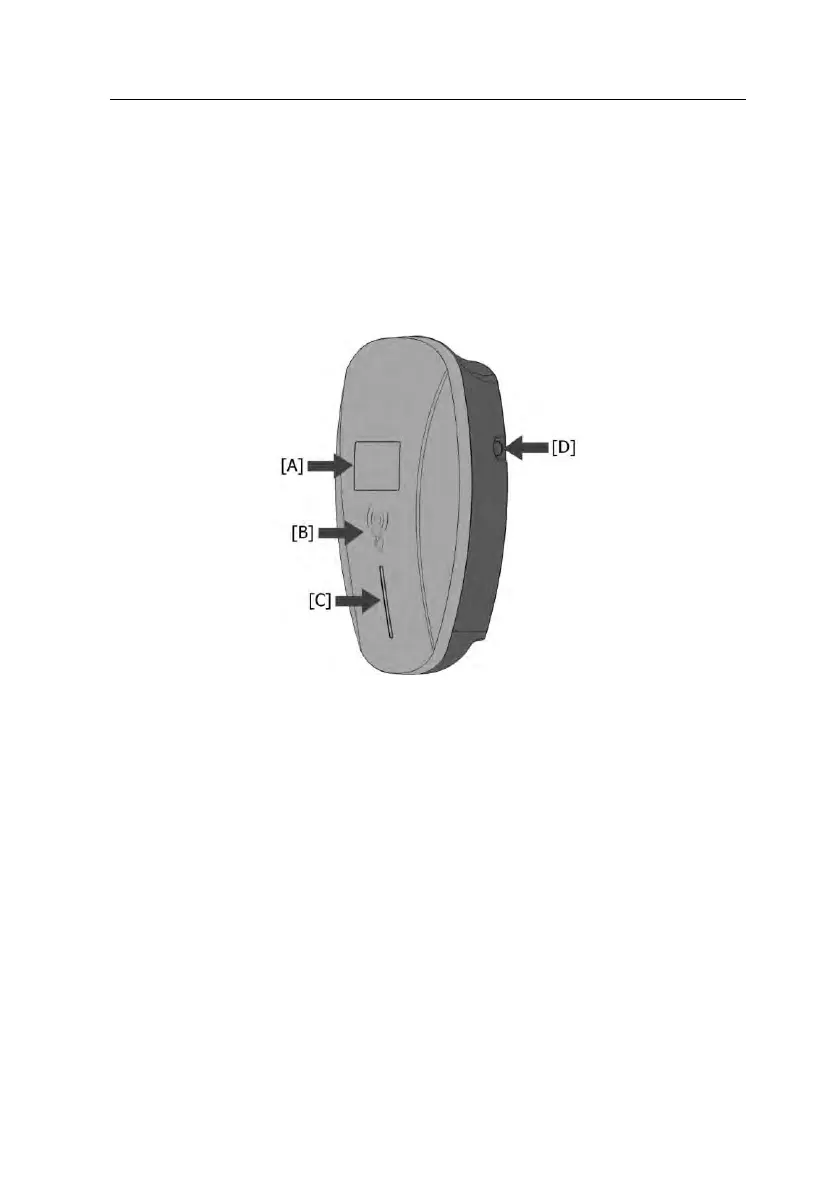
As shown in Fig. 6-1, Sonic series product is configured with multiple human-machine interfaces.
Screen display area: A screen used to display system status
Swipe card area: Swipe the RFID card to charging
Indicator lights: It is used to show indicate system status
Charging control button: Start or stop charging by press for Button-controlled charging
Fig. 6-1 HMI of AC EV Charging Station
6.2.2. LCD indicators
The screen is used to display the running status of charging piles, which is convenient for users to
know the real-time situation of charging piles.In the status bar of the upper part, the accumulated
charging electric energy and CP status of Bluetooth WIFI are displayed. The pile number and fault
code are listed on the status bar in the following section
①Standby state



 To Next Page