Infotainment
Remote control
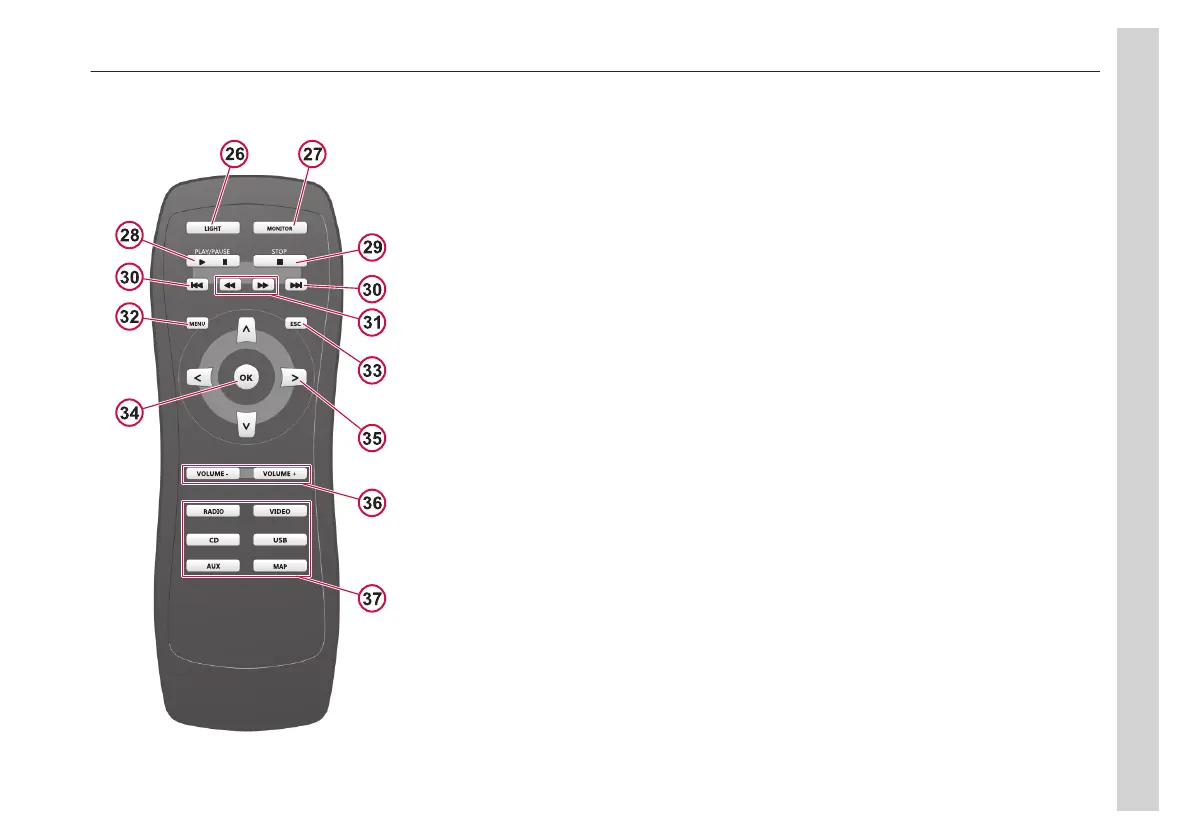
26. Button light on/off
27. On/off displays in cabin
28. Play/pause
29. Stop
30. Skip backwards/forward
31. Fast search
32. MENU
Short press: DVD menu
Long press: Next disc
33. ESC, backwards in DVD menu
34. OK, confirm DVD menu choice
35. DVD menu controls
36. Volume
37. Source
Main functions
Many functions are controlled from the
menu.
• Access the menu by pressing MENU
(20).
• Confirm choices with the knob (12).
• Exit items with the back (21) button.
The MORE menu
MORE is a menu item for system
settings and other basic settings such as
radio region, display and bluetooth
pairing.
To avoid unintentional changes in the
settings, the MORE menu is protected.
When MORE is chosen, the word CODE
is displayed. To continue, press both
knobs simultaneously.
Cockpit and Cabin
The control panel has cockpit buttons on
the left side and cabin buttons on the
right.
Choose the cockpit or cabin with a short
push, knobs (12 or 15) or any of the
source buttons (17 or 25). Confirm with
ENTER (22). The audio and video
sources are controlled separately.
COCKPIT or CABIN is displayed
depending on which area is active at the
moment.
05
Equipment
65


 To Next Page