Infotainment
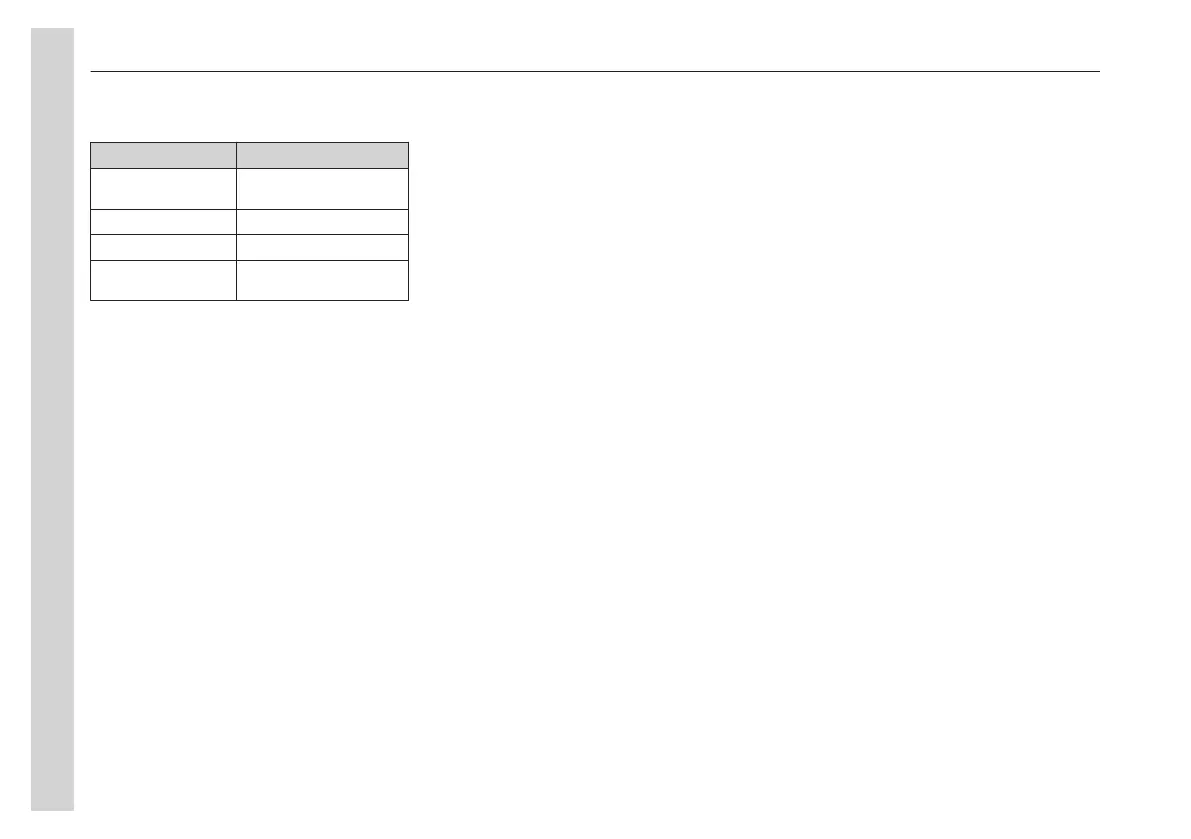
Select a source for COCKPIT or
CABIN
Function Action
Select radio Press the RADIO
button
Select CD source Press the CD button
Select AUX/USB Press the AUX button
Select video or
DVD source
Press the VIDEO
button
Lighting
The back lighting of the buttons can be
turned on and off on the Remote Control
button LIGHT (26).
Choose red or green back lighting for the
buttons under: Menu -> More -> System
-> Red/Green
Start, turn off and silence the audio
system
The radio normally turns on and off with
the ignition. To turn it on and off
manually, briefly press the ON (1) button.
When the radio is turned off manually, it
stays off until manually turned on.
To mute the system, briefly press the
knob. Press again to restore the sound.
Audio sources
The main four audio inputs are RADIO,
CD, USB and AUX. Several devices can
be connected and available at the same
time.
Radio Mode
Switch to radio mode as audio source.
The radio starts with the latest selected
radio type (FM, AM, MW, LW, SW).
Use the FM (11) button to switch
between the FM-bands and the AM (5)
button for the MW, LW and SW.
Search in radio mode
Briefly press << or >> (14) to search for
radio stations. When a station is found,
the search stops. Press again to keep
searching.
Search manually by holding down the <<
or >>.
In search mode:
A long press ▼ stores the current station
at next free memory spot (in FMTS
bank).
A long press ▲ searches and stores the
stations automatically at next free
memory spot (in FMTS bank).
Store radio stations
When in FM or AM mode, use the FM
and AM buttons repeatedly to switch
between memory banks.
Switch between the memory banks:
• MENU -> BAND
Proceed as follows to store a radio
station on the desired number:
• Press and hold one of the buttons 1–
6 to store a station.
• Select a stored radio station with a
brief press on one of the buttons.
Radio data system (RDS)
RDS is used by many radio stations
throughout Europe. The system provides
features such as Automatic frequency
changing (AF) and trigger signals for
Traffic announcements (TA).
Alternative frequency (AF)
The frequency range for FM stations is
fairly limited, many stations therefore
broadcast on alternative frequencies in
different areas. Use the AF function to
listen to a station without interruption.
• Press MENU and select AF to turn
on or off the function.
• When Alternative Frequency is
active, the display shows AF.
Traffic announcements (TA)
This function allows the radio to interrupt
with traffic announcements regardless of
the mode it is in.
When TA is broadcasting, interrupt an
announcement by pressing the TA
button. The function remains active.
05
Equipment
66


 To Next Page