Infotainment
When TA is not broadcasting, turn the
function on and off with the TA button.
When the Traffic Announcements
function is active, the display shows
"TA".
Important Public Announcement
Important Public Announcement can be
broadcast over the radio in case of
serious events.
This function cannot be deactivated.
RADIO functions
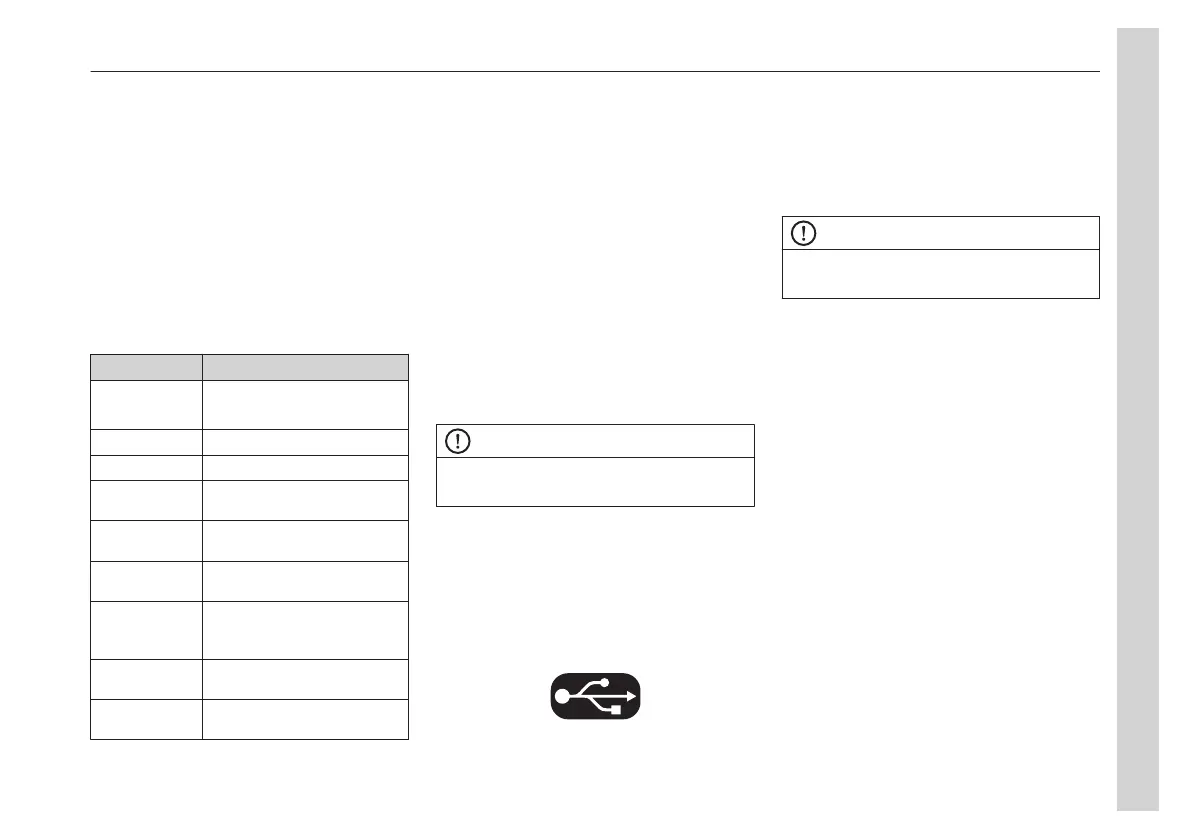
Function Action
*SEARCH < search downwards
> search upwards
*TUNE Select a frequency
*STORE Store a station
*BAND Select the desired memory
bank and location
TRAVEL-S Start the Travelstore
function
TA ON/OFF Switch traffic
announcements on/off
AF ON/OFF Automatic switching to
alternative frequencies
on/off
REG ON/OFF Switch the regional function
on or off
AUTO/
MANUAL
Switch between automatic
and manual tuning
CD mode
In the CD menu, choose folders and/or
tracks to play.
Tracks can also be played in a random
order (RND ON/OFF) or repeated (RPT
ON/OFF).
To adjust the audio from a CD source in
the cockpit or cabin, first set the focus to
the area.
Press the << or >> to switch between
tracks. To rewind or fast forward, hold
the buttons down.
Switch between folders with ▼ or ▲.
AUX and USB mode
NOTE
To use AUX, it must be turned on in the
system settings.
Turn on AUX, press Menu -> More ->
System -> AUX On/Off.
The volume of the AUX device must be
set to max. If the max volume from the
AUX device is too low, adjust the volume
on the radio.
USB icon: active and available
Audio settings
The different sound settings for the radio
are available in the menu.
Audio Settings
NOTE
Remember to change focus between
cockpit and cabin!
Adjusting the sound profile
The sound profile can be adjusted in the
menu under AUD.
When the name of the function is
displayed, adjust it between -7 and 7 by
turning the knob.
Available functions:
• BASS
• TREBLE
• BALANCE (left - right)
• FADER (front - rear)
• CENTER (everything to 0)
• RESTORE (back to current sound
profile)
The sound profile is saved in the More ->
Save -> Store a sound profile.
Adjusting the volume up and down
The volume of the current source is
raised and lowered by turning the knobs.
05
Equipment
67


 To Next Page