AUDIO AND MEDIA
}}
75
Web browser
30
The car has a built-in web browser that makes it
possible to search and display information from
the Internet.
For basic operation, read how the system is oper-
ated and menu navigation (p. 28).
The web browser is a simple type and supports
the HTML 4 standard in text and images. The
web browser does not support moving images,
video and audio. It is not possible to download
and save files.
To use the web browser, the car must first be
connected to the Internet (p. 69).
NOTE
Data is transferred when using the internet
(data traffic), which can have a cost.
Activation of data roaming can result in fur-
ther charges.
Contact your network operator about the cost
for data traffic.
NOTE
The web browser is not available while driving.
Press the Connect button in the centre console
and select Web browser.
When connected to the Internet using
Bluetooth
®
the Bluetooth
®
symbol (p. 32) is
shown in the top right hand corner of the screen.
If no Internet connection is available then this will
be advised in the screen.
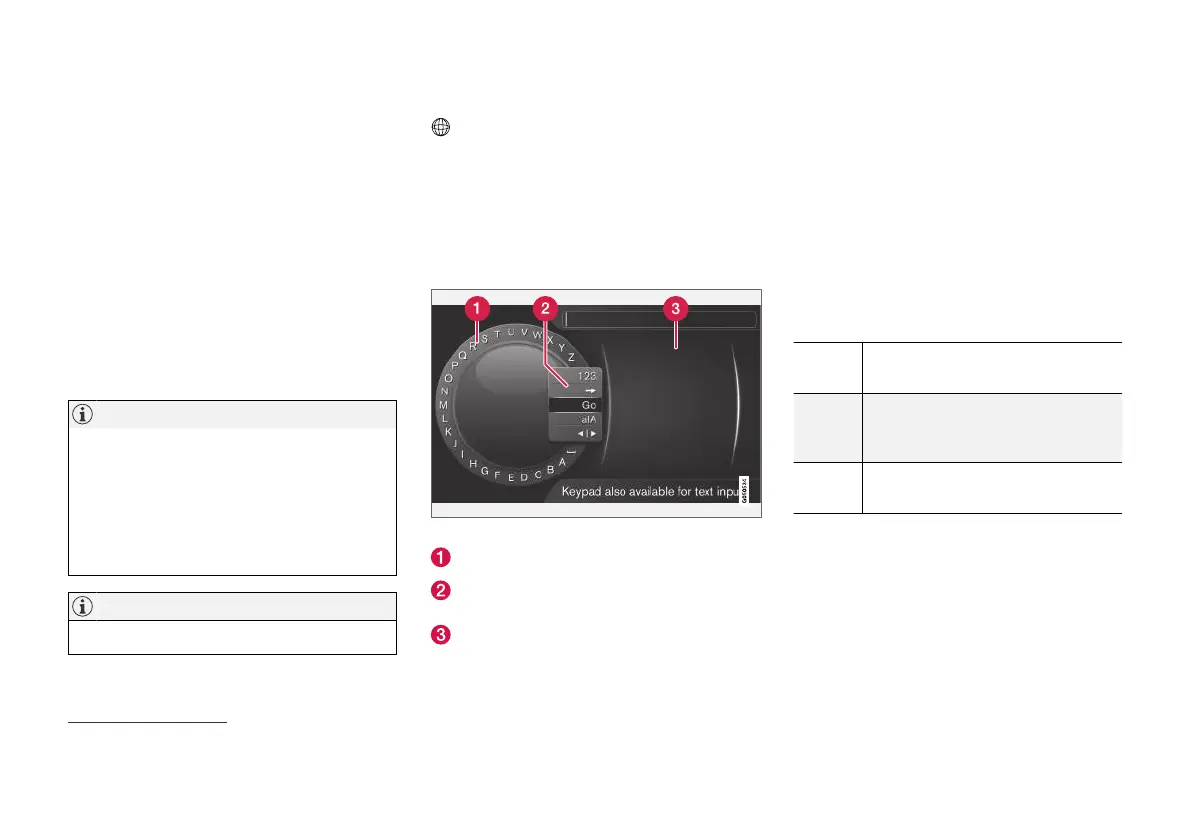
Search function
Searching using the character wheel.
Character list.
Changing the input mode (see following
table).
Recently visited web pages (history).
Use the character wheel to enter a web address
URL, e.g. www.volvocars.com.
1.
Turn TUNE to the desired letter, press OK/
MENU to confirm. The number and letter
buttons on the control panel in the centre
console can also be used.
2. Continue with the next letter.
3. To change the input mode to numbers or
special characters, load the address entered
or to go to the history, turn TUNE to one of
the options (see explanation in the following
table) in the list for changing the input mode
(2), press OK/MENU.
123/A
BC
Change between letters and num-
bers with OK/MENU.
=>
Leads to history (3). Turn TUNE to
select a web address URL, press
OK/MENU to go to the address.
Go
Loads the entered web address
URL with OK/MENU.
30
Applies to certain markets



 To Next Page