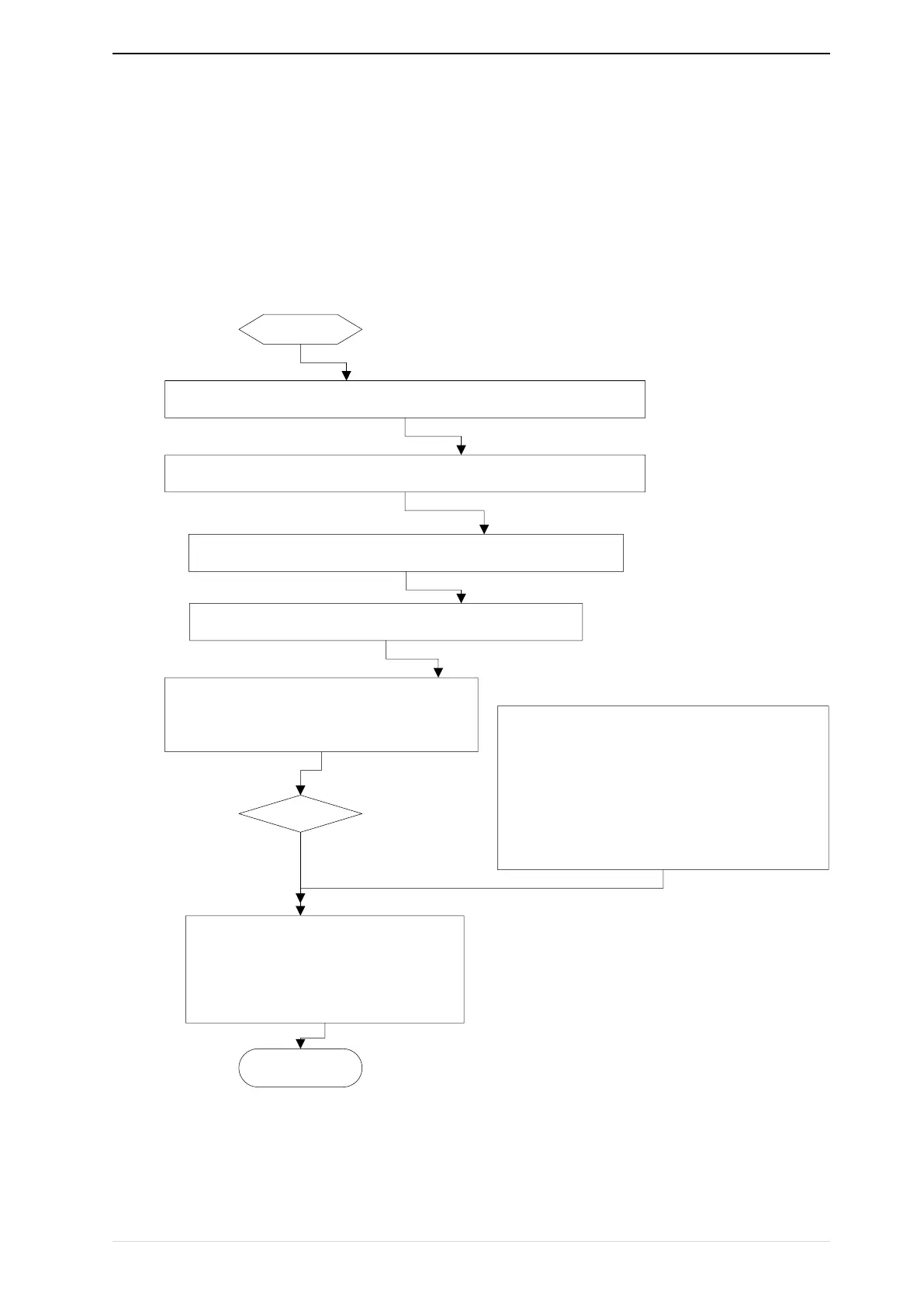
start
Follow the instructions in Chapter 3 to install the inverter and wire it
Make sure the power cable, motor cable and brake unit are connected
correctly
Observe the safety precautions and switch on the power supply
Enter guide mode”-GdE-“
Set each parameter in turn according to the
guidance of the wizard, set the motor self-
learning mode P11.10, press the run button,
waiting for the complete of self-learning
· Press “RUN”to Run inverter
· Press “STOP” to stop inverter
While monitoring the output frequency
or command frequency,press
“ENTER”to modify the target
frequency
End
close loop vector control(VC),Before normal
operation, ensure that the encoder P10.03 is in
the correct directionIf rotary self-learning is
performed, the encoder orientation can be
automatically recognized and storedIf it is not
executed, it needs to open the loop control to
run the motor and observe whether the encoder
feedback(r10.12) is in the same direction with
the given direction, if no,change as P10.03
Open control
Y
N


 To Next Page