Chapter 4 Operation and display IR610 high performance vector control frequency inverter user manual
- 39-
4.2 Display hierarchy and menu mode
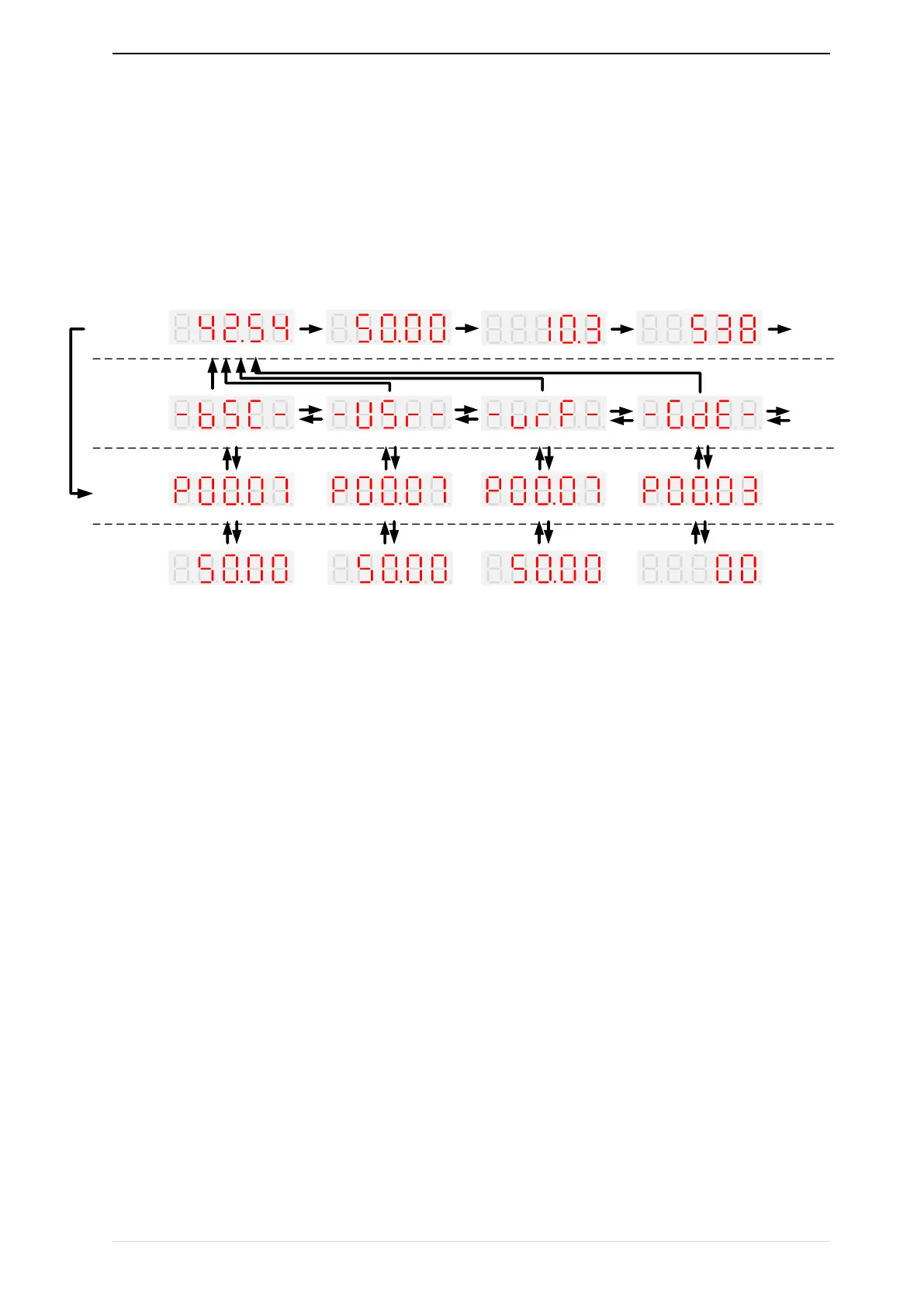
IR610 digital keyboard display is divided into four layers, from top to bottom are: monitoring status, menu mode
selection status, function code selection status, parameter editing / viewing status, as shown in Figure 4-2. In the
menu mode selection status, press 【UP】 or 【DOWN】 key to select menu mode, press 【ENTER】 to enter the
selected menu mode, the following describes several menu modes:
Wizard modeCheck mode
Standard mode
User-difined mode
ENTERESC
ENTERESC
UP
DOWN
UP
DOWN
UP
DOWN
-bSC-
UP
DOWN
SHIF
T
SHIF
T
SHIF
T
SHIF
T
Monitoring volume1 Monitoring volume2
Monitoring volume3
Monitoring volume4
Monitoring
volume1
ESC
MONITOR
STATUS
MENU
CHOOSE
STATE
COMMAND
CODE
PARAMETER
EDIT/VIEW
STATUS
ESC
ENTERESC ENTERESC
ENTERESC
ENTERESC ENTERESC ENTERESC
【UP、DOWN、SHIFT】 【UP、DOWN】 【UP、DOWN】 【UP、DOWN】
【UP、DOWN、SHIFT】 【UP、DOWN、SHIFT】 【UP、DOWN、SHIFT】 【UP、DOWN、SHIFT】
4-2Keyboard operation diagram
Standard mode(-bSC-)
If visiting access (P00.01) is standard, all the function codes mentioned in this manual are accessible.
If visiting access (P00.01) is the end user (in the state of user password lock), then only some function code can be
accessed.
User-difined mode(-USr-)
In this menu mode, only 20 user-defined parameters defined are displayed.
Verify mode(-vrF-)
In this menu mode, only parameters that differ from the factory settings are displayed。
Guide mode(-GdE-)
When users first use the inverter, can guide the user to complete a simple trial run。
4.3 Digital tube display
Display of decimal data
16 digits:
The range of unsigned numbers is 0 ~ 65535 (without decimal point). The displayed range of signed numbers
is -9999 ~ 32767 (excluding decimal point). The negative numbers less than -9999 will be displayed as -9999.


 To Next Page