9. Click [Back] to come back and click [Set Z=0] to set the height of the current
build plate to zero. Then click [Manual] to lift the build plate upper.
Note: It must to level fo first using, changing new build plate and new screen.
It have to level again when print abnormal. For example, printed model cannot
stick to build plate.
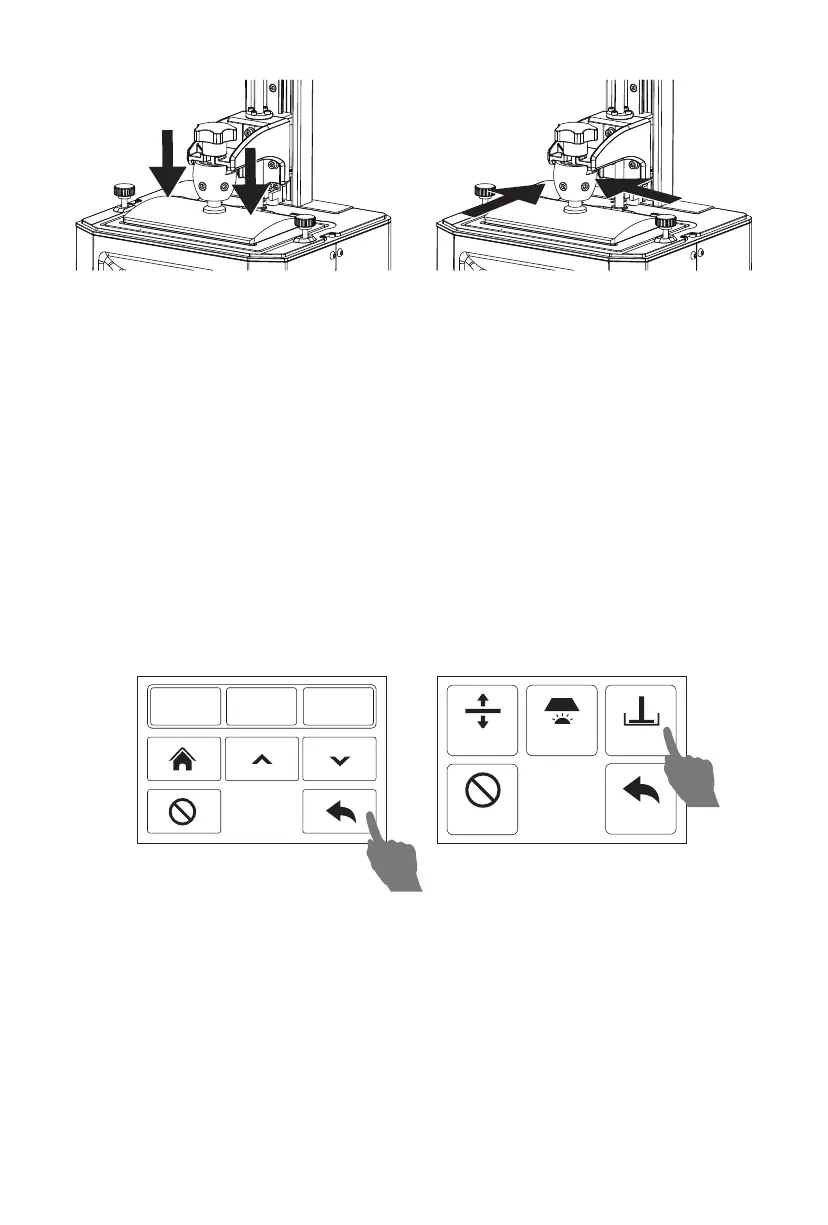
8. If twitch a piece of A4 paper and feel the large resistance.Press the top of the
build plate with one hand to let four corners of build plate to touch the LCD screen
evenly. And just tighten the screws in the front and right side of cradle head first.
Then tighten again.
If twitch a piece of A4 paper and don’t feel the large resistance, click [0.1mm] in
the touched screen and twitch paper and feel the resistance again. Repeat it,
until feel the large resistance from paper. Then tighten all screws.
Press
Tighten the screws
Manual
Stop
Exposure Set Z=0
Back
0.1mm 1mm 10mm
Note:Because of change in tightness by tighten screws on the build plate, it
have to adjust the height of Z-axis. If twitch a piece of A4 paper and feel little
resistance or no resistance, click [0.1mm] and the height of Z-axis decline
0.1mm; If twitch a piece of A4 paper and feel large resistance, click [0.1mm] and
height of Z-axis rise 0.1mm. Over and over. The perfect state is pulling out the
paper and you still feel some resistance.
9


 To Next Page