4
5
SB1.
0MD2
OVERVIEW
WITH DVD PLAYER
9 8 10
11
12 2
~
SCREEN OFF
3 I 1
1
·J
~~~
6
2
[Dl
cS1
•••
•••
•••
WIFI
DUAL
SCREEN
DUAL
SCREEN
APPS
~
7
8
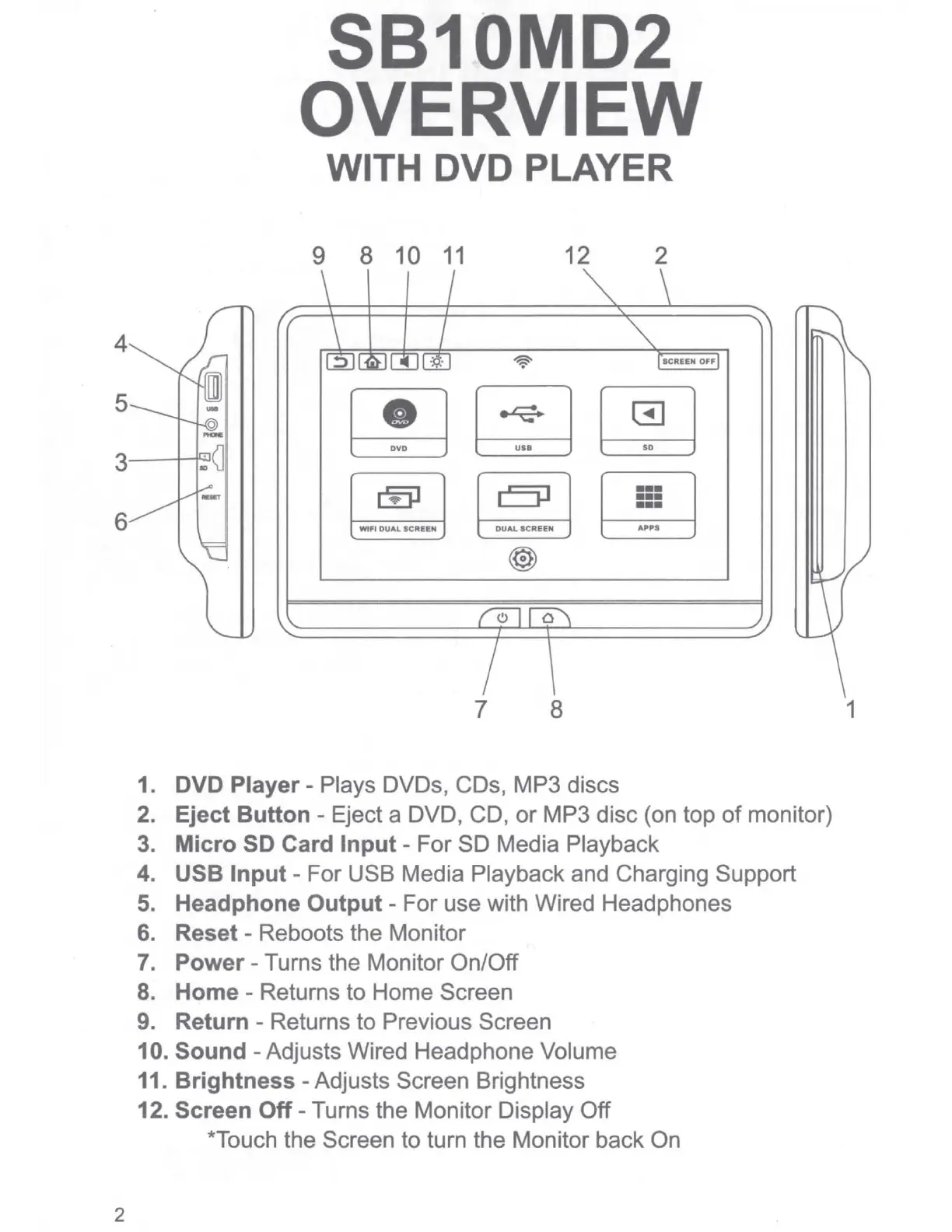
1. DVD Player - Plays DVDs, CDs, MP3 discs
2. Eject Button - Eject a DVD, CD,
or
MP3 disc (on top
of
monitor)
3. Micro SD Card Input - For SD Media Playback
4. USB Input - For USB Media Playback and Charging Support
5.
Headphone Output - For use with Wired Headphones
6. Reset - Reboots the Monitor
7. Power - Turns the Monitor On/Off
8. Home - Returns to Home Screen
9. Return - Returns to Previous Screen
10. Sound - Adjusts Wired Headphone Volume
11. Brightness - Adjusts Screen Brightness
12. Screen Off - Turns the Monitor Display Off
*Touch the Screen to turn the Monitor back On
1


 To Next Page