5B10M2
OVERVIEW
WITHOUT DVD PLAYER
8 7 9
10
11
~
I
~CREEN
OFF
I
5
2
~~~
@-1 I
-4
'"''""'
I
c§l
B
•••
•
••
.
•••
WJi
I 3
wi,1
DUAL
SCREEN
DUAL
SCREEN
APPS
(@
@'
.
.,
1
r
c,
]r
a
--....._
- I / ~ ,
_l
6 7
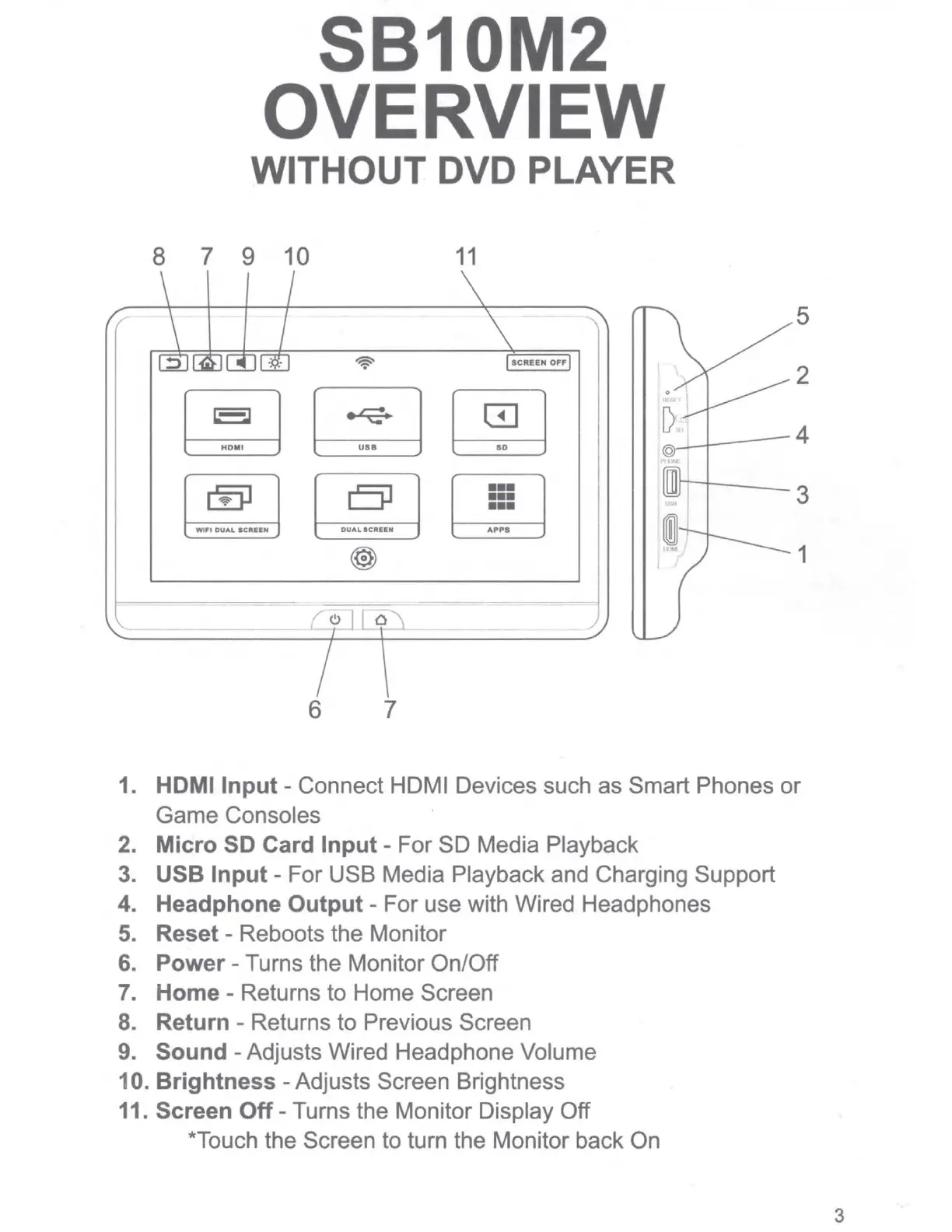
1. HDMI Input - Connect HDMI Devices such as Smart Phones
or
Game Consoles
2. Micro
SD
Card Input - For SD Media Playback
3.
USB Input - For USB Media Playback and Charging Support
4. Headphone Output - For use with Wired Headphones
5.
Reset - Reboots the Monitor
6.
Power - Turns the Monitor On/Off
7.
Home - Returns to Home Screen
8.
Return - Returns to Previous Screen
9.
Sound
-Adjusts
Wired Headphone Volume
10. Brightness - Adjusts Screen Brightness
11. Screen Off - Turns the Monitor Display Off
*Touch the Screen to turn the Monitor back On
3


 To Next Page