V
X
-
100 User Manual(v01
)
24
[Figure 3]
[Figure 3]
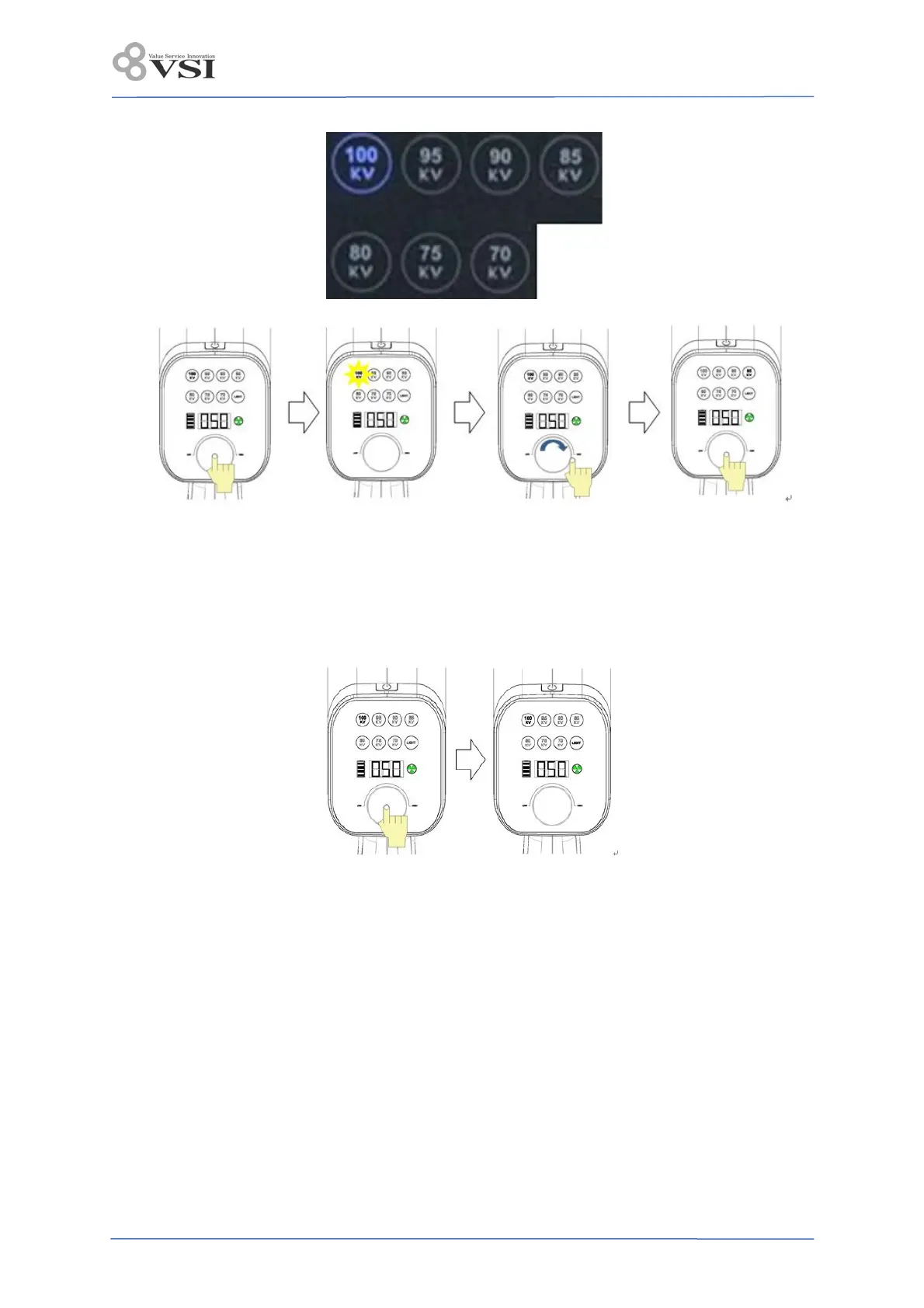
3) How to turn on/off the light field indicator
- Power is ON, and if you press JOG DIAL once, the field is turned on.
- “LIGHT” turns on the control panel. When 3 seconds elapse from the ON state, it will automatically
turn off.
- Press JOG DIAL once to turn off the light field indicator while the it is on.
4) After all the settings are completed, the device's target area is accurately positioned and the X-ray
film or detector is placed in the patient’s body part.
5) Set the location intended to exposure X-ray. The focal spot is aligned in the center of this beam
area. The plane of the intended location should be perpendicular to the cone. And the image receptor
is positioned in the patient’s body part.
6) When the X-ray exposure display is displayed in green after shooting preparation is completed,
pressing the X-ray exposure button irradiates the X-ray and the beep sounds once, and the
X-ray exposure display is displayed in yellow. At this time, do not let go of the X-ray exposure button.


 To Next Page