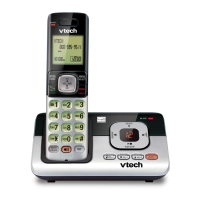
This document is a user manual for the VTech CS6114, CS6114-11, and CS6114-2 DECT 6.0 cordless telephones. It provides instructions on how to set up, use, and maintain the device, along with important safety information and technical specifications.
Function Description
The VTech CS6114 series are DECT 6.0 cordless telephones designed for home or office use. They allow users to make and receive calls, store contact information, and utilize various call management features. The system consists of a telephone base, a cordless handset, and a charger. The handsets communicate with the base unit via radio waves, offering mobility within a certain range.
Important Technical Specifications
- Frequency Control: Crystal controlled PLL synthesizer
- Transmit Frequency: 1921.536-1928.448 MHz
- Channels: 5
- Nominal Effective Range: Maximum power allowed by FCC and IC. Actual operating range may vary according to environmental conditions at the time of use.
- Power Requirements:
- Handset: 2.4V Ni-MH battery
- Telephone base: 6V DC @ 400mA
- Charger: 6V DC @ 400mA
- Memory:
- Directory: 30 memory locations; up to 30 digits and 15 characters
- Caller ID log: 30 memory locations; up to 24 digits and 15 characters
Usage Features
Handset Overview:
The handset features an earpiece, LCD display, microphone, and a keypad with various function keys.
- ▼CID/VOL-: Reviews caller ID log, scrolls down in menus, moves cursor left, decreases listening volume.
- ▲/VOL+: Reviews directory, scrolls up in menus, moves cursor right, increases listening volume.
- /FLASH: Makes/answers calls, answers call waiting.
- 1: Adds/removes '1' in front of caller ID log entries.
- **TONE*: ** Switches to tone dialing temporarily during a call.
- MUTE/DELETE: Mutes microphone, deletes displayed entries/digits/characters.
- MENU/SELECT: Shows menu, selects items, saves entries/settings.
- OFF/CANCEL: Hangs up, returns to previous menu/idle mode, deletes digits while predialing, silences ringer, erases missed call indicator.
- 0/OPER: Enters space character during text editing.
- #: Shows other dialing options when reviewing caller ID log.
- REDIAL/PAUSE: Reviews redial list, inserts dialing pause.
Telephone Operations:
- Making a Call: Press the TALK button, then dial the number.
- Predialing: Enter the number, then press TALK.
- Answering a Call: Press TALK or any dialing key.
- Ending a Call: Press OFF or place the handset in the base/charger.
- Volume Adjustment: During a call, press VOL- or VOL+.
- Mute Function: Press MUTE to mute the microphone; press again to resume.
- Call Waiting: Press FLASH to switch between calls (requires subscription).
- Chain Dialing: Access numbers from directory, caller ID log, or redial list during a call.
- Find Handset: Press /FIND HANDSET on the base to page all idle handsets.
Directory:
- Stores up to 30 entries (number up to 30 digits, name up to 15 characters).
- Entries are shared by all system handsets.
- Adding an Entry: Enter number, press MENU, then SELECT for Directory, then Add contact. Enter number and name, then SELECT to save.
- Reviewing an Entry: Press ▼ or ▲ to browse, or use dialing keys for alphabetical search.
- Editing an Entry: Search for entry, press SELECT, edit number, then name, then SELECT to save.
- Deleting an Entry: Search for entry, press DELETE, then SELECT to confirm.
Caller ID:
- Stores up to 30 entries (number up to 24 digits, name up to 15 characters).
- Entries appear in reverse chronological order and are shared by all system handsets.
- Reviewing Entries: Press CID, then ▼ or ▲ to browse.
- Memory Match: Displays stored name from directory if incoming number matches.
- Missed Call Indicator: Handset displays "XX missed calls" for unreviewed entries.
- Dialing Options: Press # repeatedly while reviewing caller ID log to view different dialing formats.
- Saving to Directory: Review entry, press SELECT, modify number/name, then SELECT to save.
- Deleting Entries: Review entry, press DELETE to delete.
- Deleting All Entries: Press MENU, SELECT for Caller ID log, then Del all calls, then SELECT to confirm.
Sound Settings:
- Key Tone: Turn on/off via MENU > Settings > Key tone.
- Ringer Tone: Choose from different tones via MENU > Ringers > Ringer tone.
- Ringer Volume: Adjust volume (or turn off) via MENU > Ringers > Volume.
- Temporary Ringer Silencing: Press CANCEL or MUTE when ringing.
Voicemail:
- Handset displays voicemail indicators (requires subscription).
- Retrieve by dialing access number provided by service provider.
- Turn off indicators via MENU > Settings > Clr voicemail.
Handset Registration:
- If deregistered, remove handset from base.
- Press and hold /FIND HANDSET on base for ~4 seconds until IN USE light turns on.
- Press # on handset. Handset displays "Registering...", then "Registered" with a beep.
Screen Messages:
Provides various status messages like "Call log empty," "Directory full," "Out of range," "New voicemail," "Low battery," "Muted," and "No line."
Maintenance Features
General Product Care:
- Avoid rough treatment and water exposure.
- Clean with a dry, non-abrasive cloth. Do not use damp cloths or cleaning solvents.
- Protect from extreme temperatures, direct sunlight, humidity, dust, and corrosive liquids.
- Ensure proper ventilation; do not block openings.
- Use only specified power adapters and batteries.
- Do not overload power outlets or extension cords.
- Unplug during electrical storms or if malfunctioning.
- Do not attempt to disassemble or repair the unit yourself.
Battery Care:
- Use only supplied Ni-MH battery.
- Charge for 16 hours initially.
- Keep handset in base/charger when not in use for optimal performance.
- Disconnect and remove battery if not used for a long time to prevent leakage.
- Dispose of batteries safely; do not burn or puncture.
- The RBRC® seal indicates VTech's participation in a battery recycling program.
Troubleshooting (Frequently Asked Questions):
The manual includes a comprehensive FAQ section addressing common issues such as:
- Telephone not working (no dial tone, cannot dial out).
- Caller ID not displaying.
- Interference during calls.
- Handset out of range.
- Battery not charging.
- Telephone not ringing.
- Handset beeping or not performing normally.
- Noise on the line or hearing other calls.
- LCD language accidentally set to Spanish or French.
Safety Instructions:
- Read and understand all instructions.
- Follow warnings and instructions marked on the product.
- Unplug from wall outlet before cleaning.
- Do not use near water.
- Do not place on unstable surfaces.
- Install in a protected location away from heat sources, direct sunlight, and moisture.
- Ensure proper ventilation.
- Use only specified power sources.
- Do not place objects on power cords.
- Do not insert objects into openings.
- Do not disassemble.
- Unplug if cord is damaged, liquid is spilled, exposed to moisture, or product is dropped.
- Avoid using during electrical storms.
- Do not use to report a gas leak near the leak.
- For pacemaker users: Keep wireless telephone at least six inches from the pacemaker, do not place directly over pacemaker, and use at the ear opposite the pacemaker.
FCC, ACTA, and IC Regulations:
The device complies with FCC Part 15 and Industry Canada RSS standards, ensuring it does not cause harmful interference and accepts interference. It also meets Part 68 and ACTA technical requirements for connection to the telephone network. The Ringer Equivalence Number (REN) is provided.
California Energy Commission Battery Charging Testing Instructions:
Provides specific steps to activate and deactivate a CEC battery charging testing mode for compliance testing.

 Need help?
 General

 To Next Page