16 17
Turn off the new voicemail
indicators
If you have retrieved your voicemail while
away from home, and the handset still
displays the new voicemail indicators, use
this feature to turn off the indicators.
• This feature turns off the indicators only, it
does not delete your voicemail messages.
1. Press MENU when the phone is not in
use.
2. Press q or p to choose Settings and
then press SELECT.
3. Press q or p to choose Clr voicemail
and then press SELECT.
4. The screen displays Reset VM Icon?.
Press SELECT to confirm. You hear a
confirmation tone.
Register a handset
When your handset is deregistered from
the telephone base, follow the steps
below to register it back to the telephone
base.
1. Remove the handset from the
telephone base.
2. Press and hold /FIND HANDSET at
the telephone base for about four
seconds until the IN USE light turns on.
3. Then press # on the handset. It
displays Registering...
The handset show Registered and you
hear a beep when the registration process
completes. The registration process takes
Not
available
One handset is already
reviewing the caller ID
log and the other handset
tries to review it.
Number
repeated
The telephone number
you enter is already
stored in the directory.
Out of
range or
no pwr at
base
The handset cannot
communicate with the
telephone base. Check
the telephone base
power connection or
move the handset closer
to the telephone base.
Phone
X:XX:XX
The handset is on a call.
PRIVATE
NAME
The caller is blocking the
name information.
PRIVATE
NUMBER
The caller is blocking
the telephone number
information.
about 60 seconds to complete.
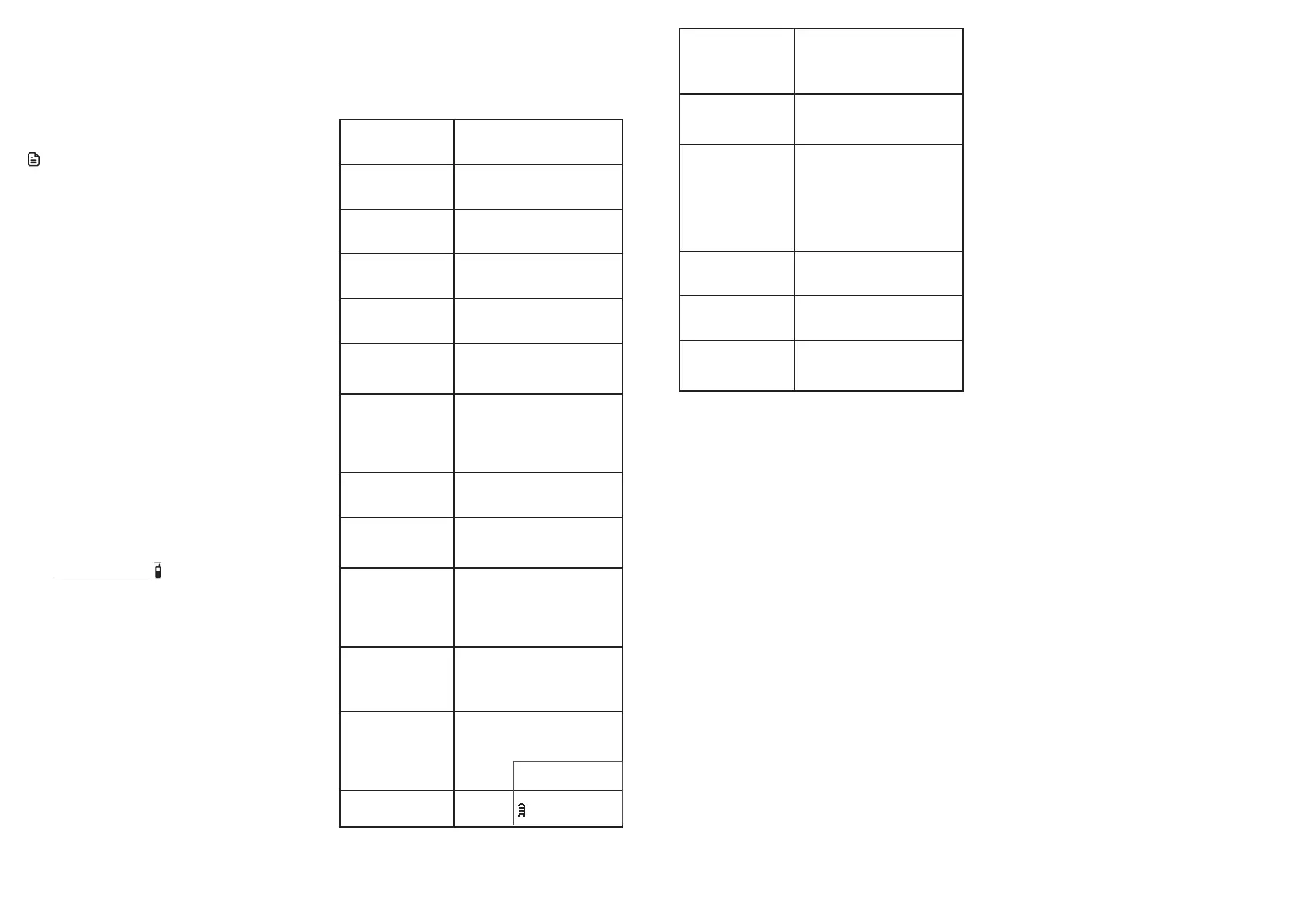
Screen messages
Call log
empty
There are no caller ID log
entries.
Directory
empty
There are no directory
entries.
Directory
full
The directory is full.
Ended
X:XX:XX
You have just ended a
call.
Incoming
call
There is an incoming call.
Line in
use
A system handset is in use,
or another telephone on
the same line is in use.
LONG
DISTANCE
or L (before the
caller’s number)
It is a long distance call.
Low
battery
The battery needs to be
recharged.
Microphone
on
MUTE is turned off and
the person on the other
end can hear you.
Muted
You have turned off the
handset microphone. The
other party cannot hear
you but you can hear the
other party.
New
voicemail
There are new voicemail
message(s) from the
telephone service
provider.
No battery
No battery is installed.
Follow the directions
for battery installation
on page 4 to install the
battery before charging.
No line
There is no telephone line
connected.
Clr voicemail
p
q



 To Next Page