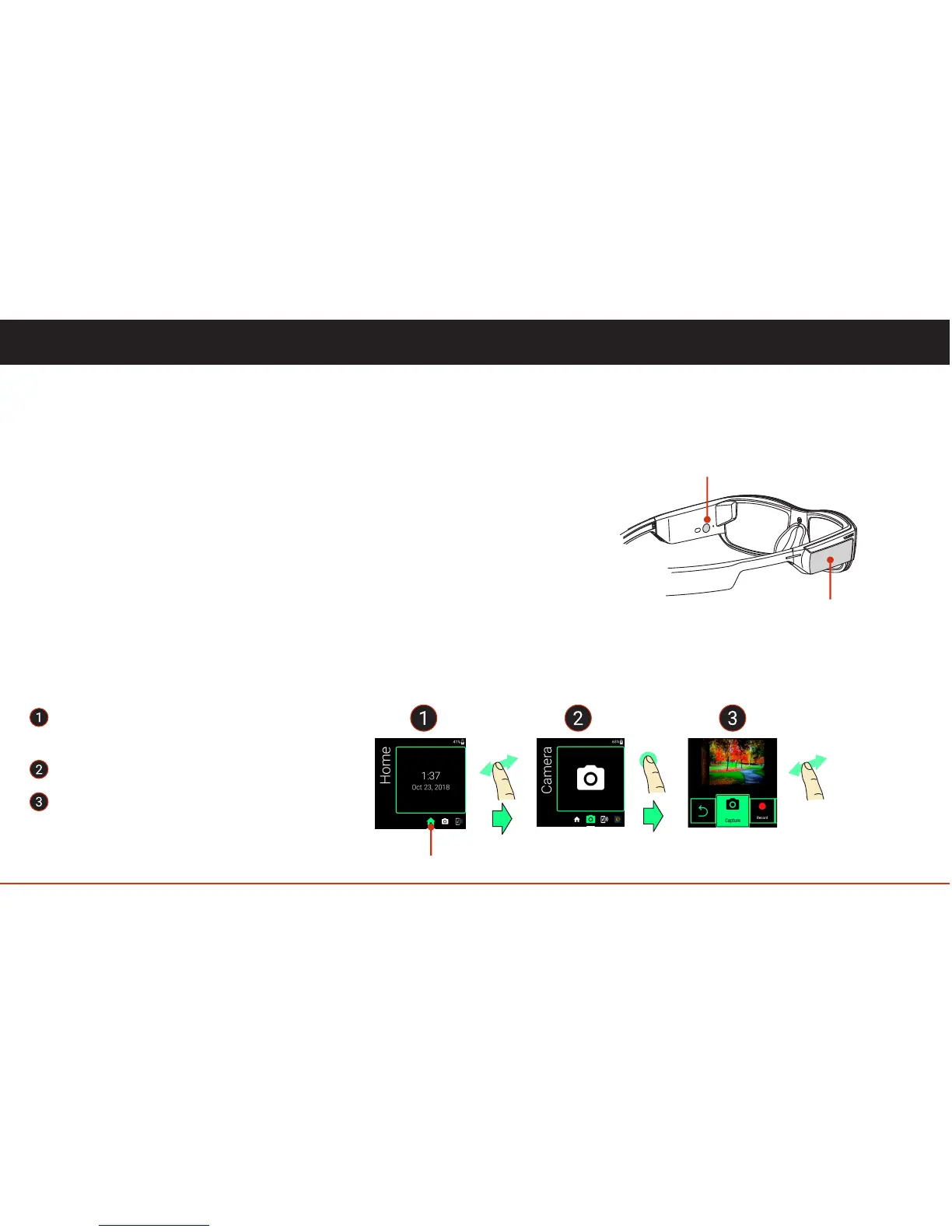
Tap to select the “in focus” app.
Swipe forward or backward to
navigate through the App List.
• display ON/OFF, press and release the power button.
• power ON/OFF, with display on, hold power button for 3 Seconds to get the menu.
• reboot, with display on, hold power button for 3 Seconds to get the menu.
• airplane mode ON/OFF, with display on, hold power button for 3 Seconds to get the menu.
• hard shutdown*, hold power button for 7-8 Seconds for a hard shutdown.
* This may lose or corrupt data, and is not recommended unless the device becomes unresponsive.
There are only two physical interfaces on the device, the power button and the touchpad (see illustration on page 4).
Power Button
The power button has multiple functions including:
Touchpad
The touchpad is the primary means to interact with the Blade. Taps and swipes are the basic gestures.
Navigation Basics
Swipe to navigate to actions or return
to the App List.
06
User Controls
App List (see page 10)
Touchpad
Power Button
tap
swipe swipe



 To Next Page