A hard shutdown initiates
a fresh restart. This may
lose or corrupt data, and
is not recommended
unless the device
becomes unresponsive.
Hard Shutdown
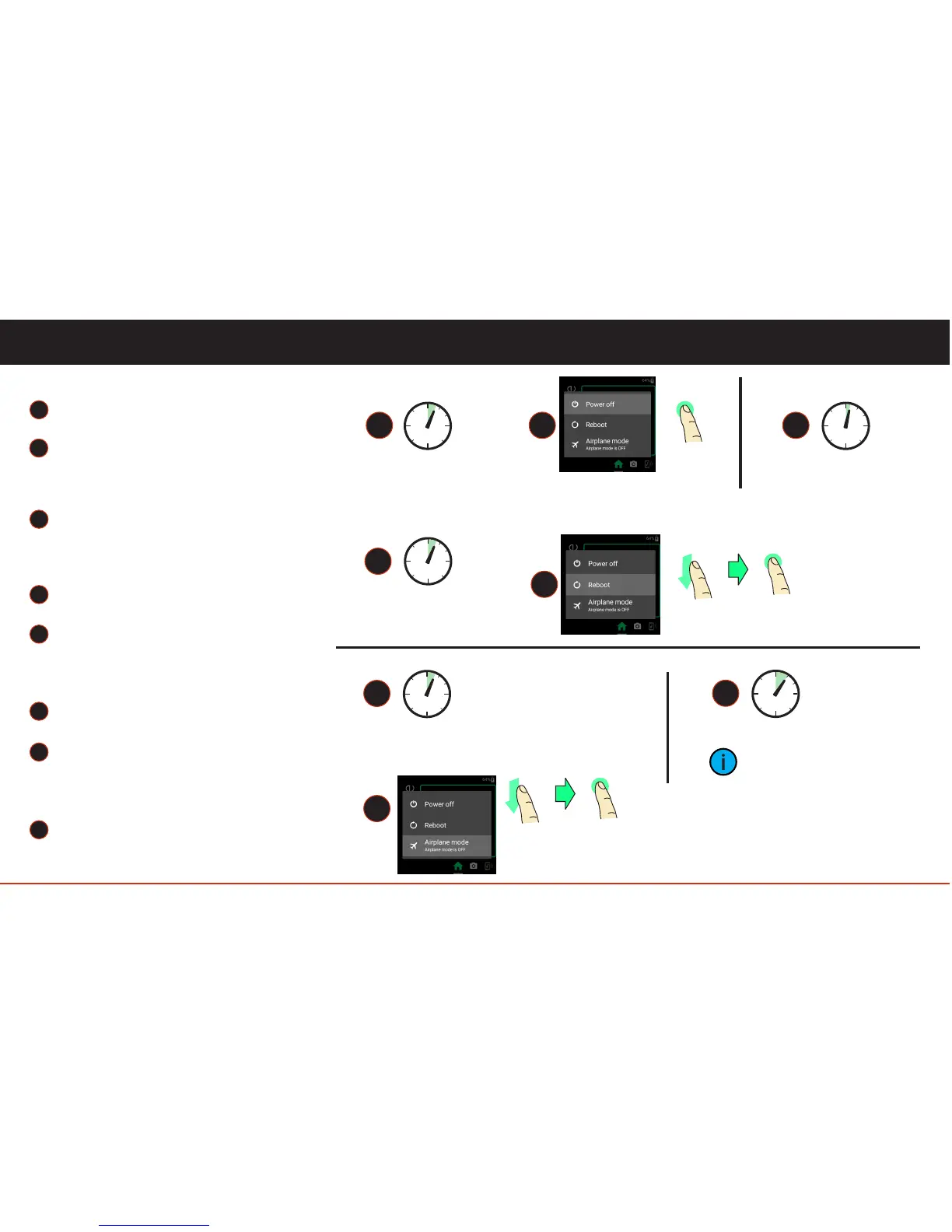
Press and hold the power button for
seven seconds.
Press and hold the power button for
three seconds.
Turning Airplane Mode ON/OFF
7
Select Airplane mode from the menu.
09
6
8
User Controls
6
3 sec.
8
7 sec.
hard shutdown
7
swipe
tap
Press and hold the power button for
three seconds.
Select Reboot from the menu.
Turning Blade Off
Toggle Display On/Off
Press and release (one second).
Rebooting Blade
Press and hold the power button for
three seconds.
Select Power Off from the menu.
4
1
3
5
2
5
1
3 sec.
power ON/OFF
2 3
1 sec.
display ON/OFF
3 sec.
Blade on/off
Reboot
tap
swipe
tap
4



 To Next Page