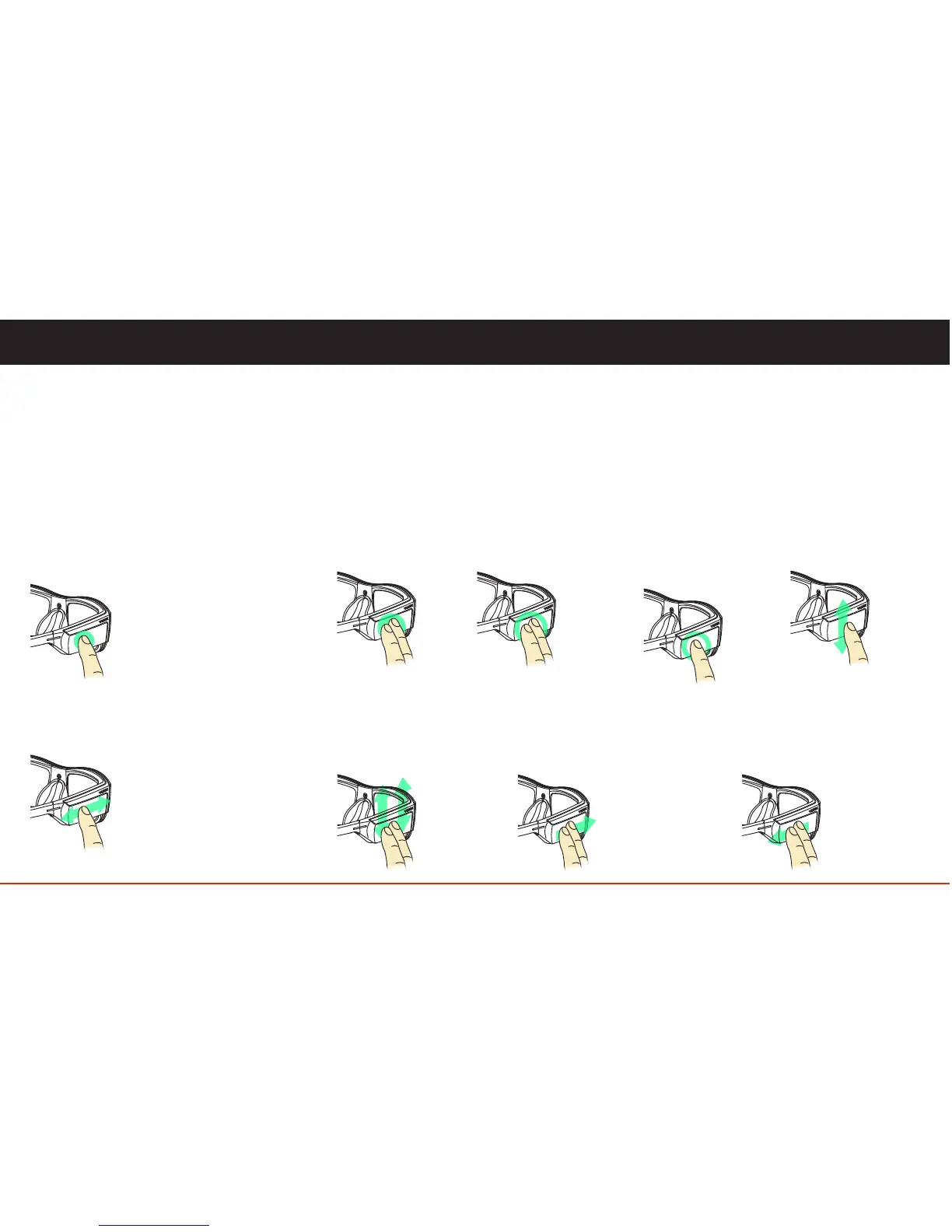
One Finger Swipe Forward and Backward
• navigate features, lists and App List
• scrub video
• navigate keyboard
One-Finger Tap
• turn on display and wake up
(if in sleep mode)
• select an item (app, action or feature)
• display action list (if in full screen mode)
Basic Gestures
These two simple gestures will quickly
get you started using your Blade.
07
Two-Finger Swipe Forward
• delete action
• clear current notification
• delete photo or video
• add space (keyboard)
Two-Finger Swipe
Backward
• backspace (keyboard)
• available gesture
definable within app
Two-Finger Swipe
Up / Down
• increase or
decrease volume
• navigate to recovery
options
Two-Finger Hold
One second
• return to home
Two-Finger Tap
• move backward
• close action bar
One-Finger Hold
One second
• open menu
• displays options
for keyboard
characters
One-Finger Swipe
Up / Down
• navigate vertical lists
Two finger gestures combined with the
basic gestures are all you need to
navigate the device.
Advanced Gestures
User Controls



 To Next Page