Name a Sample
1. Select the line you want to rename.
2. Double-click Sample Name, input the sample’s name, and press Enter on the keyboard to confirm.
Save a Testing
Click the icon in Tools Bar, input the file name and click Save to confirm in the dialog box.
Open a Testing
Click the icon in Tools Bar, choose the file name you need in the dialog box, then click Open to confirm.
Print Test Report
Click the icon in Tools Bar, then set Print Parameters in the dialog box, press Print to confirm.
Export Data to Excel (the Microsoft Excel should be installed)
Click Main Menu→File→Export to Microsoft Excel, Excel will be started up, and data will be stored in it.
Export Curve as bmp Picture
Click Main Menu→File→Export Bitmap, input the file name and click save to confirm the dialogue box.
Switch Display Mode
Click the icon or in the Tools Bar to switch the display mode (Abs. or Transmit).
Zoom Selected Area
Click the icon in Tools Bar, choose the area you want to magnify, then you’ll see the magnified one, the
Mouse’s cursor turns into the form of “+”. Click the icon again to cancel the current status.
Modify Scale
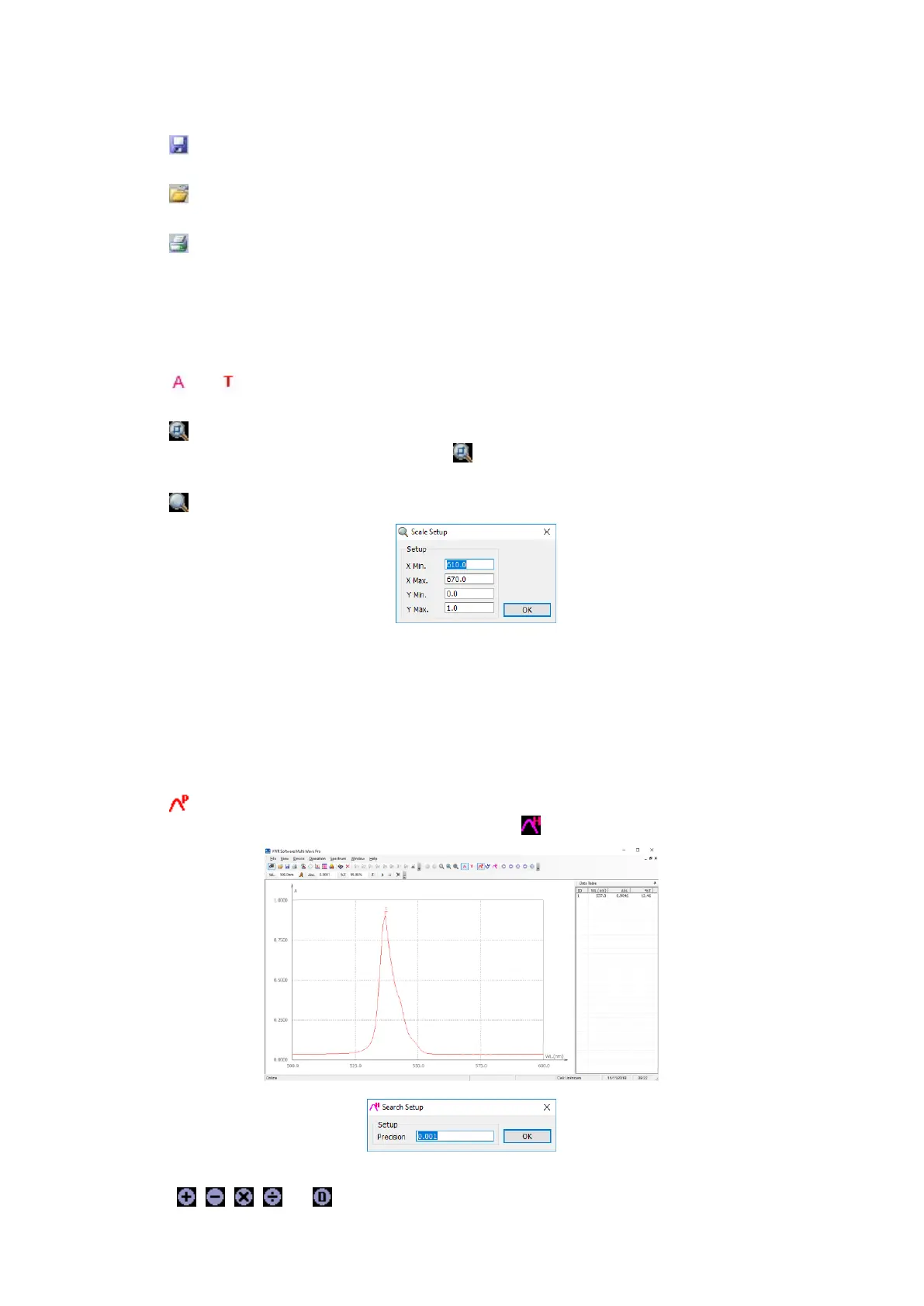
Click the icon on Tools Bar to display coordinate as you like.
Auto Fitting
Click the icon on Tools Bar to change the scale to appropriate value.
Select as Current Curve
Click Main Menu→Curve Operate→Choose the curve as you like.
Change the Color of Current Spectrum
Click Main Menu→Curve Operate→Choose the color as you like.
Search Peaks
Click the icon in Tools Bar to search the peaks, they labeled automatically on the curve, and the peaks will be
listed in the Right Frame. You can set the Peak height by clicking icon.
Mathematics Function
Click the icons or in the Tools Bar, a new dialog box will display on the screen respectively.
You can add, subtract, multiply or divide two spectrums.


 To Next Page