5 CP 2M error messages
Under specific conditions, the following error messages may be shown on the
analyzer’s display during operation of the CP 2M.
Possible problems, their causes, and recommended remedial actions are listed in table 4.
Table 4
Description of the problem
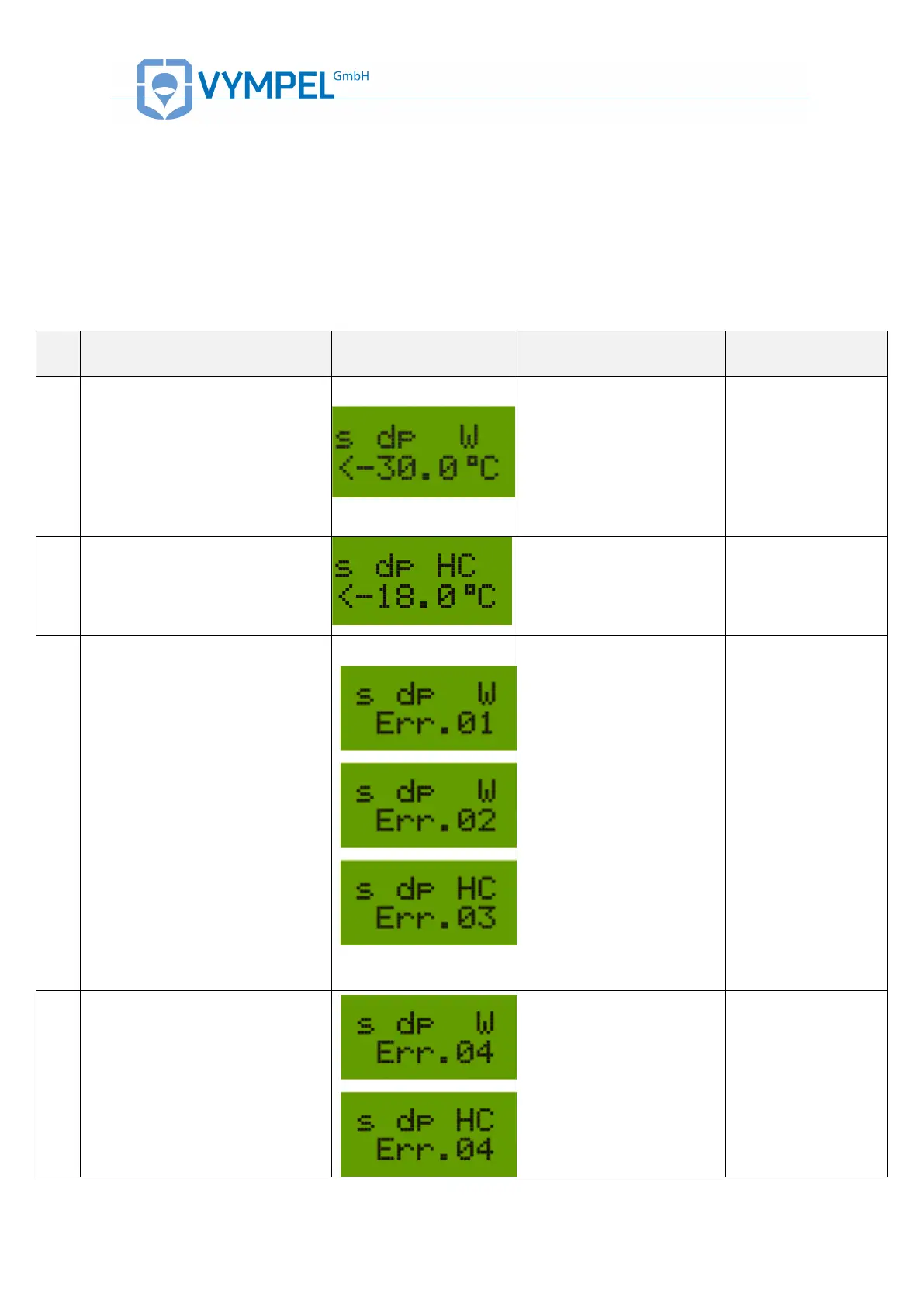
During dpW and/or dpHC
measurement a dew point value
of –30 °C is shown preceded by
the “<” symbol.
The dew point value
measured is outside the
analyzer’s measurement
range.
Check the value
using a reference
hygrometer.
During dpHC measurement a “W”
symbol is displayed preceded by
the “>” symbol.
Water condensation was
registered prior to the
detection of hydrocarbon
condensation.
Measure the dpW of
the present sample
gas using a
reference
hygrometer.
a) defective laser or the
laser is not activated
The photo signal is below the
preset level:
Err 01 – Direct channel
Err 02 – Back channel
Err 03 – Interference channel
Err 12 – Direct and back channel
b) defective photo sensor
(n)
1) Visually check to
confirm that the
laser diode is
activated. This
requires that the CP
2M be unmounted
from the gas
sampling element;
2) Check the data
signal value in the
Clean mode». If the
laser diode is
inactive or the signal
is less than 50
conventional units,
the CP 2M must be
returned to the
factory for servicing
Periodically (every few seconds)
the message Err 04 appears on
the display in place of the
measurement value
a) The outside temperature
value is outside of the
acceptable range
b) Defective temperature
sensor
Check the
temperature of the
CP 2M’s housing in
«Clean Mode». The
housing temperature
should be within the
range +10 – +45 °С.


 To Next Page