71
Maintenance Instructions ADJUSTMENTS
ADJUSTMENTS
Transmission Control
IMPORTANT: The proper adjustment of the trans
mission control stops is essential for ecient op
eration and life of the transaxle. These stops are
properly ad justed at the factory and should only re
quire read justment if the transaxle or related
control linkage is removed or changed.
NOTE: It would not be unusual for a new machine,
after the initial 5 or 10 hours of operation, to begin to
not travel straight (this is due to the breakin of the
tran smissions). To ne tune tracking, refer to Step 5 -
Straight Tracking Adjustment in this section.
Step 1 - Steering Lever Position Adjustment
NOTE: For proper operation, the steering levers
should be adjusted to sit evenly using the following
procedure.
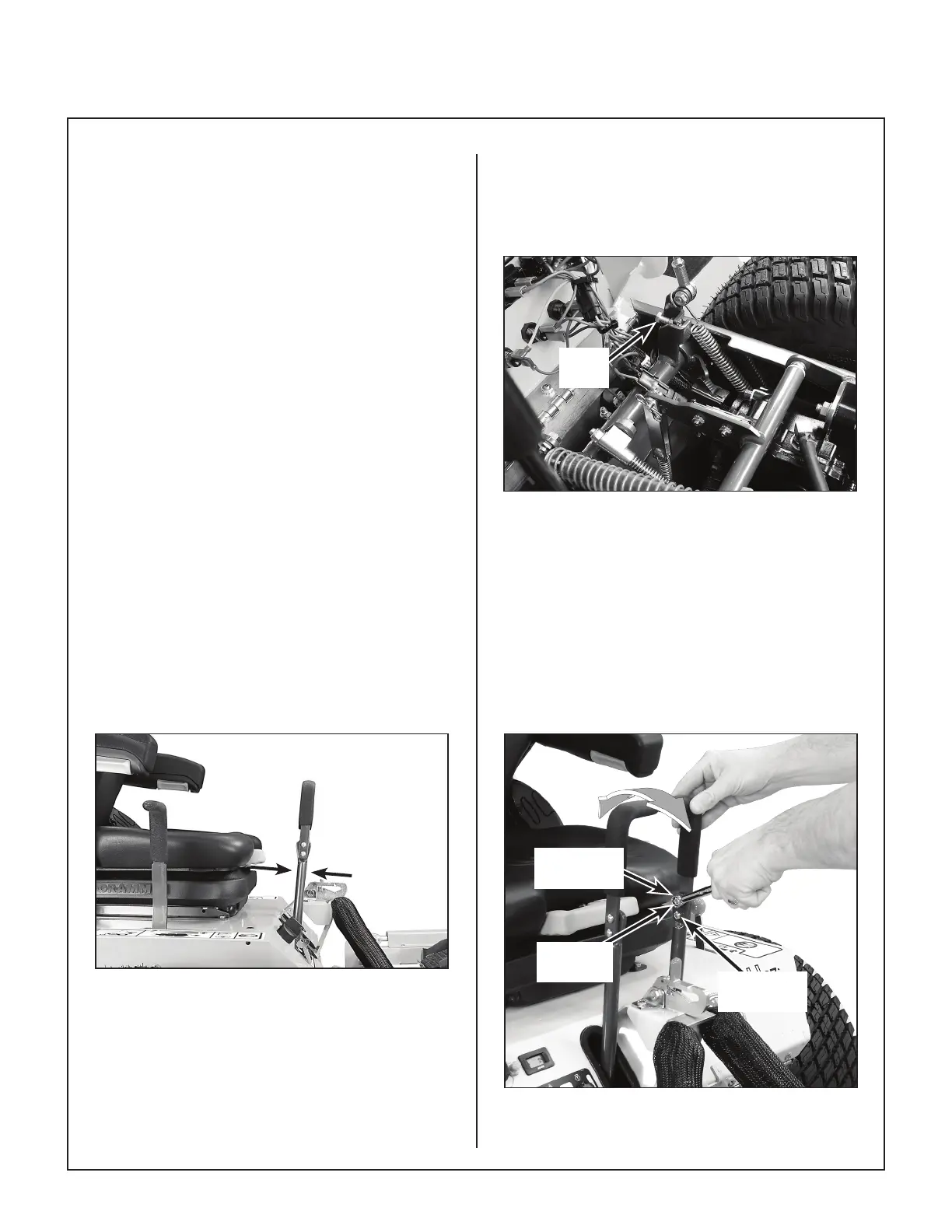
1. Examine the steering levers to make sure they
are parallel front to back in relation to one an
other. If they are not equal, adjust accordingly.
(The handles may or may not be even at this
point.)
NOTE: The LH steering lever is non-adjustable.
This procedure will require adjustment of the RH le
ver to make it even with the LH lever.
Levers should sit
parallel to each other
Lever Alignment
2. Adjust the position of the RH lever by turning the
stop bolt in the Speed Control Actuator in or out.
Turning the stop bolt in will make the RH lever
move back, and turning it out will make it move
forward. Tighten the locknut.
Stop
Bolt
Stop Bolt Location
Step 2 - Steering Handle Adjustment
An adjustment range of approximately 3 in. (76 mm)
is available on the steering handles–the handles can
be adjusted forward or aft depending on the arm
length of the operator. The handles can be adjusted
by loosening the locknut at the pivot point and the
locknut holding the handle in position in the adjust
ment slide. Adjust handles into most comfortable po
sition and tighten both locknuts.
Locknut
(Position)
Locknut
(Pivot Point)
Adjustment
Slide
Steering Handle Adjustment


 To Next Page