93
T27i Maintenance Instructions
Adjustments
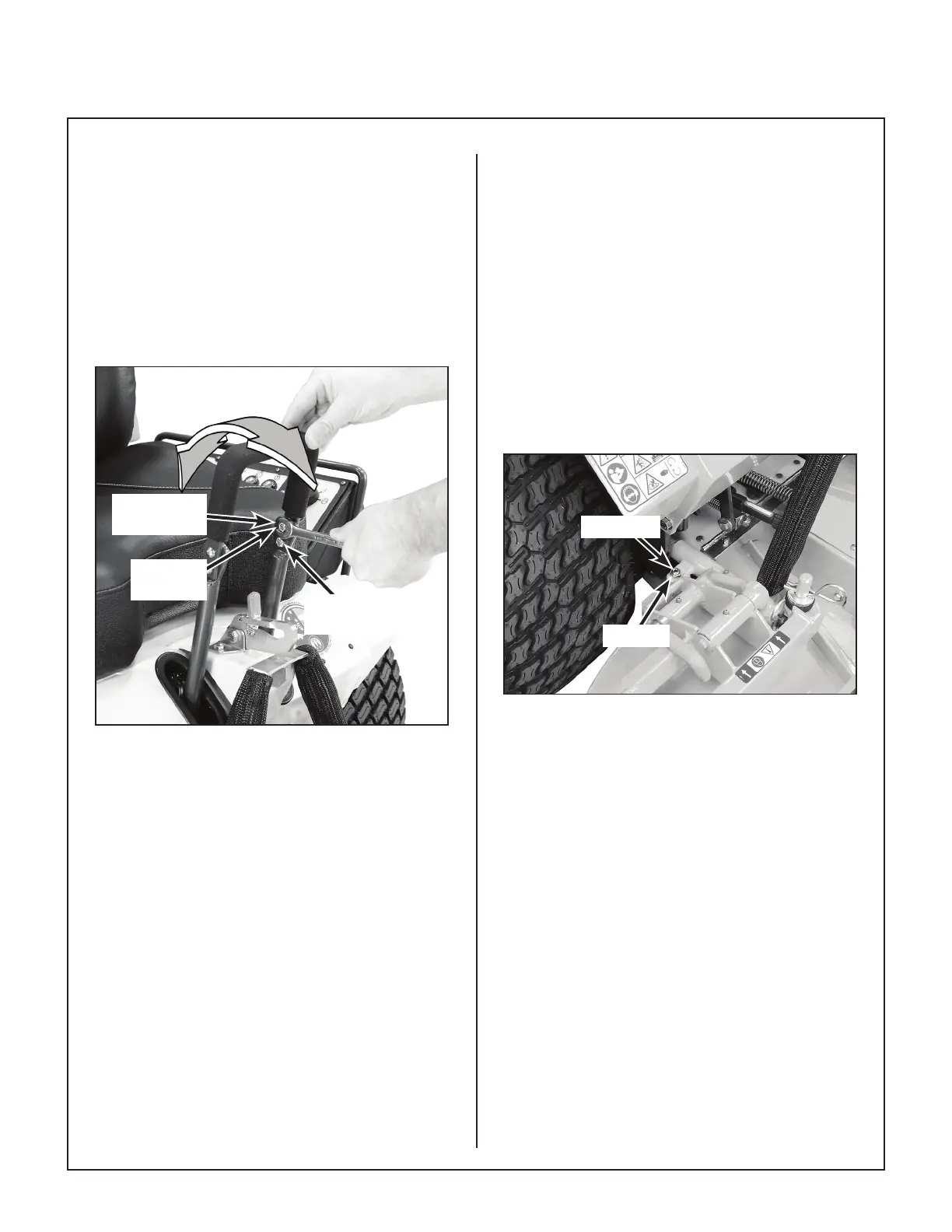
Steering Handles
An adjustment range of approximately 3 in. (76
mm) is available on the steering handles—the
handles can be adjusted forward or aft depending
on the arm length of the operator. The handles
can be adjusted by loosening the locknut at the
pivot point and the locknut holding the handle in
position in the adjustment slide. Adjust handles
into most comfortable position and tighten both
locknuts.
Locknut
(Pivot Point)
Locknut
(Position)
Adjustment
Slide
Steering Handle Adjustment
Tilt-Up Deck Adjustable Stop*
When the carrier frame hinge joint is properly
adjusted, the deck lock levers should move in and
out of the engaged and disengaged positions
freely. All four (4) hitch pins used for height adjust-
ment should sit ush on the washers above the
deck pin bushing. On a level surface, if any pin is
sticking up (likely the front pins), tighten the oppo-
site side or loosen the same side to lower the pin.
Adjustments are made by loosening the jam nut
and tightening or loosening the set screws on the
Deck Mount Pivot Brackets. Retighten the jam nut
when the adjustment is complete.
* Does not apply to DS60 Deck
Set Screw
Jam Nut
Tilt-Up Deck Adjustable Stop


 To Next Page