EN - V2.0 13
3.2 Master Configuration
* If the Master is a Copper, you need to have a myWallbox account and connect via Bluetooth
and the App with the charger (see Copper User Guide).
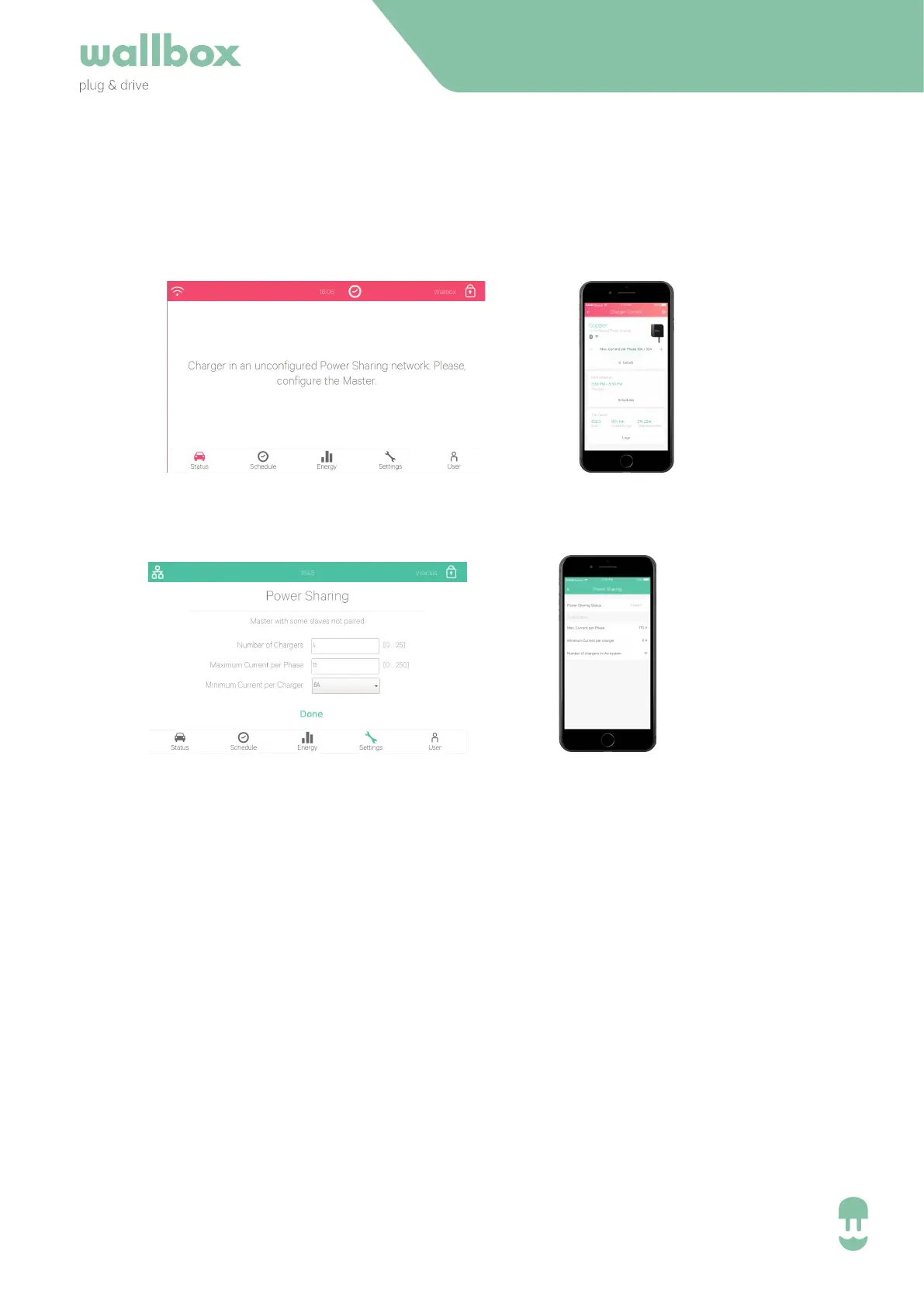
Once connected, select the settings->power sharing to configure the system.
In the Master 3 parameters need to be configured:
• Number of Chargers in the Power Sharing System (to assure that the master knows all
chargers connected).
• This number must include the master charging station
• Maximum Current per Phase
• This value determines the maximum that your installation can carry. Typically this
value can be drawn from the main MCB, that has been installed for this power
supply.
• Minimum Current per Charger (6 A or 10 A)
• While the standards define a minimum current of 6 A (default value), some cars
need to have a minimum current of 10 A.
Once the system has been powered on, the charger will visualise the state “unconfigured
master” by a red LED or the dashboard of the charger.
INSTALLATION GUIDE
If you move further to the settings of the Master, the power sharing system can be configured:
Commander
Pulsar / Copper
Commander
Pulsar / Copper


 To Next Page