EasyManua.ls Logo

Wallgate WDC200 - 8 Related Documentation

Wallgate WDC200
33 pages
Print Icon
To Next Page IconTo Next Page
To Previous Page IconTo Previous Page
Loading...
30
Product Manual WDC200 Electronic Control
Revision 18
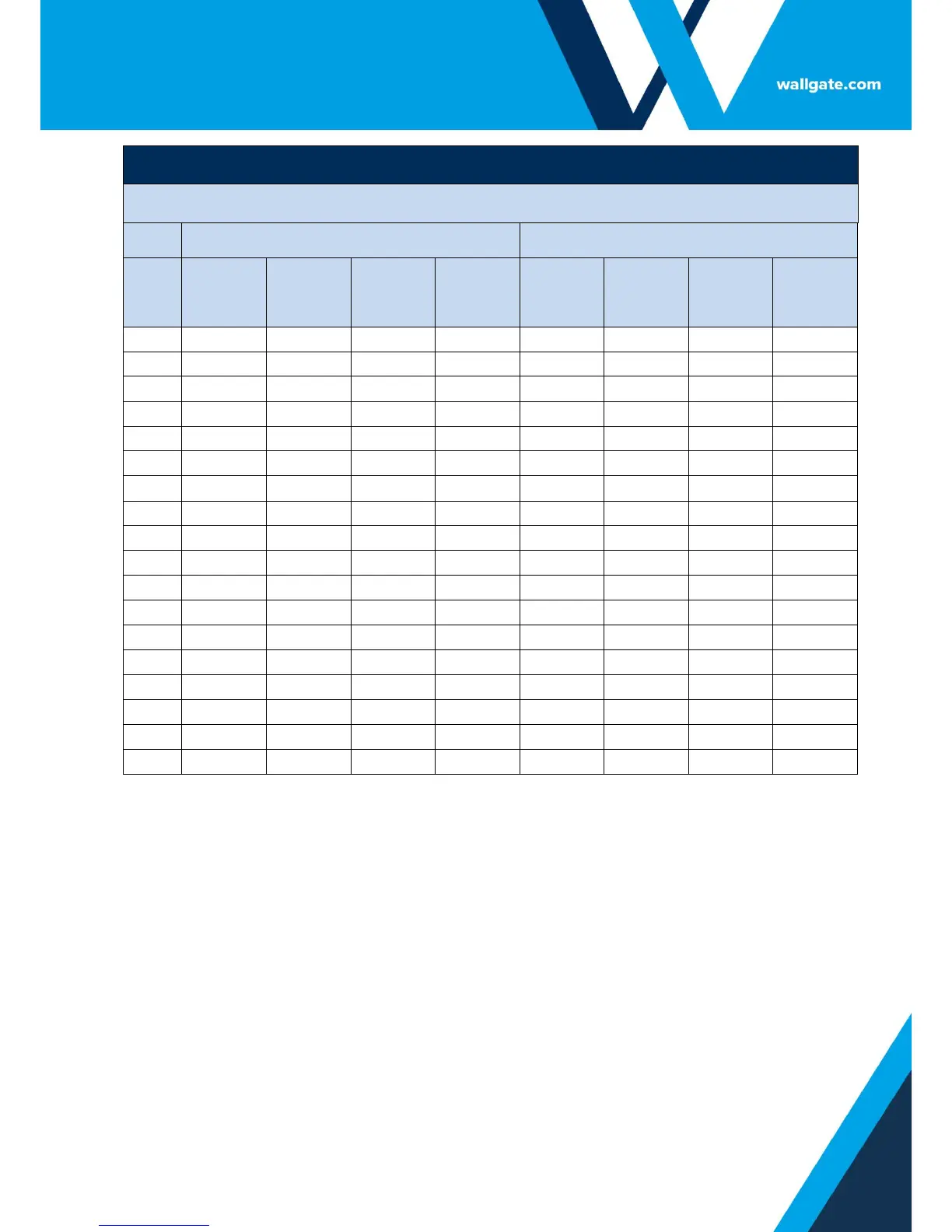
Main Menu Item: Auto-Run Cycle
Water Outlets
Room 1
Room 2
TIME
1 - WC
2 - SHWR
3
BASIN
(Cold)
4
BASIN
(Hot)
5 - WC
6 - SHWR
7
BASIN
(Cold)
8 - BASIN
(Hot)
21:00
N
N
N
N
N
N
N
N
21:30
N
N
N
N
N
N
N
N
22:00
N
N
N
N
N
N
N
N
22:30
N
N
N
N
N
N
N
N
23:00
N
N
N
N
N
N
N
N
23:30
N
N
N
N
N
N
N
N
00:00
N
N
N
N
N
N
N
N
00:30
N
N
N
N
N
N
N
N
01:00
N
N
N
N
N
N
N
N
01:30
N
N
N
N
N
N
N
N
02:00
N
N
N
N
N
N
N
N
02:30
N
N
N
N
N
N
N
N
03:00
N
N
N
N
N
N
N
N
03:30
N
N
N
N
N
N
N
N
04:00
N
N
N
N
N
N
N
N
04:30
N
N
N
N
N
N
N
N
05:00
N
N
N
N
N
N
N
N
05:30
N
N
N
N
N
N
N
N
The default setting for the auto-run function is N = OFF on all outlets for all time settings.
Changing the default to Y will set that outlet to switch ON at that time setting.
8. Related Documentation
Product Manual for WDCMS optional software for networking WDC units to a PC
or laptop.
Product Manual for Data Logging optional software for downloading hygiene
purge activation logs from the WDC control units and creating log reports.

Related product manuals