Product Manual WDC200 Electronic Control
5.4. Connect the Input and Output Cables
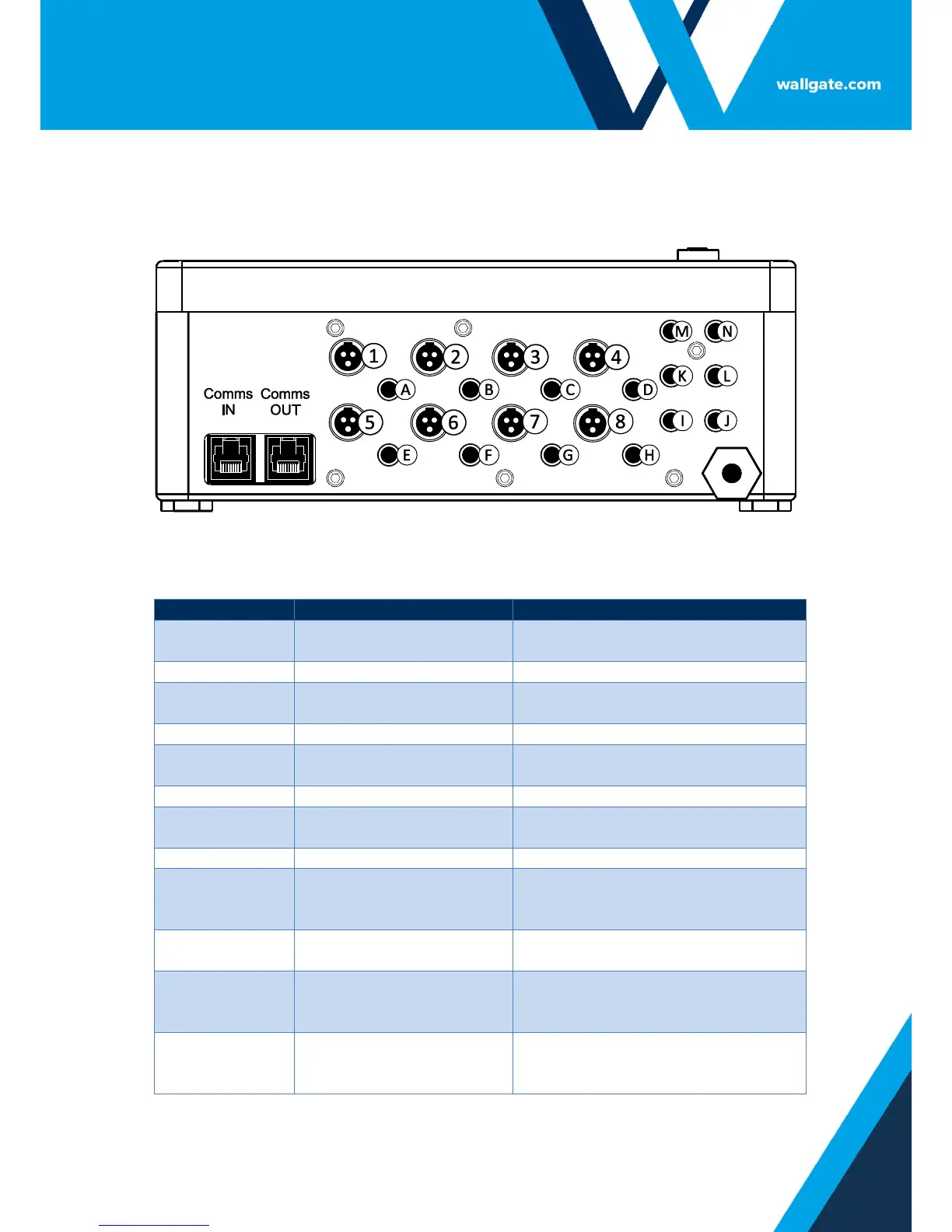
The control unit has input and output sockets in the lower panel of the unit. Refer to
Figure 2 for the illustration of the lower panel.
Figure 2. Connectors in the WDC200 control unit
Table 3. Legend for Figure 2
Opens WC Flush Valve in Room 1
Opens Shower Valve in Cell 1
Output to Basin Valve
Cold
Opens Basin Valve Cold in Room 1
Output to Basin Valve Hot
Opens Basin Valve Hot in Room 1
Opens WC Flush Valve in Room 2
Opens Shower Valve in Room 2
Output to Basin Valve
Cold
Opens Basin Valve Cold in Room 2
Output to Basin Valve Hot
Opens Basin Valve Hot in Room 2
Input from WC Flush
Piezo touch button /
sensor
User input (Piezo touch button or
IR sensor) for WC Flush Room 1
Input from Shower Piezo
touch button / sensor
User input (Piezo touch button or
IR sensor) for Shower Room 1
Input from Basin Cold
Piezo touch button /
sensor
User input (Piezo touch button or
IR sensor) for Basin Cold Room 1
Input from Basin Hot
Piezo touch button /
sensor
User input (Piezo touch button or
IR sensor) for Basin Hot Room 1


 To Next Page