6 Electrical Installation
Operating Manual WLVCM-BA-10
6.2.1.5 Interface W5 „Temperature Sensor“
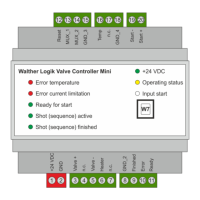
The clamps at interface W5 will be used for connecting a temperature sensor Type „PT100“. All Walther
Systemtechnik hotplates come with these temperature sensors by default. As already shown in figure
3, the temperature sensor will be connected at the “Temp“ and “GND_4“ clamps.
Constant current supply for PT100 sensor
Common reference potential for the WLVCM
Table 7 – Overview of clamps at the electrical interface W5
6.2.1.6 Interface W6 „Program Start“
Use the clamps at the W6 interface “Program Start“ for starting an application cycle with a previously
selected parameter set. For this purpose, a voltage of +24 VDC will be applied at the two potential-free
designed clamps „Start –„ and „Start +“. The application cycle will start directly when the signal changes
from LOW to HIGH. Depending on the selected triggering and the set operating mode (see chapter
8.4.8), the start signal can be reset to LOW after the actual signal change, or it has to stay on signal
level HIGH for the duration of the application process. In the latter case the duration of the application
process will be directly controlled via the HIGH signal level of the “Start“ signal. Please see chapter 8
for sample curves when operating the WLVCM through a superordinate control unit.
Potential-free digital inlet 0V
20 Start +
0 VDC
+24 VDC
Potential-free digital inlet
• 0 VDC signal level LOW
• +24 VDC signal level HIGH
Table 8 – Overview of clamps at the electrical interface W6
6.2.1.7 Interface W7 „USB“
Parametering the WLVCM will be made through the USB interface. Use it to connect the WLVCM to a
Windows-PC where you can run the configuration tool WLVCM. You will need a USB cable with a Type
B plug for connecting to the WLVCM.


 To Next Page