8 Start of Operation and Parametering
Operating Manual WLVCM-BA-10
8 Start of Operation and Parametering
8.1 Connecting to the Computer
When you have successfully installed the WLVCM and the configuration tool WLVCM, you can now
connect the WLVCM to your Windows PC via a suitable USB cable. Then start the configuration tool
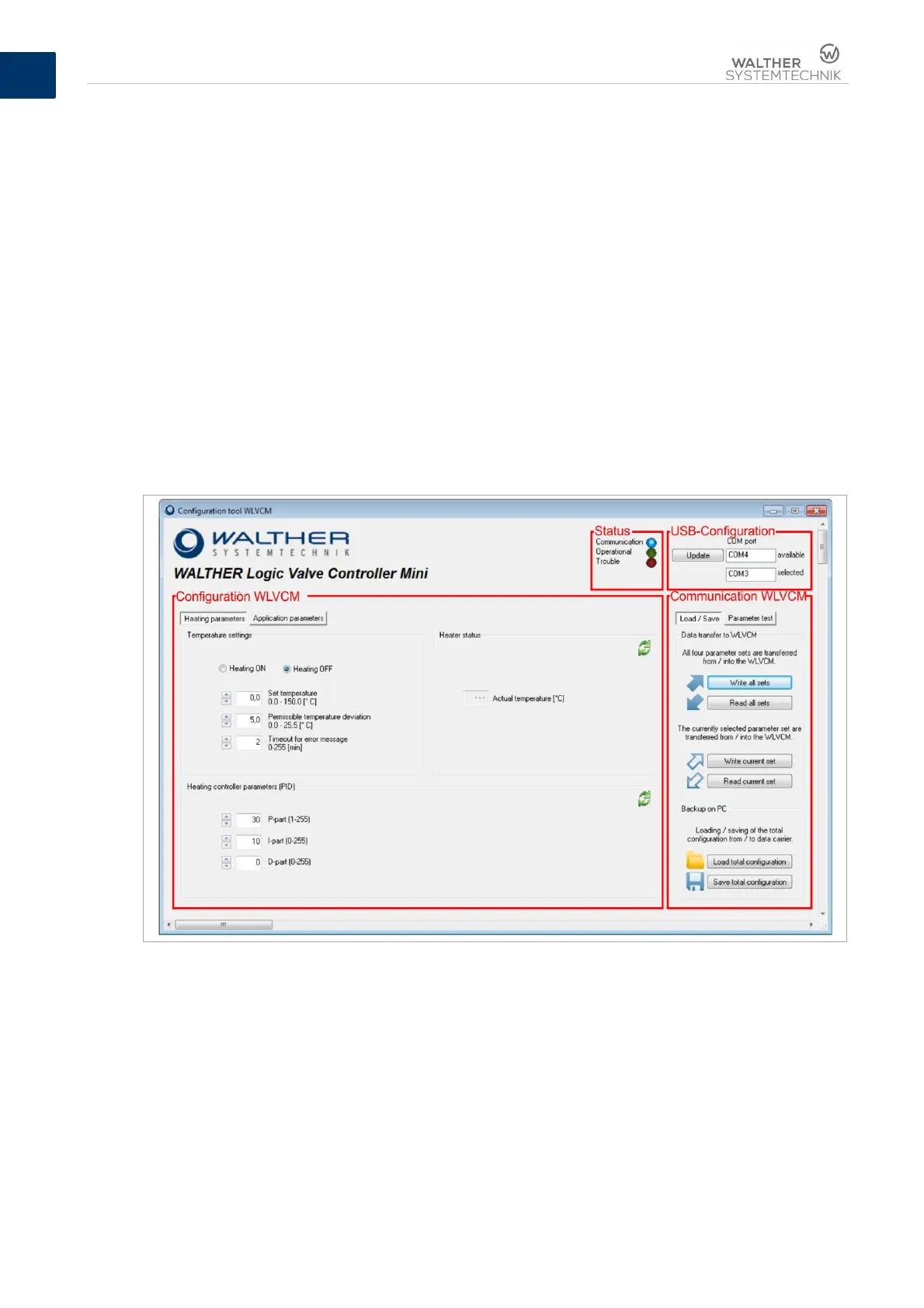
WLVCM. Figure 6 shows you the user surface which will appear next and which is explained in detail in
chapter 8.2.
8.2 Configuration Tool WLVCM – Overview
Figure 6 shows you the user surface which appears after the first start of the configuration tool WLVCM.
It can be divided into four areas:
1. Configuration WLVCM
2. Communication WLVCM
3. USB / LAN- configuration
4. Status
These four areas and the available setting options are explained in detail in chapters 8.3 to 8.6 below.
Figure 7 – The four areas of the configuration tool WLVCM
If you wish to operate the configuration tool WLVCM in a different language, the display of all operating
elements in a different language is also possible. Make a right-click on the upper window bar (see figure
7) and a context menu will open where you can select the menu item ‘language’. Use the following
window for the desired language setting for the WLVCM configuration tool.


 To Next Page