8 Start of Operation and Parametering
Operating Manual WLVCM-BA-10
If a connected WLVCM module is not recognized when the configuration tool WLVCM is started, an
error message will occur. In that case, please check if properly cabled and also the employed USB
cable.
Make sure that the USB cable has shielded lines and also four conductors which
connect the contacts (+5V, D+, D-, GND) at each cable end!
8.4 Configuration Tool WLVCM – Area Configuration WLVCM
The area “Configuration WLVCM“ (see also figure 6) can be divided into two sections: “heating
parameters“ and “application parameters“. There are two buttons assigned with these names with which
you can switch between the two areas. The chapters 8.4.1 to 8.4.9 below will describe in detail the
individual configuration options for the two areas.
8.4.1 Heating Parameters
Use the heating parameter button for setting all parameters for temperature control in connection with
a Walther Systemtechnik hotplate. Of course, a properly installed hotplate – as described in chapter 6
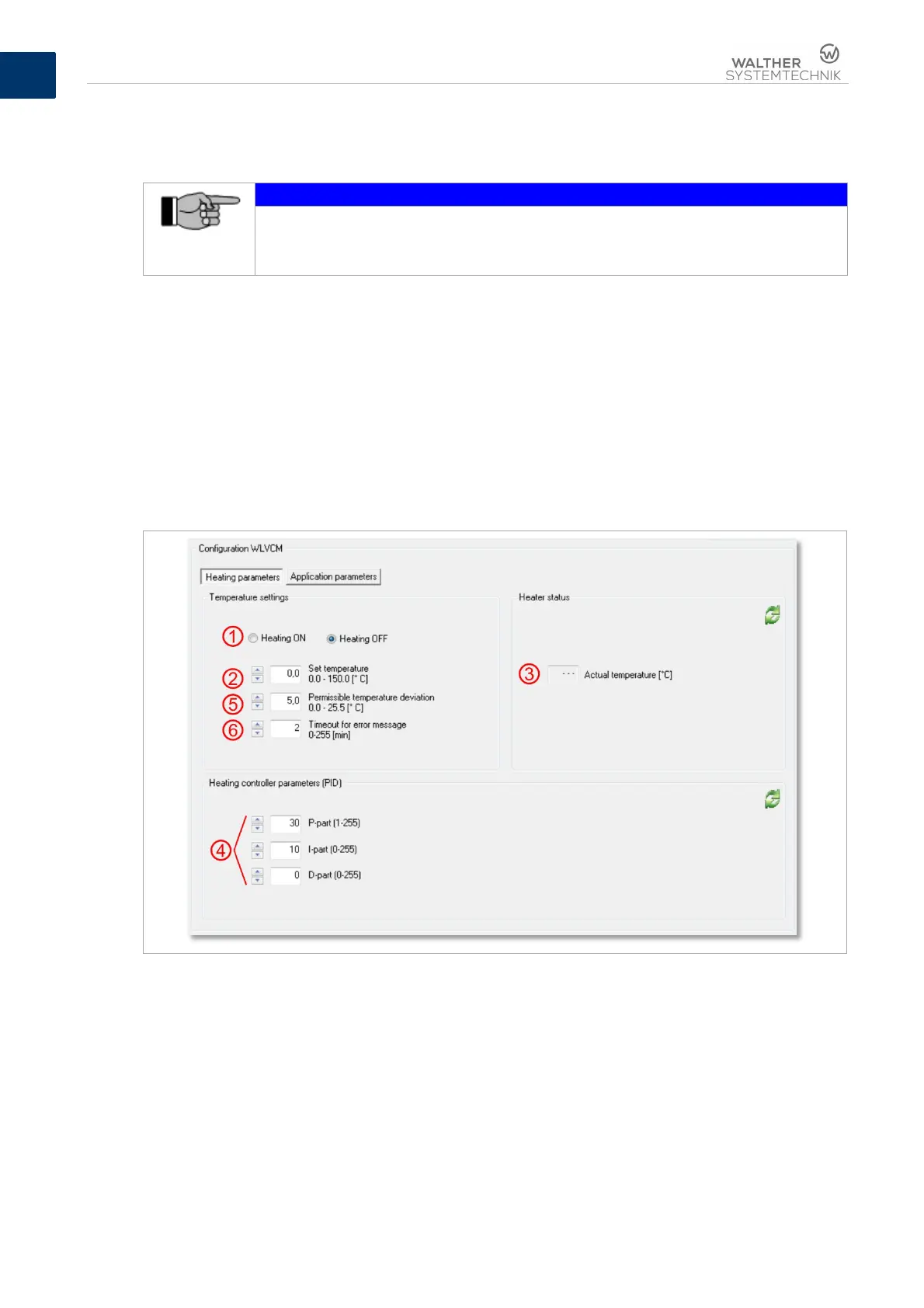
– is the prerequisite. Figure 9 provides an overview of the required settings for temperature control.
Figure 10 – Parameters for temperature control in connection with a hotplate, connected to the WLVCM
Field ➁ is used for setting the desired required temperature. For the required temperature a value
between 0°C to 150°C can be entered with one decimal point. However, the actual reachable maximum
temperature directly depends on the employed type of hotplate and can be gathered from the individual
data sheet.
After an activation of the heating function through button ➀, the WLVCM will try to reach the preset
required temperature. When you turn the heating ➀ off, this will also cut off the power supply to the
connected hotplate, and it will cool down to the existing room temperature.
When the heating is active, the field “actual temperature“ ➂ will continuously display the current actual
temperature of the hotplate in °C. The value of the actual temperature will be updated every 2 seconds.


 To Next Page