3ACQUITY UPLC and ACQUITY Premier Oligonucleotide BEH C
18
Columns
[ CARE AND USE MANUAL ]
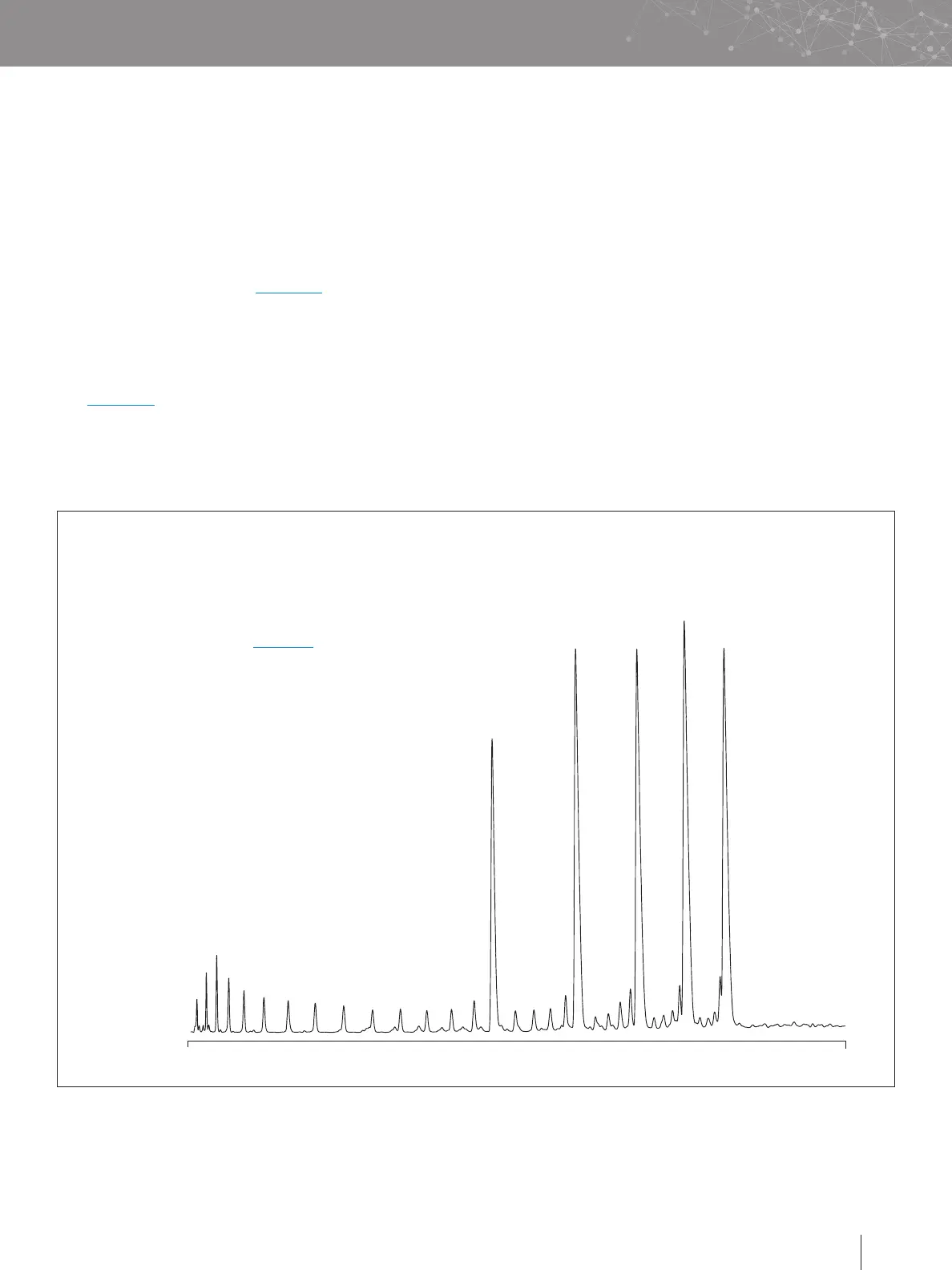
Figure 1. Separation using the MassPREP Oligonucleotide Standard on an ACQUITY UPLC Oligonucleotide BEH C
18
Column .
15
0 28
min
20
25
30
35
3. Repeat the test at predetermined intervals to track column
performance over time. Slight variations may be obtained
on two different UPLC Systems due to the quality of the
connections, operating environment, system electronics,
reagent quality, column condition, and operator technique.
ACQUITY UPLC and ACQUITY Premier Oligonucleotide BEH
C
18
Column performance can be tested with the MassPREP™
Oligonucleotide Standard (p/n: 186004135), a quality controlled
synthetic oligonucleotide sample consisting of 15, 20, 25, 30,
and 35 mer deoxythymidine. Approximately 0.1 nmol of each
oligonucleotide was injected onto the ACQUITY UPLC and
ACQUITY Premier Oligonucleotide BEH C
18
Column. Refer to
p/n: 715001677 for more information on sample prep for the
MassPREP Oligonucleotide Standard. Smaller peaks eluting
prior to the main peaks are failure, by-product sequences from
the synthesis.
Chromatographic Conditions
UPLC system: ACQUITY UPLC with installed 425 µL mixer (see
Section II, g), PDA Detector with standard UV cell
Sample injected: Approximately 0.1 nmol of MassPREP
Oligonucleotide Standard
(p/n: 186004135) diluted in 0.1 M TEAA
Column: ACQUITY UPLC Oligonucleotide BEH C
18
,
1.7 µm, 2.1 x 50 mm
Mobile phases: A: 0.1 M TEAA
B: Acetonitrile/0.1 M TEAA, 20/80, v/v
Flow rate: 0.2 mL/min
Gradient delay: 0.45 mL
Gradient: 40 to 59.5% B in 26 minutes
(8–11.9% acetonitrile,
0.15% acetonitrile per minute)
Detection: 260 nm, 5 scans per second
g. Column QR Code
The quick reference (QR) code that is located on the column
label provides column-specific information (i.e., the part and
serial numbers that are unique identifiers for the column), and
its encoding follows a widely adopted industry-standard.
1. Scan QR code using any device that is capable of
scanning QR codes (i.e., for smart phones and tablets,
use the built-in camera app).
2. Be directed to the column’s information hub
on waters.com.
3. Access technical and scientific information for the column
(i.e., certificate of analysis, application notes).












 To Next Page