5
BT-D03-MOI-FR-W-EN-06-19
ENGLISH ENGLISH
EN
EN
3. FIRST INSTALLATION
See quick installation guide for installation.
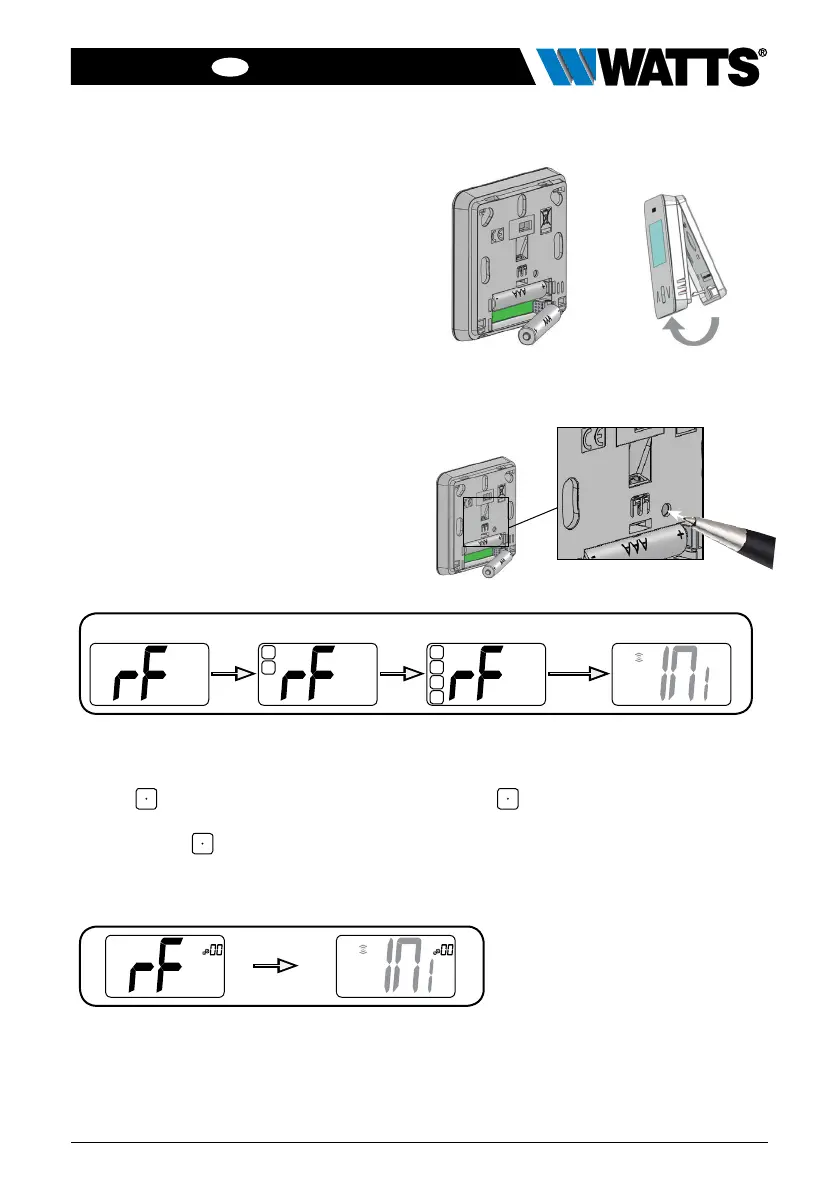
Batteries installation.
• Open the cover and insert the 2 AAA
supplied batteries.
• Close the cover.
Thermostat pairing, RF wireless com-
munication initialization.
You must put your receiver or WATTS
Vision
®
touch screen in radio pairing
mode (refer to the device leaflet).
On the back, push 5 sec the button for
direct access to initialization menu.
Following screens are displaying:
Other method from parameter menu:
Note:
After few seconds, the thermostat and the receiver/touch screen should exit from the RF
init mode, this is the normal procedure to confirm a correct pairing.
To make the installation easier, it will be better to have the thermostat near to the receiver
or touch screen during the configuration mode.
1 Press
key to wake-up the thermostat 3 Press key to enter in initialization
2 Press 5 sec
key to enter parameter
menu
Following screens are displaying:
5 sec
Going to wireless initialization menu
holding
button
holding
button
releasing
button
Initialization
starting



 To Next Page