12
APP INSTRUCTION
HOW TO USE THE APP?
STEP 0: Download the app in the app store.
STEP 1: Keep pressing the WIFI button on the pump until the
light flickers quickly.
STEP 2: Open the App, click the setting.
Click “SETUP A NEW SPA”, scan the QR code.
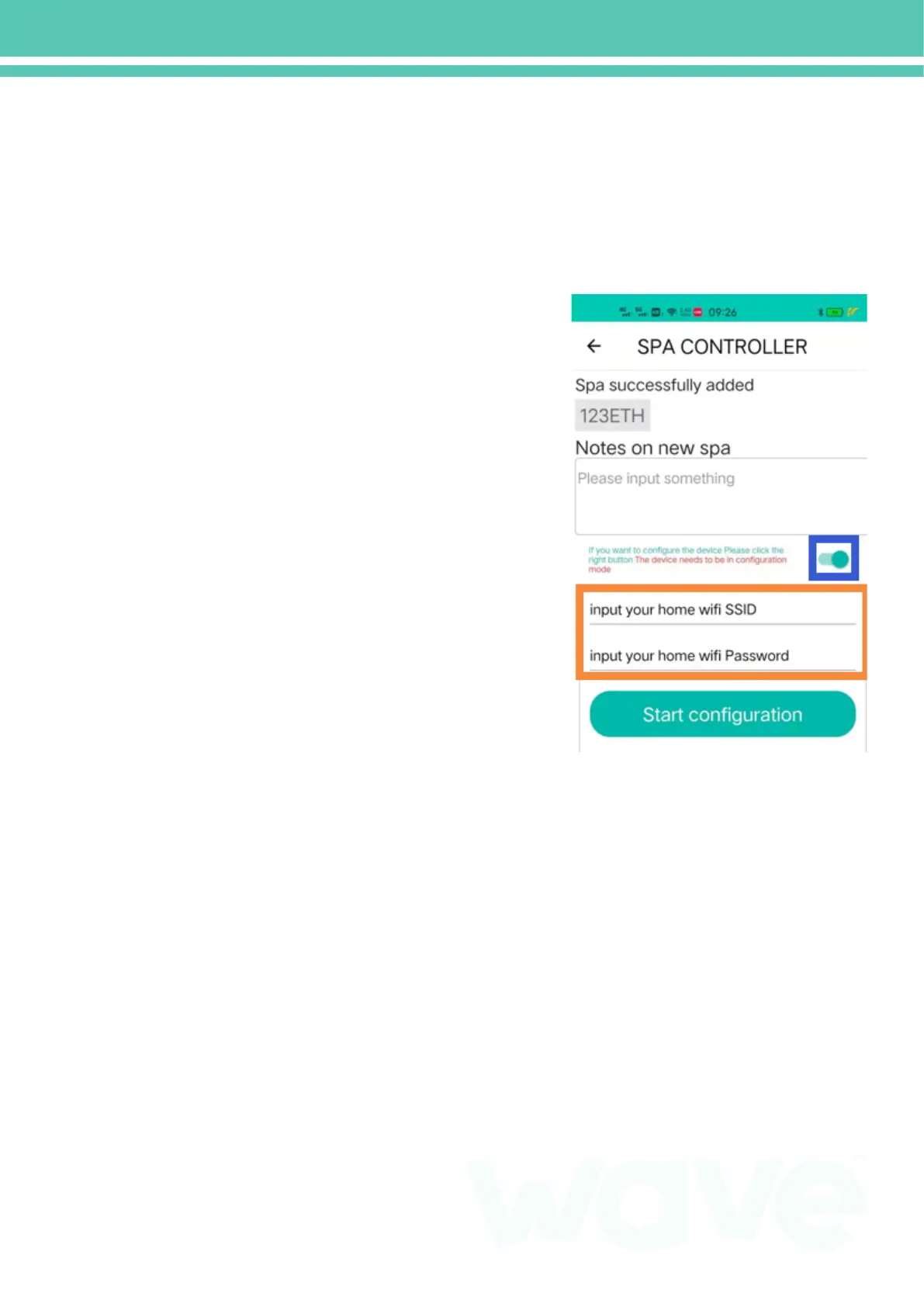
STEP 3: Click the button in the blue frame, then the red frame
will show up and input the WIFI’s name and code.
STEP 4: Open your WLAN on your phone, find and connect the
WIFI names ‘Bath_Wi_Fi_XXXXXX’
STEP 5: Click the ‘start configuration’ and wait connecting. After
that, the WIFI light will be on.
Remark: Before ‘ Start configuration’, check your WLAN is
connected correctly and your WIFI name and code.
1. After your set up the SPA, you can find it in ‘MY SPA’.
2. Select the SPA you want to use, then you can use App.
Remark: You can change the PIN code in ‘Member Center’, the
initial code is ‘0000’


 To Next Page